TRUE SIGNAL FX MT5 V1.0 Unlimited
$22
TRUE SIGNAL FX MT5 is an intelligent trading indicator for MetaTrader 5 that combines Auto-Tune optimization, adaptive market analysis, clear Buy & Sell signals, and suggested Stop Loss and Take Profit levels. It supports Forex, Gold (XAUUSD), and CFDs across lower timeframes such as M1, M5, and M30.

Description
TRUE SIGNAL FX MT5 – Intelligent Forex Trading Indicator for MetaTrader 5
TRUE SIGNAL FX MT5 – Smart Adaptive Trading Signals for MT5
TRUE SIGNAL FX MT5 is a powerful MetaTrader 5 trading indicator designed to help traders analyze market conditions and identify potential trading opportunities with a more adaptive approach.
The indicator combines automatic parameter optimization with visual Buy and Sell signals, allowing traders to adjust the indicator to changing market conditions without manually testing numerous parameter combinations.
It can be used with Forex pairs, Gold (XAUUSD), and other CFDs supported by MetaTrader 5, making it a flexible tool for traders who want to enhance their technical analysis workflow.
Explore more trading tools in the Indicator collection.
Intelligent Auto-Tune Optimization
One of the main features of TRUE SIGNAL FX MT5 is its built-in Auto-Tune system.
Instead of relying exclusively on fixed indicator parameters, the Auto-Tune function analyzes current market behavior and automatically generates optimized settings.
Auto-Tune Features
- Automatic parameter optimization
- Adaptive settings for changing market conditions
- Reduced manual parameter testing
- Quick optimization process
- Designed for multiple trading instruments
- Helps traders evaluate different market conditions
The Auto-Tune process can be repeated when market behavior changes, allowing traders to refresh the indicator configuration when necessary.
Clear Buy & Sell Signals
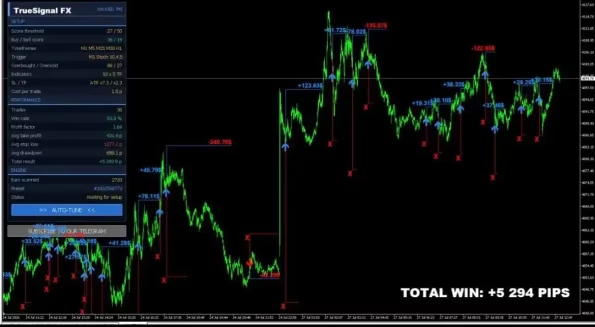
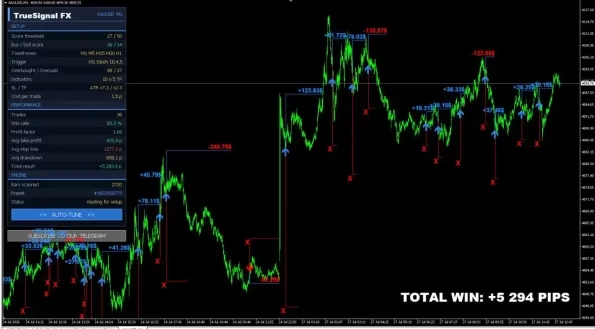
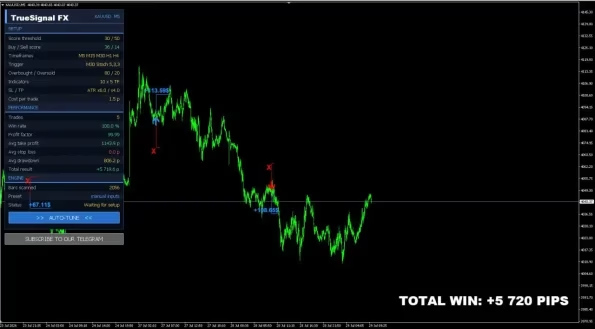
After the indicator has been optimized, TRUE SIGNAL FX MT5 displays visual trading signals directly on the MetaTrader 5 chart.
Signal Types
Buy Signal: An upward arrow indicates a potential Buy setup.
Sell Signal: A downward arrow indicates a potential Sell setup.
The indicator also provides suggested trade-management levels:
- Suggested Stop Loss level
- Suggested Take Profit level
- Visual signal direction
- Chart-based signal presentation
These levels are intended as trading guidance and should be evaluated together with the trader’s own risk-management rules.
Adaptive Market Analysis
Financial markets continuously change, and fixed indicator settings may not always be suitable for every market environment.
TRUE SIGNAL FX MT5 uses its Auto-Tune functionality to help traders adjust parameters according to current price behavior.
A practical workflow is:
- Run Auto-Tune.
- Review the generated settings.
- Check the historical performance panel.
- Analyze the Buy and Sell signals.
- Apply appropriate risk management.
- Re-optimize when market conditions change.
This gives traders a structured process for evaluating the indicator instead of relying entirely on manually selected parameters.
Historical Performance Information Panel
TRUE SIGNAL FX MT5 includes an integrated information panel that provides historical performance information based on previous market data.
The panel can help traders review the current configuration before using the generated signals in live trading.
Performance Panel Includes
- Historical signal evaluation
- Performance overview
- Optimization feedback
- Parameter comparison
- Configuration review
If the current results are not suitable for the trader’s strategy, the Auto-Tune function can be run again to generate another parameter configuration.
Historical results should always be treated as analysis of past market data rather than a guarantee of future performance.
Suggested Stop Loss & Take Profit Levels
In addition to Buy and Sell signals, TRUE SIGNAL FX MT5 provides suggested trade-management levels.
The indicator displays:
- Stop Loss: Red level
- Take Profit: Blue level
These levels can help traders establish a more structured approach to individual trades.
However, suggested levels should not replace personal risk management. Traders should consider account size, volatility, spread, slippage, leverage, and their own acceptable risk before entering a position.
Supported Trading Instruments
TRUE SIGNAL FX MT5 is designed for use across multiple financial markets supported by MetaTrader 5.
Supported markets include:
- Forex pairs
- Gold (XAUUSD)
- CFDs
- Other compatible MT5 instruments
Gold traders can use the indicator on XAUUSD, while Forex traders can apply it to currency pairs that fit their individual trading strategy.
Recommended Timeframes
The product is designed with a focus on lower trading timeframes.
Recommended Charts
- M1 – 1 Minute
- M5 – 5 Minutes
- M30 – 30 Minutes
Lower timeframes can provide more frequent market signals, but they can also expose traders to increased market noise, spread costs, and short-term volatility.
For this reason, traders should test the indicator under their broker’s actual trading conditions.
Easy Installation & Quick Setup
TRUE SIGNAL FX MT5 is designed to provide a straightforward setup process on MetaTrader 5.
How to Install TRUE SIGNAL FX MT5
- Download the indicator.
- Install it into your MetaTrader 5 platform.
- Open the preferred trading chart.
- Attach TRUE SIGNAL FX MT5 to the chart.
- Run the AUTO TUNE function.
- Review the generated parameters.
- Check the historical performance information.
- Analyze the Buy and Sell signals.
- Apply your preferred risk-management rules.
The setup process is designed to minimize complicated manual configuration.
Product Specifications
| Specification | Details |
|---|---|
| Product Name | TRUE SIGNAL FX MT5 |
| Platform | MetaTrader 5 |
| Product Type | Forex Trading Indicator |
| Supported Markets | Forex, Gold (XAUUSD), CFDs |
| Main Technology | Auto-Tune Optimization |
| Signals | Buy & Sell |
| Risk Guidance | Suggested Stop Loss & Take Profit |
| Recommended Timeframes | M1, M5, M30 |
| Trading Style | Intraday / Short-Term Analysis |
| Version | 1.0 |
| Build | 6204+ |
| DLL | Required |
Who Is TRUE SIGNAL FX MT5 For?
TRUE SIGNAL FX MT5 may be useful for traders who are looking for:
- An adaptive MT5 Forex indicator
- Automated parameter optimization
- Visual Buy and Sell signals
- XAUUSD Gold market analysis
- M1, M5, or M30 trading analysis
- Suggested Stop Loss and Take Profit levels
- Historical signal evaluation
- A simpler technical-analysis workflow
It can be used by both newer traders who want a more structured indicator workflow and experienced traders who want an Auto-Tune optimization feature.
If you also use automated trading systems, you can explore the Expert Advisor collection.
TRUE SIGNAL FX MT5 for Gold & Forex Trading
For Gold traders, TRUE SIGNAL FX MT5 can be applied to XAUUSD, one of the most actively traded instruments in the Forex and CFD markets.
For Forex traders, the indicator can also be applied to compatible currency pairs.
Because each instrument behaves differently, traders should avoid assuming that settings optimized for one symbol will automatically produce the same results on another. The Auto-Tune function can be used to evaluate settings for the selected market.
Demo Testing Before Live Trading
Before using TRUE SIGNAL FX MT5 with real funds, Demo testing is strongly recommended.
A suitable testing process includes:
- Select your preferred instrument.
- Choose an appropriate timeframe.
- Run Auto-Tune.
- Review historical information.
- Observe Buy and Sell signals.
- Check Stop Loss and Take Profit levels.
- Monitor spread and execution.
- Test the indicator under different market conditions.
This can help traders understand how the indicator behaves with their specific broker and trading environment.
Download TRUE SIGNAL FX MT5
After completing your purchase, access your product through Download immediately after payment.
For installation or product-related assistance, contact FxEAstore Support.
You can also follow the FxEAstore Telegram Channel for product updates and new releases.
For traders looking for development resources, the Source Code collection is also available.
Risk Management & Trading Disclaimer
TRUE SIGNAL FX MT5 is a technical-analysis indicator and does not guarantee profitable trading results.
Forex, Gold, CFDs, and other leveraged financial instruments involve significant financial risk. Trading performance can be affected by:
- Market volatility
- Broker execution
- Spread
- Commission
- Slippage
- Internet connection
- Liquidity
- Leverage
- Account size
- Trading strategy
- User-defined risk management
Auto-Tune optimization and historical performance information are based on market data and should not be interpreted as guarantees of future results.
Always conduct your own testing on a Demo Account before using the indicator with live funds. Use responsible position sizing and trade only with capital you can afford to lose.
Final Overview
TRUE SIGNAL FX MT5 combines adaptive market analysis, Auto-Tune optimization, visual Buy and Sell signals, historical performance information, and suggested Stop Loss and Take Profit levels into one MetaTrader 5 indicator.
With support for Forex, XAUUSD Gold, and CFDs, plus recommended M1, M5, and M30 timeframes, it provides a flexible technical-analysis tool for traders who want to evaluate market signals using an adaptive configuration process.
Related products


Indicator


Indicator