

OilVector X MT5 V1.83 Unlimited
$22
OilVector X MT5 is an automated MetaTrader 5 Expert Advisor designed specifically for WTI crude oil trading. It combines a Daily Breakout strategy, individual Stop Loss and Take Profit settings, break-even management, and optional Prop Firm Mode without Grid or Martingale recovery.

Description
OilVector X MT5 – Automated WTI Crude Oil Trading for MetaTrader 5
Discover OilVector X MT5 for Automated Oil Trading
OilVector X MT5 is a specialized Expert Advisor developed for traders who want to automate crude oil trading on MetaTrader 5.
Unlike general-purpose Forex robots, OilVector X MT5 focuses on the WTI crude oil market and uses a predefined Daily Breakout strategy to identify potential opportunities when prices move beyond important daily levels.
The EA combines automated trade execution with structured risk controls, helping traders apply a systematic approach without continuously monitoring charts or manually managing every position.
Its core features include:
- Daily Breakout trading logic
- Individual Stop Loss and Take Profit
- Automated break-even management
- Configurable position sizing
- Optional Prop Firm Mode
- Daily and total loss limits
- On-chart statistics and equity tracking
- No Grid or Martingale recovery
OilVector X MT5 is designed to make automated WTI trading more structured, with clearly defined trading rules and risk parameters.
Daily Breakout Strategy for WTI Crude Oil
The core strategy behind OilVector X MT5 is based on Daily Breakout logic.
The EA monitors predefined daily price levels and looks for conditions that may indicate a potential directional move. When the required conditions are met, it can execute trades automatically according to its programmed rules.
Crude oil prices can respond sharply to changes in supply, demand, economic conditions, geopolitical developments, and inventory reports. These factors can create both breakout opportunities and periods of unpredictable volatility.
OilVector X MT5 is designed to follow its predefined strategy rather than rely on discretionary decisions or emotional reactions.
Key Strategy Characteristics
- Focus on daily breakout opportunities
- Automated entry execution
- Predefined trade-management rules
- Individual Stop Loss protection
- Fixed Take Profit settings
- Automated break-even functionality
- Configurable risk parameters
Breakout strategies can experience false signals, particularly in ranging markets or during volatile conditions. Testing across different market environments is essential before using the EA on a live account.
Designed Specifically for WTI Crude Oil
OilVector X MT5 is built for WTI crude oil rather than a broad selection of unrelated trading instruments.
Depending on the broker, WTI may appear under different symbol names, including:
- XTIUSD
- USOUSD
- WTI
- Other broker-specific crude oil symbols
Before installing the EA, confirm the correct instrument name and contract specifications with your broker.
Oil trading conditions can vary significantly between brokers. Spreads, commissions, swaps, trading hours, margin requirements, and execution quality may all influence the EA’s actual performance.
For this reason, the symbol and broker configuration should be checked carefully before testing or live deployment.
No Grid or Martingale Recovery
One important characteristic of OilVector X MT5 is its approach to trade and risk management.
The EA does not rely on Grid recovery, Martingale lot multiplication, or basket-based recovery methods. Instead, each position has its own predefined risk parameters, including Stop Loss and Take Profit.
Why This Matters
Grid and Martingale strategies can increase market exposure as losses accumulate. OilVector X MT5 avoids these particular recovery mechanisms and uses a more structured approach to individual positions.
Its design includes:
- No Grid trading
- No Martingale lot multiplication
- No recovery basket strategy
- Individual Stop Loss for each position
- Defined Take Profit targets
- Automated position management
However, avoiding Grid and Martingale does not eliminate trading risk. A breakout strategy can still experience losing trades, consecutive losses, slippage, and substantial drawdowns.
Automated Break-Even and Trade Management
OilVector X MT5 includes automated break-even management to help manage open positions as market conditions change.
When the strategy’s conditions are met, the EA can adjust trade protection according to its programmed rules. This is intended to help manage exposure without requiring constant manual intervention.
Trade Management Features
- Individual Stop Loss
- Fixed Take Profit
- Automated break-even management
- Rule-based position handling
- Automatic trade execution
- Configurable position sizing
Actual order execution may differ from expected levels because of market gaps, liquidity conditions, spreads, and slippage. Break-even management should not be interpreted as a guarantee that every trade will close without a loss.
Prop Firm Mode for Additional Risk Controls
OilVector X MT5 includes an optional Prop Firm Mode intended to provide additional controls for traders operating under evaluation or funded-account rules.
Prop firms often impose strict limits on daily losses, total drawdown, and other trading activities. This mode provides configurable controls to help traders monitor these limits.
Maximum Daily Loss
Set a daily loss threshold. When the configured limit is reached, the EA can stop opening new trades for the remainder of the day.
Maximum Total Loss
Configure a maximum overall loss limit based on the account’s initial balance, according to the EA’s settings.
Optional Maximum Daily Profit
Set a daily profit threshold to help limit additional trading after reaching a chosen target.
Randomized Entry, Stop Loss, and Take Profit
The EA also offers configurable randomization for entry, Stop Loss, and Take Profit levels within specified ranges.
This feature is designed to introduce small variations in trade parameters when using similar configurations across multiple accounts. It should not be considered a guarantee of compliance with any prop firm’s rules.
Reset State
The Reset State function allows stored Prop Firm Mode information to be cleared when beginning a new evaluation or account cycle, where appropriate.
Important: No EA can guarantee that it will pass a prop firm evaluation or comply with every firm’s requirements. Review the firm’s current rules and test the complete configuration before using a funded account.
On-Chart Dashboard and Equity Tracking
OilVector X MT5 includes an on-chart dashboard designed to display trading information directly within MetaTrader 5.
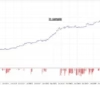
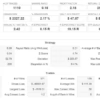
The dashboard provides access to performance statistics and an equity curve, helping users monitor the account’s development without relying exclusively on external monitoring services.
Dashboard Highlights
- On-chart performance statistics
- Equity curve visualization
- Trading information within MT5
- Persistent state storage
The persistent-state functionality is designed to retain relevant dashboard information when the EA is removed or the MetaTrader terminal restarts.
These monitoring tools can help traders evaluate performance, but they do not guarantee that the displayed results will predict future trading outcomes.
Broker Compatibility and Trading Conditions
Because OilVector X MT5 trades crude oil, broker conditions deserve particular attention.
Before selecting a broker, consider the following:
- Spread on the relevant WTI symbol
- Commission and swap charges
- Contract size and tick value
- Trading hours and market closures
- Margin requirements
- Slippage and execution speed
- Historical tick-data quality
- Symbol-specific trading restrictions
A configuration that performs well with one broker may behave differently with another. Test the EA using the actual symbol and conditions you intend to trade.
Backtesting OilVector X MT5
Backtesting is an important step when evaluating any automated trading system.
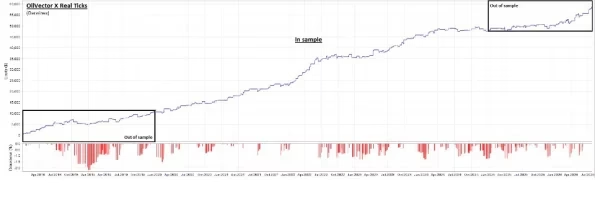
For OilVector X MT5, consider using MetaTrader 5’s Every Tick Based on Real Ticks testing mode when suitable historical data is available.
Recommended Evaluation Process
- Select the correct WTI symbol offered by your broker.
- Use the most accurate available historical tick data.
- Configure the account balance, leverage, and risk settings realistically.
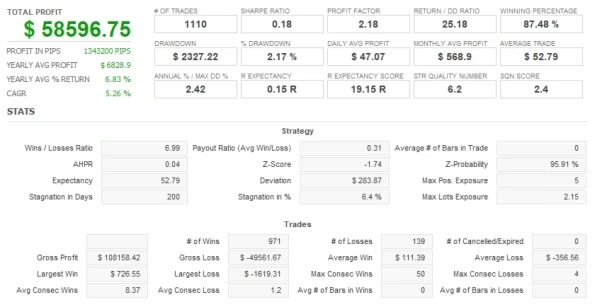
- Evaluate maximum drawdown, profit factor, and recovery factor.
- Review losing streaks and performance across different market conditions.
- Forward-test the configuration on a Demo account before live trading.
Historical testing can help reveal weaknesses, but it cannot fully reproduce future market conditions, execution delays, slippage, or unexpected events.
VPS Support for Continuous Automated Trading
A Virtual Private Server (VPS) can provide a more consistent environment for running MetaTrader 5 and an automated trading system.
Running OilVector X MT5 on a VPS may reduce interruptions caused by a personal computer shutting down, losing its internet connection, or closing the trading terminal.
A VPS does not remove market risk or guarantee better execution. Traders should still monitor connectivity, terminal status, broker conditions, and account performance.
Key Features of OilVector X MT5
- Specialized WTI crude oil trading EA
- MetaTrader 5 compatibility
- Daily Breakout strategy
- Automated entry execution
- Individual Stop Loss protection
- Fixed Take Profit
- Break-even trade management
- Configurable position sizing
- No Grid recovery
- No Martingale recovery
- Optional Prop Firm Mode
- Maximum Daily Loss control
- Maximum Total Loss control
- Optional Maximum Daily Profit limit
- Entry, SL, and TP randomization
- On-chart statistics
- Equity curve tracking
- Persistent state functionality
- Timer-driven execution fallback
OilVector X MT5 Specifications
- Product Name: OilVector X MT5
- Platform: MetaTrader 5
- Product Type: Expert Advisor
- Version: 1.83
- Required MT5 Build: 6230+
- DLL: Required
- Primary Market: WTI Crude Oil
- Strategy: Daily Breakout
- Stop Loss: Yes
- Take Profit: Yes
- Break-Even Management: Yes
- Prop Firm Mode: Optional
- Grid: No
- Martingale: No
Who Should Consider OilVector X MT5?
OilVector X MT5 may be worth evaluating if you:
- Want to automate WTI crude oil trading on MT5.
- Prefer a rule-based breakout strategy.
- Want individual Stop Loss and Take Profit management.
- Prefer not to use Grid or Martingale recovery.
- Need additional configurable loss controls.
- Want to monitor performance directly in MetaTrader 5.
- Are prepared to backtest and forward-test an EA before live use.
It may not suit traders who expect guaranteed profits, immediate results, or a trading system that never experiences drawdowns.
Explore More Automated Trading Tools
If you are looking for other trading solutions, explore our Expert Advisors for automated trading, browse our Indicators for technical analysis tools, or discover Source Code products.
These categories provide additional options for traders building and evaluating their trading setups.
Get OilVector X MT5 Today
OilVector X MT5 combines specialized WTI breakout logic with automated trade management and configurable risk controls in one MetaTrader 5 Expert Advisor.
After purchasing, you can download immediately after payment.
For product announcements and new trading tools, follow our Telegram Channel. If you need help with your order or installation, contact Support.
Risk Disclaimer
Trading crude oil, Forex, and other leveraged financial instruments involves substantial risk. Automated trading software cannot eliminate losses or guarantee profits. Past performance and backtesting results do not guarantee future results.
Actual performance may vary because of market volatility, broker execution, spreads, commissions, slippage, leverage, and configuration. Always test OilVector X MT5 on a Demo account before live deployment. Use appropriate risk management and only trade with capital you can afford to lose.

Related products


Expert Advisor


Expert Advisor


Expert Advisor


Expert Advisor


Expert Advisor


Expert Advisor


Expert Advisor


Expert Advisor