
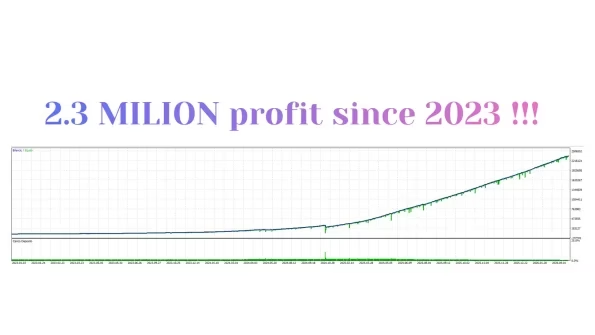
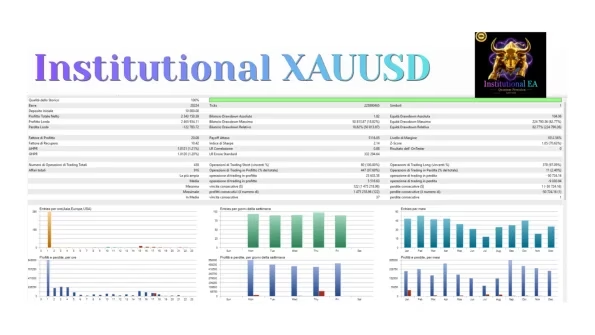



Institutional XAUUSD MT5 V25.0 Unlimited
$22
Institutional XAUUSD MT5 is an automated Gold Expert Advisor for MetaTrader 5, combining trend filtering, price action, time and seasonal analysis, automatic lot sizing, Stop Loss, Take Profit, and Trailing Stop.

Description
Institutional XAUUSD MT5 – Automated Gold Trading Expert Advisor
Institutional XAUUSD MT5 – Automated Gold Trading for MetaTrader 5
Institutional XAUUSD MT5 is a specialized Expert Advisor designed exclusively for XAUUSD (Gold) trading on the MetaTrader 5 platform.
The EA combines several market-analysis and trade-management components, including trend direction filtering, price-action analysis, structural market conditions, time filtering, seasonal analysis, automated position sizing, Stop Loss, Take Profit, and Trailing Stop.
Rather than attempting to trade multiple Forex pairs, Institutional XAUUSD MT5 focuses specifically on Gold and is designed around the characteristics of the XAUUSD market.
The primary operating timeframe is H1, providing a structured environment for automated Gold trading.
XAUUSD-Focused Trading System
Gold can behave differently from traditional currency pairs, with its volatility and price movements often changing significantly across trading sessions and market conditions.
Institutional XAUUSD MT5 is built specifically around these characteristics.
The EA focuses on:
- XAUUSD / Gold
- MetaTrader 5
- H1 timeframe
- Trend direction
- Price action
- Market structure
- Time-based conditions
- Seasonal conditions
- Automated money management
- Automated trade management
By concentrating on a single trading instrument, the system is designed specifically for Gold rather than operating as a general multi-currency Expert Advisor.
Dynamic Trend Direction Filter
One of the core components of Institutional XAUUSD MT5 is its trend direction filter.
The filter is designed to identify prevailing market direction and help determine when the EA’s trading logic should be active.
Instead of treating every price movement as a potential entry, the system uses directional information to filter market conditions.
This approach is particularly relevant to XAUUSD because Gold can alternate between strong directional movements, consolidation periods, and rapid volatility.
The trend filter therefore acts as one layer within the EA’s broader automated decision-making framework.
Price Action and Market Structure
Institutional XAUUSD MT5 also incorporates price-action and structural market analysis.
Rather than depending exclusively on conventional indicator signals, the EA evaluates price behavior and structural conditions as part of its automated trading logic.
This provides a framework for traders who prefer an automated system based on market behavior and predefined rules.
The combination of trend filtering and price-action analysis allows the EA to evaluate the broader trading environment before executing a position.
Time-Based Trading Filter
Market conditions can vary significantly depending on the trading period.
Institutional XAUUSD MT5 includes a time filter designed to restrict trading during selected periods.
This allows the EA to operate according to configured trading-time conditions rather than remaining active across every possible market period.
Time filtering can be particularly useful for automated Gold trading because spreads, volatility, liquidity, and price behavior can change throughout the trading day.
Seasonal Market Filter
Another component of Institutional XAUUSD MT5 is its seasonal filter.
The system can incorporate seasonal market conditions into its trading framework and restrict activity according to configured historical periods.
Seasonal analysis can provide an additional filter when evaluating whether the EA should operate.
However, historical seasonal patterns can change, so they should not be interpreted as guarantees of future market behavior.
No Grid and No Martingale
Institutional XAUUSD MT5 is designed without traditional Grid or Martingale strategies.
The EA does not rely on progressively increasing exposure to recover previous losing trades.
Instead, its trade structure uses individual positions with predefined risk-management parameters.
The system includes:
- Predefined Stop Loss
- Take Profit
- Trailing Stop
- Automated position sizing
- Configurable risk selection
Avoiding Grid and Martingale logic does not remove trading risk, but it means the EA’s trading structure is not based on progressively increasing position exposure after losses.
Automated Money Management
Institutional XAUUSD MT5 includes automatic lot sizing.
The EA can calculate trading volume based on the account balance and selected risk settings, reducing the need for traders to manually calculate the appropriate lot size for every position.
Actual position exposure can still vary depending on:
- Account balance
- Selected risk level
- Stop Loss distance
- Broker contract specifications
- Leverage
- Margin requirements
- XAUUSD price volatility
For this reason, traders should always verify the resulting lot size before allowing the EA to trade with real funds.
Stop Loss Protection
Institutional XAUUSD MT5 includes a predefined Stop Loss for automated trade protection.
A Stop Loss establishes a planned exit level when the market moves against a position.
However, the exact execution price cannot always be guaranteed during extreme volatility, market gaps, liquidity shortages, or significant slippage.
Traders should therefore consider broker execution conditions when evaluating the EA’s risk profile.
Automated Take Profit
The EA also supports Take Profit for automated position exits.
Once the configured target is reached, the position can be closed automatically without requiring continuous manual monitoring.
This allows the trading process to follow predefined exit rules from entry through completion.
Integrated Trailing Stop
Institutional XAUUSD MT5 includes an integrated Trailing Stop.
The trailing mechanism can adjust protective levels as an open position develops according to the EA’s configured logic.
This can help manage positions that move in a favorable direction while maintaining an automated protection mechanism.
Actual Trailing Stop execution can still be affected by spread, liquidity, slippage, and broker conditions.
Simple Configuration Approach
Institutional XAUUSD MT5 is designed with a relatively straightforward configuration philosophy.
The product specifications emphasize using the supplied configuration and selecting the desired risk level rather than requiring traders to optimize a large number of complicated parameters.
This can make the EA easier to approach for users who prefer a simpler automated Gold trading workflow.
Even so, default settings should always be tested before live trading because broker conditions and market behavior can vary.
Important Installation Requirement
An important part of the setup process is the EA’s initial installation.
According to the product instructions, Institutional XAUUSD MT5 should be attached to the XAUUSD H1 chart while the Gold market is closed, such as during the weekend or after the trading session has ended.
This allows the EA to initialize before the market reopens.
Recommended Initialization Process
- Wait until the XAUUSD market is closed.
- Install Institutional XAUUSD MT5 in MetaTrader 5.
- Open the appropriate XAUUSD H1 chart.
- Attach the EA while the market is closed.
- Confirm that the EA initializes correctly.
- Review the selected risk settings.
- Allow the EA to operate when the market reopens.
Users should follow the latest installation instructions included with their purchased version.
XAUUSD Broker and Symbol Settings
Gold symbols can have different specifications between brokers and account types.
For example, some Cent or Micro accounts may use a different number of decimal places for XAUUSD compared with standard accounts.
This can affect point-based calculations for:
- Stop Loss
- Trailing Stop
- Take Profit
- Price distances
- Other trading parameters
Before running the EA, check the XAUUSD symbol specifications directly in MetaTrader 5, including:
- Digits
- Point size
- Tick size
- Contract size
- Minimum lot
- Tick value
- Margin requirements
Using the correct symbol configuration is particularly important when trading Gold with automated software.
Hedging and Netting Account Support
Institutional XAUUSD MT5 supports both:
- Hedging accounts
- Netting accounts
However, traders should confirm that their broker’s MetaTrader 5 environment and XAUUSD contract specifications are compatible with the EA before installation.
Recommended H1 Gold Trading
The primary timeframe for Institutional XAUUSD MT5 is H1.
Using the H1 timeframe allows the system to focus on broader Gold price movements instead of relying on extremely short-term market fluctuations.
The EA combines the H1 trading environment with trend, price-action, time, and seasonal filters to determine suitable trading conditions.
VPS Recommended for Automated Trading
A reliable VPS is recommended for continuous operation.
A VPS can keep MetaTrader 5 running even when a local computer is turned off or experiences an internet or power interruption.
For automated Gold trading, stable connectivity can help reduce interruptions in EA operation.
However, VPS usage does not guarantee better execution. Actual trading latency depends on VPS location, broker infrastructure, network routing, and the broker’s trading server.
Recommended Testing Process
Before using Institutional XAUUSD MT5 with real funds, demo testing is recommended.
Step 1 – Install on a Demo Account
Install the EA on a suitable MetaTrader 5 Demo Account.
Step 2 – Select XAUUSD
Use the intended Gold trading symbol provided by your broker.
Step 3 – Select H1
Attach the EA to the XAUUSD H1 chart.
Step 4 – Select Risk
Apply the intended risk setting and verify the automatic lot calculation.
Step 5 – Monitor Trade Management
Observe:
- Stop Loss
- Take Profit
- Trailing Stop
- Lot sizing
- Trading frequency
Step 6 – Check Execution
Monitor:
- Spread
- Slippage
- Execution speed
- Margin usage
- Drawdown
Step 7 – Evaluate Different Market Conditions
Allow sufficient testing time to observe how the EA behaves during different Gold market environments.
Demo testing can help identify broker-specific differences before additional capital is exposed.
Who Is Institutional XAUUSD MT5 For?
Institutional XAUUSD MT5 may be relevant to traders who are looking for:
- Automated Gold trading
- XAUUSD-focused algorithmic trading
- MetaTrader 5 automation
- H1 Gold trading
- Trend filtering
- Price-action analysis
- Time filtering
- Seasonal filtering
- Automatic position sizing
- Stop Loss protection
- Take Profit management
- Trailing Stop functionality
- A non-Martingale trading structure
- A non-Grid Gold EA
- Simplified configuration
The EA is specifically designed for XAUUSD, so traders looking for a multi-currency Forex robot should consider that Gold is its stated trading instrument.
Institutional XAUUSD MT5 Key Features
- Automated Gold trading
- XAUUSD-focused Expert Advisor
- MetaTrader 5 compatible
- H1 primary timeframe
- Dynamic trend filter
- Price-action analysis
- Structural market analysis
- Time-based trading filter
- Seasonal market filter
- Automatic lot sizing
- Configurable risk selection
- Stop Loss
- Take Profit
- Trailing Stop
- No Grid strategy
- No Martingale strategy
- Hedging account support
- Netting account support
- VPS recommended
- Simplified configuration
Get Institutional XAUUSD MT5
Institutional XAUUSD MT5 is available as a digital Expert Advisor through FxEAstore.com.
After completing your purchase, you can access your product through your account and download immediately after payment.
👉 Download immediately after payment
Explore more automated trading software in our Expert Advisor category.
You can also browse our Indicator collection for additional trading tools or explore available Source Code products.
For new EA releases, product updates, and Forex software news, follow the FxEAstore.com Channel.
If you need assistance with your product or purchase, contact FxEAstore Support.
Important Risk Notice
Gold and leveraged financial trading involve substantial risk and may result in losses. Institutional XAUUSD MT5 is software designed to automate a predefined trading methodology; it does not guarantee profits or eliminate market risk.
Actual results can vary depending on market volatility, broker execution, spreads, slippage, liquidity, leverage, account type, VPS conditions, and EA settings.
The absence of Grid and Martingale strategies does not mean that the EA is risk-free.
Always test the EA on a Demo Account, verify your broker’s XAUUSD specifications, review the automatic lot sizing, and understand all settings before considering live deployment.

Related products


Expert Advisor


Expert Advisor


Expert Advisor


Expert Advisor




Expert Advisor


Expert Advisor


Expert Advisor