
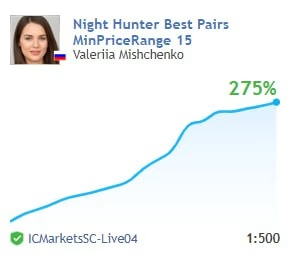
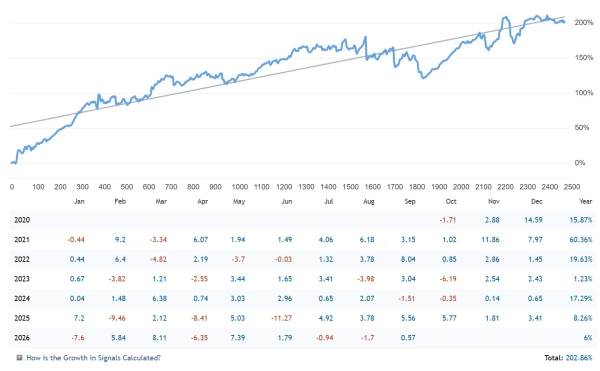
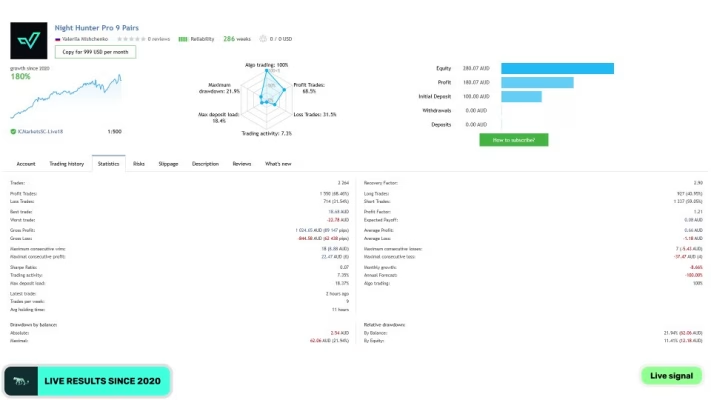
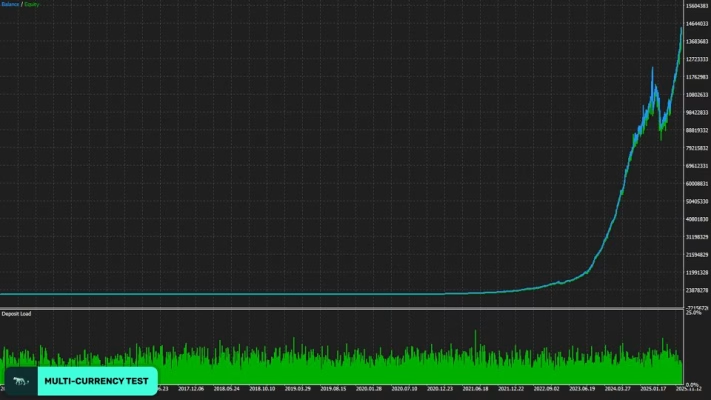


Night Hunter Pro MT5 V5.0 Unlimited
$15
Night Hunter Pro MT5 is an automated scalping Expert Advisor for MetaTrader 5, designed for structured multi-pair trading from a single M5 chart. It uses pending-order entries, Stop Loss protection, smart market filters, news protection, dynamic risk controls, and maximum drawdown management without Martingale or Grid trading.

Description
Night Hunter Pro MT5 – Professional Scalping Expert Advisor
Night Hunter Pro MT5 – Smart Automated Scalping for MetaTrader 5
Night Hunter Pro MT5 is a professional MetaTrader 5 Expert Advisor developed for traders who prefer rule-based automated trading with clearly defined risk controls.
The EA combines smart entry algorithms with multiple market filters to identify trading opportunities under selected market conditions. Instead of continuously opening trades, it waits for predefined setups before placing pending orders.
A key characteristic of Night Hunter Pro MT5 is its non-Martingale and non-Grid approach. Every position is opened through pending orders and protected with Stop Loss, providing a structured framework for managing individual trades.
For traders looking for more automated trading tools, you can explore our complete Expert Advisor collection.
Multi-Pair Trading From One M5 Chart
One of the main advantages of Night Hunter Pro MT5 is its one-chart configuration.
The EA is designed to be attached to a single M5 (5-minute) chart, with EURUSD recommended as the primary chart. From this single chart, the system can monitor and trade multiple supported currency pairs.
Supported pairs include:
- GBPUSD
- EURUSD
- EURCHF
- USDCAD
- USDCHF
- CHFJPY
- AUDCAD
- EURCAD
- EURAUD
If your broker uses symbol suffixes, such as EURUSD.a, the corresponding symbol format should be entered correctly in the EA settings.
No Martingale and No Grid Trading
Night Hunter Pro MT5 does not rely on Martingale or Grid trading techniques.
Instead, the system uses pending orders to enter the market and applies Stop Loss protection to positions. This allows traders to define a specific risk point rather than automatically increasing position size following losing trades.
The EA also includes a Maximum Drawdown Percent setting. When floating drawdown reaches the configured threshold, open positions can be closed automatically according to the selected configuration.
Advanced Risk Management
Night Hunter Pro MT5 provides several position-sizing options, allowing traders to configure exposure according to their own account size and trading plan.
Available risk-management controls include:
- Fixed Lot – use a predefined trading volume.
- Dynamic Lot – adjust position size according to balance or equity.
- Max Risk Per Trade – calculate lot size based on a selected percentage risk.
- Risk Presets – use predefined risk configurations.
- Maximum Lot – limit the maximum permitted position size.
- Maximum Symbols at a Time – control simultaneous multi-pair exposure.
- Maximum Drawdown Percent – close open positions when the configured floating drawdown limit is reached.
These settings provide flexibility for different account-management approaches.
Smart Market and Trading Filters
Night Hunter Pro MT5 includes several filters designed to help control when the EA can place new trades.
News Filter
The News Filter can suspend new trading around important economic events. Users can configure how many minutes the EA should wait before and after a news release.
This can help avoid opening new positions during potentially volatile economic announcements.
Smart Time Filter
The Smart Time Filter manages the trading schedule according to the EA’s predefined logic.
Traders can also manually configure the start and stop hours for placing pending orders.
Rollover Filter
The Rollover Time Filter is designed to avoid trading around the daily market rollover, when spreads and execution conditions may become less favorable.
Negative Swap Filter
The Swap Filter can prevent trading in directions associated with unfavorable swap conditions. A maximum negative swap threshold can also be configured.
Automated GMT and DST Detection
Night Hunter Pro MT5 includes Auto GMT Detection to help adjust time-related calculations according to broker server conditions.
A GMT/DST testing parameter is also available for historical testing, allowing traders to configure the required GMT offset and daylight-saving settings when performing backtests.
Weekend and Holiday Protection
The EA provides additional scheduling controls for periods when traders may prefer not to open new positions.
Available options include:
- Weekend trading control
- Friday trading stop time
- Automatic closing of open positions at the selected Friday cutoff
- New Year Holiday Filter
- Holiday-period trading suspension
These controls can help traders avoid selected periods of reduced liquidity or unusual market conditions.
Self-Diagnostic System and Information Panel
Night Hunter Pro MT5 includes a built-in Self Diagnostic System for monitoring important operating conditions.
The EA also provides an information panel that can be enabled or disabled through the ShowPanel setting.
This allows users to monitor the current EA status directly from the MetaTrader 5 chart.
Recommended Trading Setup
For proper operation, Night Hunter Pro MT5 is designed around the following configuration:
| Specification | Details |
|---|---|
| Platform | MetaTrader 5 |
| EA Version | 5.0 No DLL |
| Recommended Timeframe | M5 |
| Recommended Chart | EURUSD |
| Trading Style | Automated Scalping |
| Trading Mode | Multi-Pair |
| Account Type | Hedging |
| Entry Method | Pending Orders |
| Stop Loss | Supported |
| Martingale | No |
| Grid Trading | No |
| News Filter | Yes |
| Smart Time Filter | Yes |
| Rollover Filter | Yes |
| Swap Filter | Yes |
| Auto GMT Detection | Yes |
| Drawdown Protection | Yes |
| VPS Operation | Recommended |
Main Features of Night Hunter Pro MT5
Key features include:
- Professional automated scalping system
- MetaTrader 5 compatibility
- M5 timeframe operation
- One-chart setup
- Multi-currency-pair support
- Smart entry and exit algorithms
- Pending-order trading
- Stop Loss protection
- News Filter
- Smart Time Filter
- Rollover Time Filter
- Negative Swap Filter
- Auto GMT detection
- New Year Holiday Filter
- Self Diagnostic System
- Maximum Drawdown protection
- Fixed and dynamic lot sizing
- Maximum lot control
- Maximum simultaneous-symbol control
- Buy/Sell direction control
- No Martingale
- No Grid trading
- VPS-ready continuous operation
Night Hunter Pro MT5 Settings
The EA provides a broad range of configurable parameters.
General Settings
- Allow Opening a New Trade
- Lot-sizing Method
- Fixed Lot
- Dynamic Lot
- Maximum Lot
- Maximum Spread
- Maximum Slippage
- Maximum Symbols at a Time
- Allow Buy/Sell
- Maximum Drawdown Percent
Strategy Settings
- Trading Symbols
- Start/Stop Order Placement Hours
- Smart Time Filter
- Friday Trading Stop
- New Year Holiday Filter
- Stop Loss
- Hidden Stop Loss option
- Rollover Time Filter
- Swap Filter
- Maximum Negative Swap
- News Filter
- News protection period before/after events
Additional Settings
- Trade Comment
- UID
- ShowPanel
- GMT/DST Test
This level of customization allows users to adapt the EA’s trading and risk parameters to their own account conditions.
How to Install Night Hunter Pro MT5
Setting up Night Hunter Pro MT5 is straightforward:
- Install the EA on your MetaTrader 5 platform.
- Attach the EA to one M5 chart only.
- EURUSD is recommended as the installation chart.
- Enter the correct supported symbols in the Symbols setting.
- Add your broker’s symbol suffix if required.
- Make sure the trading account is a hedging account.
- Enable the required WebRequest permissions for News Filter and GMT services.
- Run the EA continuously on a reliable VPS.
- Configure the risk settings according to your trading plan.
- Test the configuration before using significant trading capital.
No external .set files are required because the recommended settings are stored internally in the EA.
Broker and VPS Requirements
Trading conditions can have a significant effect on an automated scalping system.
For Night Hunter Pro MT5, a broker with the following characteristics is recommended:
- Low spreads
- Reliable order execution
- Low slippage
- Stable rollover conditions
- Suitable ECN-style trading conditions
Continuous VPS operation is also recommended to help keep the EA running without interruption.
Why Choose Night Hunter Pro MT5?
Night Hunter Pro MT5 is designed around selective automated execution rather than aggressive recovery techniques.
Its combination of:
- Multi-pair trading
- One-chart installation
- Pending-order entries
- Stop Loss protection
- News filtering
- Time filtering
- Swap protection
- GMT/DST handling
- Dynamic position sizing
- Drawdown control
provides traders with a configurable framework for automated MetaTrader 5 trading.
If you are also interested in other types of trading software, visit our Indicator collection or Source Code collection.
Download Night Hunter Pro MT5
After completing your purchase, you can access your digital product through the download area.
Download immediately after payment
This product is supplied as a digital trading software package for MetaTrader 5.
For product questions or assistance, you can contact FxEAstore Support.
You can also follow the latest product updates through the FxEAstore Telegram Channel.
Important Risk Disclaimer
Forex and automated trading involve financial risk. Trading results can be affected by spread, slippage, liquidity, broker execution, market conditions, VPS stability, account type, and the risk parameters selected by the user.
Night Hunter Pro MT5 should be tested on a demo account and evaluated with your own broker and trading conditions before being used with significant capital.
Past performance, backtests, or historical trading results do not guarantee future results. Always use appropriate risk management and never trade more than you can afford to lose.
Final Overview
Night Hunter Pro MT5 is an automated MetaTrader 5 scalping EA built for traders who prefer selective, rule-based execution and configurable risk management.
With one-chart multi-pair trading, pending-order entries, Stop Loss protection, advanced news and time filters, swap protection, automated GMT detection, and maximum drawdown controls, the EA provides a structured environment for automated Forex trading.
For the recommended setup, use an M5 chart on a hedging account, configure the supported symbols correctly, choose suitable risk parameters, and keep the EA running continuously on a reliable VPS.

Related products


Expert Advisor


Expert Advisor




Expert Advisor


Expert Advisor


Expert Advisor


Expert Advisor


Expert Advisor