












Gold Beaver MT5 V5.57 Unlimited
$15
Gold Beaver MT5 is a multi-strategy Expert Advisor designed for automated XAUUSD trading on MetaTrader 5. Featuring 13 trading presets, intelligent Strategy Rank, Equity View, customizable trade smoothing, and built-in risk management, it gives traders greater flexibility when choosing their preferred trading approach. With no martingale, grid, or averaging strategies, Gold Beaver MT5 also includes a Prop Firm Guard, stop-loss protection, and a customizable trading panel.

Description
Gold Beaver MT5 – 13 Powerful Strategies for Automated XAUUSD Trading
What Is Gold Beaver MT5?
Gold Beaver MT5 is a multi-strategy Forex Expert Advisor developed specifically for trading Gold (XAUUSD) on the MetaTrader 5 platform. Instead of relying on a single trading approach, this EA combines 13 different trading presets, allowing users to select configurations that match their trading preferences and risk tolerance.
The system offers conservative, balanced, and aggressive trading profiles, together with an all-strategies configuration. This flexibility makes it possible to explore different approaches to the gold market through one automated trading tool.
Gold Beaver MT5 also includes intelligent Strategy Rank, Equity View, customizable trade smoothing, and built-in risk management features. These tools help traders evaluate available presets and adjust their trading configuration based on their own account and broker conditions.
Whether you prefer a more conservative approach or greater trading activity, Gold Beaver MT5 provides multiple configuration options within one MT5 Expert Advisor.
Key Features of Gold Beaver MT5
1. 13 Built-In Trading Presets
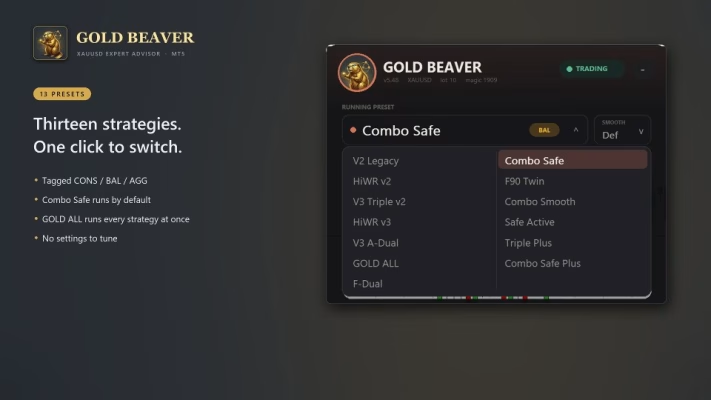
Gold Beaver MT5 includes 13 trading presets organized into four main profiles:
- CONS (Conservative): HiWR-V3, HiWR-V2, and F-Dual. Designed for traders who prefer fewer trading opportunities and a more conservative approach.
- BAL (Balanced): Combo Safe, Combo Safe Plus, Combo Smooth, Safe Active, F90 Twin, and V2-Legacy. Designed for moderate trading activity.
- AGG (Aggressive): V3-Triple-V2, V3-A-Dual, and Triple Plus. Intended for traders comfortable with greater equity fluctuations.
- ALL (All Strategies): GOLD ALL combines the available strategies into one configuration.
The default preset is Combo Safe, providing a balanced starting point for users who want to explore the EA.
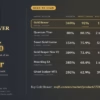
2. Intelligent Strategy Rank
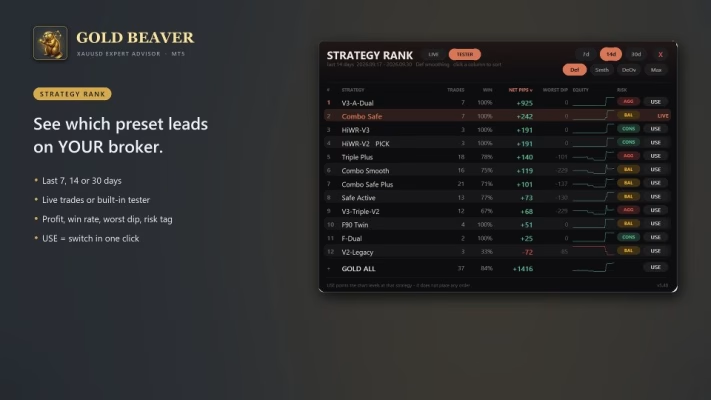
One of the most useful features of Gold Beaver MT5 is its built-in Strategy Rank system.
Rather than choosing a preset based only on its name or general performance claims, traders can compare available strategies using data from their own trading environment.
Strategy Rank supports three evaluation periods:
- Last 7 days
- Last 14 days
- Last 30 days
Users can analyze performance using live trading data or the built-in strategy tester. After identifying a preferred preset, they can use the available selection function to switch to that strategy.
This feature provides a practical way to evaluate how different presets behave under specific broker conditions.
3. Equity View – Monitor Strategy Performance
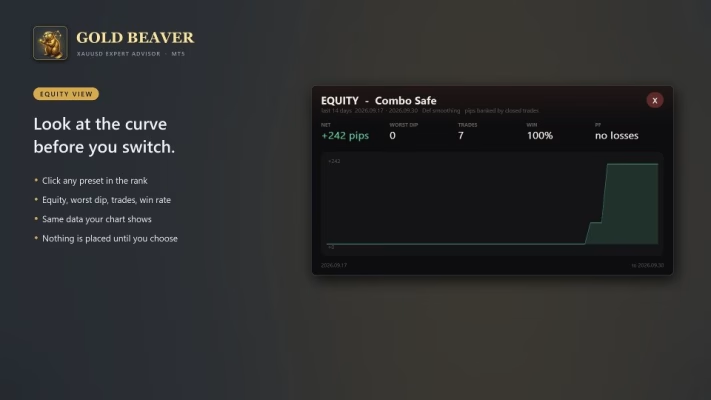
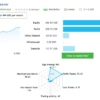
Gold Beaver MT5 includes an Equity View that allows users to inspect individual preset performance before selecting a trading configuration.
Available statistics include:
- Equity curve development
- Worst equity drawdown
- Total number of trades
- Win rate
By reviewing these statistics, traders can make more informed decisions when comparing presets instead of relying entirely on assumptions or trading frequency.
4. Four Customizable Trade Smoothing Modes
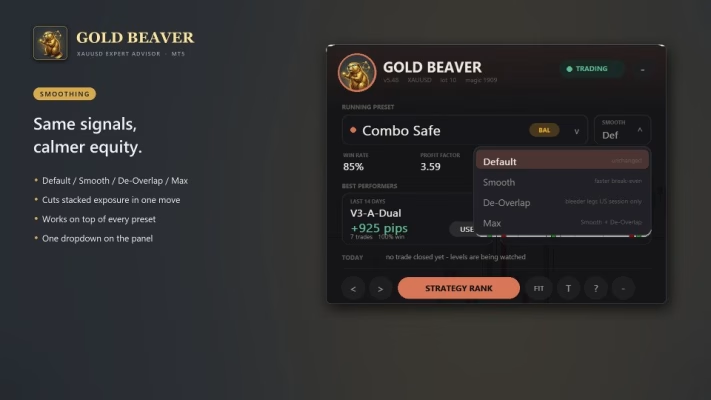
The EA provides four trade smoothing modes to help users manage overlapping trading exposure.
Available options include:
- Default: Uses the standard strategy configuration.
- Smooth: Applies additional smoothing to reduce stacked exposure.
- De-Overlap: Helps minimize overlapping trade exposure.
- Max: Applies the strongest available smoothing configuration.
These modes can be used alongside the selected trading preset, giving users additional flexibility when adjusting their preferred trading behavior.
5. Built-In Risk Management
Risk management is particularly important when trading Gold because XAUUSD can experience significant price movements.
Gold Beaver MT5 follows a structured position-management approach with several important characteristics:
- No martingale position sizing.
- No grid trading strategy.
- No averaging down.
- Stop loss assigned to every position when it opens.
- Configurable risk-control options.
These characteristics help distinguish the EA’s trading structure from systems that rely on martingale, grid, or averaging techniques.
However, using an EA with built-in risk controls does not eliminate market risk or guarantee that losses will remain within a particular limit.
6. Prop Firm Guard
Gold Beaver MT5 includes a dedicated Prop Firm Guard for traders who want additional controls when operating under proprietary trading account rules.
Its available functions include:
- Daily loss percentage limit.
- Maximum loss percentage limit.
- Configurable loss thresholds.
- Optional close-all function when a configured limit is breached.
The Prop Firm Guard is disabled by default, allowing users to decide whether to activate it and configure it according to their account requirements.
Before using this feature in a prop firm challenge or funded account, carefully verify the EA’s behavior against the firm’s drawdown calculations, equity rules, and trading restrictions.
7. Flexible XAUUSD Timeframe Compatibility
Gold Beaver MT5 is designed specifically for XAUUSD trading and can be attached to any supported MT5 chart timeframe.
Its trading signals are evaluated at M15 candle boundaries. The EA is not designed as a high-frequency trading system and does not depend on ultra-low-latency execution or specialized co-location infrastructure.
This makes it suitable for standard MetaTrader 5 trading environments.
8. No DLL Dependencies
The No DLL version operates without external DLL dependencies or external services.
Key compatibility benefits include:
- No DLL files required.
- No external services required.
- Standard MetaTrader 5 environment.
- No specialized low-latency VPS requirement.
- Suitable for ordinary MT5 installations.
This provides a more straightforward setup for users who prefer trading software without additional external dependencies.
9. Restart-Safe Trading and Multi-Chart Support
Gold Beaver MT5 is designed to handle common MetaTrader 5 operating situations, including terminal restarts and VPS migrations.
When the EA is attached again after a restart or VPS move, it rebuilds its open-order information and pending trading levels.
It also supports multiple chart instances through individual magic numbers, helping traders organize separate EA instances more conveniently.
10. Lot Sizing Across Different Account Currencies
The EA supports lot-size calculations for accounts using different base currencies, including:
- USD
- EUR
- GBP
- JPY
- AED
- AUD
Its trading panel displays a suggested lot size based on the account balance and selected preset.
Please remember that a small lot size does not automatically mean low risk. Gold trading can involve substantial price fluctuations, so position volume should always be selected carefully.
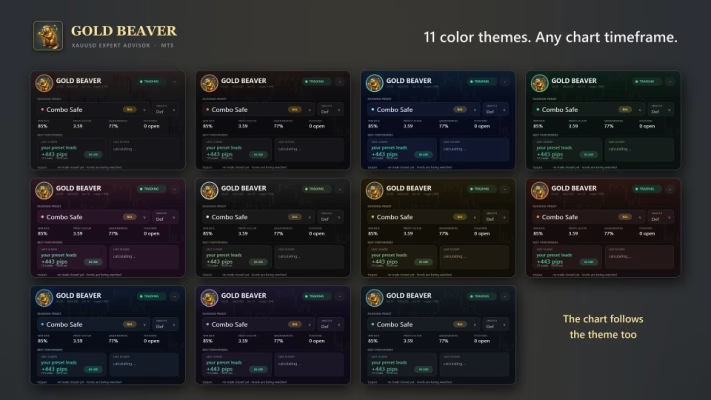
11. Customizable Trading Panel with 11 Color Themes
Gold Beaver MT5 features an integrated on-chart interface that provides convenient access to important information and settings.
The panel includes:
- Preset selection.
- Strategy Rank access.
- Equity performance information.
- Suggested lot-size display.
- Trade profit labels.
- Panel visibility controls.
- 11 customizable color themes.
These interface options help users monitor their selected configuration directly from the trading chart.
Recommended Gold Beaver MT5 Settings
The most appropriate preset depends on your trading objectives, risk tolerance, account size, and broker conditions.
The following configurations are suggested starting points:
| Trading Objective | Suggested Configuration |
|---|---|
| General starting point | Combo Safe |
| Conservative trading | HiWR-V3 |
| Balanced trading | Combo Safe Plus |
| Smoother equity profile | Combo Smooth + Smooth |
| Prop firm challenge | Combo Safe or HiWR-V3 + Prop Firm Guard |
| More trading activity | Safe Active |
| Aggressive trading | Triple Plus |
| Higher growth potential with deeper drawdowns accepted | V3-Triple-V2 or V3-A-Dual |
These are starting configurations, not guaranteed optimal settings. Always test different presets under your broker’s conditions before using them on a live account.
How to Backtest Gold Beaver MT5
Backtesting is an important step before running any automated trading system on a real account.
Gold Beaver MT5 supports testing through the MetaTrader 5 Strategy Tester.
Two useful modeling options are available:
1. 1 Minute OHLC
This mode can be used for faster preliminary testing and evaluating general strategy behavior over historical market data.
2. Every Tick Based on Real Ticks
This mode provides a more detailed simulation using historical tick data. It is useful when you want to examine execution behavior more closely.
For more meaningful results, use historical XAUUSD data from your broker and consider its actual spreads, commissions, and trading conditions.
Historical testing does not guarantee future profitability or identical results in live trading.
Gold Beaver MT5 – Technical Specifications
| Specification | Details |
|---|---|
| Product Name | Gold Beaver MT5 |
| Platform | MetaTrader 5 |
| Trading Instrument | XAUUSD (Gold) |
| Supported Timeframes | All chart timeframes |
| Signal Evaluation | M15 candle boundaries |
| Trading Presets | 13 |
| Trading Profiles | CONS, BAL, AGG, ALL |
| Default Preset | Combo Safe |
| Strategy Rank Periods | 7, 14, and 30 days |
| Smoothing Modes | Default, Smooth, De-Overlap, Max |
| Risk Management | Stop loss on every position |
| Martingale | No |
| Grid Trading | No |
| Averaging | No |
| Prop Firm Guard | Daily loss and maximum loss limits |
| Account Currencies | USD, EUR, GBP, JPY, AED, AUD, and more |
| DLL Requirement | None |
| External Services | None |
| EA Version | 5.57 (No DLL version) |
Why Choose Gold Beaver MT5?
Gold Beaver MT5 offers more flexibility than a typical single-strategy trading robot. Its combination of 13 presets, strategy evaluation tools, trade smoothing, and risk-management functions provides several ways to configure automated Gold trading.
Key advantages include:
- Multiple trading approaches in one EA.
- Conservative, balanced, and aggressive profiles.
- Intelligent Strategy Rank for comparing presets.
- Equity View for reviewing trading statistics.
- Four customizable trade smoothing modes.
- No martingale, grid, or averaging strategies.
- Stop loss on every position.
- Configurable Prop Firm Guard.
- Multi-chart compatibility.
- No DLL dependencies.
For traders who want to explore different XAUUSD trading configurations without installing several separate Expert Advisors, Gold Beaver MT5 is a flexible option to consider.
You can also explore more automated trading solutions in our Expert Advisor collection, discover additional tools in the Indicator collection, or browse available Source Code products.
How to Install Gold Beaver MT5
Follow these general steps to install and start using Gold Beaver MT5:
- Download the Gold Beaver MT5 product files after purchase.
- Open your MetaTrader 5 trading terminal.
- Navigate to File → Open Data Folder.
- Open the MQL5 → Experts directory.
- Copy the EA file into the Experts folder.
- Restart MetaTrader 5 or refresh the Expert Advisors section.
- Open an XAUUSD chart and attach Gold Beaver MT5.
- Enable Algo Trading and configure your preferred preset and risk parameters.
- Test the selected configuration on a demo account before using real funds.
Always review the included documentation and verify your settings before allowing the EA to trade.
Who Should Consider Gold Beaver MT5?
Gold Beaver MT5 may be suitable for:
- Traders interested in automated XAUUSD trading.
- MetaTrader 5 users looking for a multi-strategy Expert Advisor.
- Traders who want to compare different trading presets.
- Users who prefer systems without martingale or grid trading.
- Traders who need configurable loss-control functions.
- Users who want to evaluate strategy performance using their own broker data.
- Traders who prefer a No DLL trading solution.
It is important to understand that automated trading still requires monitoring, testing, and appropriate risk management.
Get Gold Beaver MT5 from FXEAstore
Get access to Gold Beaver MT5 and explore its 13 trading presets, intelligent strategy evaluation, and customizable risk-management features.
After completing your payment, you can access your purchased files through the Download Immediately After Payment page.
For product updates and announcements, follow the FXEAstore Channel.
If you need assistance with your purchase, installation, or product files, contact our Support Team.
Final Verdict – Is Gold Beaver MT5 Worth Considering?
Gold Beaver MT5 is a feature-rich Expert Advisor for automated Gold trading on MetaTrader 5. Its 13 trading presets, intelligent Strategy Rank, Equity View, four smoothing modes, and Prop Firm Guard provide users with a flexible trading environment.
The absence of martingale, grid, and averaging strategies, together with stop-loss placement on every position, makes its trading structure particularly interesting for traders who prioritize predefined risk controls.
Overall, Gold Beaver MT5 is worth considering if you are looking for a multi-strategy XAUUSD trading robot with flexible configuration options and no DLL dependencies.
Always backtest the EA, evaluate its performance on a demo account, and choose risk settings appropriate to your financial situation before trading live.
Risk Disclaimer:
Forex and Gold trading involve substantial financial risk. Automated trading software cannot guarantee profits or prevent losses. Past performance and backtesting results do not guarantee future results. Always conduct independent testing and trade only with funds you can afford to lose.
Related products

Expert Advisor


Expert Advisor


Expert Advisor


Expert Advisor


Expert Advisor


Expert Advisor


Expert Advisor


Expert Advisor