
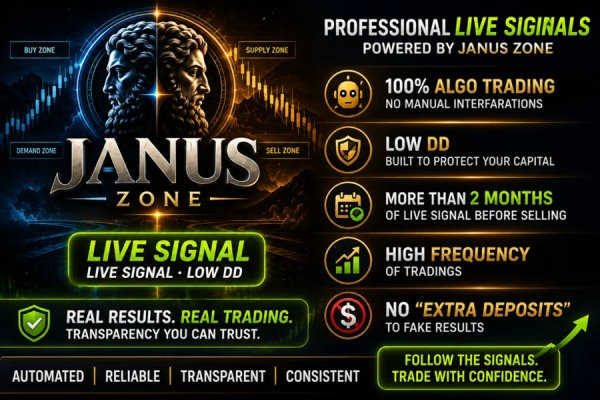








Janus Zone MT5 V2.20 Unlimited
$15
Janus Zone MT5 is a professional multi-engine Expert Advisor developed specifically for automated Gold (XAUUSD) trading on MetaTrader 5. Featuring 10 independently switchable strategies, intelligent zone analysis, liquidity-based entries, automatic position sizing, and daily profit and loss protection, this EA adapts its trading configuration to different market conditions. With no Grid, Martingale, or uncontrolled averaging, Janus Zone MT5 provides a structured approach to automated Gold trading on the H1 timeframe.

Description
Janus Zone MT5 – Advanced Multi-Strategy Gold Trading EA for MetaTrader 5
Discover the Advanced Features of Janus Zone MT5
Janus Zone MT5 is an advanced automated trading system that combines multiple independent trading engines into one Expert Advisor. Instead of relying on a single entry strategy, it uses different trading approaches to identify opportunities across trending markets, consolidation phases, liquidity sweeps, and price reversals.
Designed exclusively for Gold trading, Janus Zone MT5 allows traders to activate or deactivate individual strategies directly through its settings without modifying the source code.
Its trading philosophy focuses on disciplined execution, flexible risk management, and capital protection.
1. Multi-Engine Trading Technology
Janus Zone MT5 uses a multi-engine architecture that combines several independent trading approaches.
Each trading engine follows its own entry conditions and market logic. This allows the EA to evaluate different types of market opportunities rather than depending on one fixed trading method.
Key features include:
- Multiple independent trading engines.
- Dedicated XAUUSD trading logic.
- Different entry models for changing market conditions.
- Flexible strategy activation and deactivation.
- Automatic position sizing.
- Drawdown-aware money management.
- Integrated daily profit and loss protection.
This architecture provides greater flexibility when configuring the EA for different trading preferences.
2. 10 Independently Switchable Trading Strategies
One of the most important features of Janus Zone MT5 is its collection of 10 independently switchable strategy options.
The EA combines different trading concepts, including:
- Zone Fade: Identifies potential reversal opportunities around important price zones.
- Zone Ride: Looks for opportunities when price continues moving along a trading zone.
- Corridor Pullback: Evaluates potential entries during price retracements.
- Range Reversion: Focuses on potential reversals within established trading ranges.
- Liquidity Sweep: Analyzes liquidity-taking movements around important price levels.
- Retest-Based Entries: Evaluates price retests before considering a trade.
- Session-Based Trading: Uses trading-session logic to identify potential opportunities.
Each engine has its own entry conditions. Traders can manage the available strategy switches directly from the EA settings, making it easier to customize the trading configuration.
3. Intelligent Zone and Liquidity Analysis
Janus Zone MT5 is designed to analyze Gold price movements through zone-based trading and liquidity analysis.
Gold frequently moves through trending phases, consolidation periods, liquidity sweeps, and sharp reversals. The EA combines different entry models to evaluate these changing conditions.
Its trading framework includes:
- Important price-zone analysis.
- Liquidity-based entry conditions.
- Range and reversal evaluation.
- Pullback and retest logic.
- Session-based trading opportunities.
This multi-layered approach aims to identify potential entries based on market structure and price behavior.
4. Advanced Automatic Money Management
Janus Zone MT5 includes a flexible money management system that allows traders to select different position-sizing methods.
Available options include:
- Fixed Lot Size.
- Balance-Based Risk Calculation.
- Percentage-Based Risk.
- Maximum Drawdown-Based Position Sizing.
- Automatic Compounding.
The optional drawdown-aware money management feature can adjust position sizing according to a predefined drawdown budget.
This gives traders more control over capital exposure and allows them to configure the EA according to their account size and risk preferences.
5. Daily Profit Target and Loss Protection
Protecting account equity is an important part of automated trading. Janus Zone MT5 includes an integrated daily target protection mechanism.
Traders can configure daily percentage thresholds to control trading activity when predefined profit or loss conditions are reached.
An important feature is that the protection mechanism considers both:
- Closed Profit and Loss.
- Floating Profit and Loss.
By considering floating P/L alongside closed results, the EA can evaluate daily account performance more comprehensively.
This feature is designed to help protect accumulated daily gains and limit additional exposure after reaching predefined loss thresholds.
6. Drawdown-Aware Position Sizing
Janus Zone MT5 offers an optional position-sizing mechanism linked to account drawdown conditions.
Rather than calculating every position exclusively from a fixed risk percentage, the system can use a predefined drawdown budget to determine trading exposure.
Benefits include:
- More flexible capital allocation.
- Position sizing based on account conditions.
- Additional control over drawdown exposure.
- Support for different risk configurations.
This feature can be useful for traders who prioritize capital preservation and want more control over account equity fluctuations.
7. Margin-Safe Order Execution
The EA includes an integrated margin verification mechanism before submitting new orders.
Janus Zone MT5 checks the available account margin before attempting to open a position. This helps avoid unnecessary order rejections when the account does not have sufficient free margin.
The objective is to support more controlled order execution and reduce repeated attempts under unsuitable account conditions.
8. No Grid, No Martingale, No Uncontrolled Averaging
Janus Zone MT5 follows a disciplined trading approach without relying on aggressive recovery techniques.
The EA is designed without:
- Grid Trading.
- Martingale.
- Uncontrolled Averaging.
Instead, it focuses on independent trading strategies, predefined entry conditions, flexible position sizing, and account-level protection mechanisms.
This approach avoids increasing position sizes through Martingale or uncontrolled averaging to recover previous losses.
9. Simple and Professional Configuration Menu
Despite its multi-engine architecture, Janus Zone MT5 provides a straightforward configuration menu.
Traders can manage essential parameters directly from the EA settings without modifying the source code.
Main adjustable parameters include:
- Risk Configuration.
- Fixed Lot Size.
- Automatic Position Sizing.
- Magic Number.
- Order Comment.
- Daily Profit Target.
- Daily Loss Limit.
- Individual Strategy ON/OFF Switches.
This makes it easier to customize the trading system according to individual preferences.
10. Live Trading Monitoring
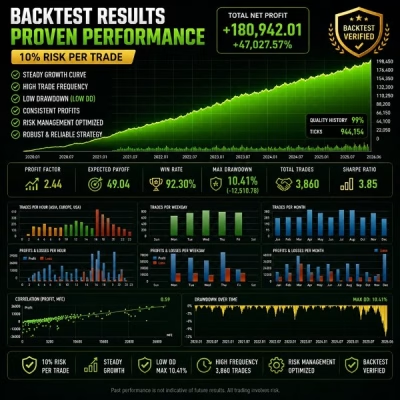
Janus Zone MT5 has undergone development, testing, and strategy refinement before release.
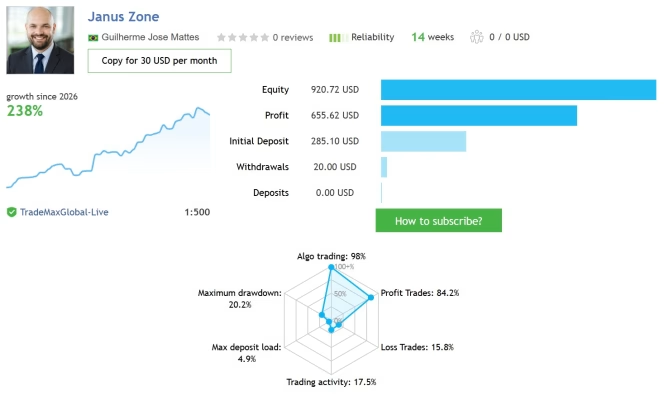
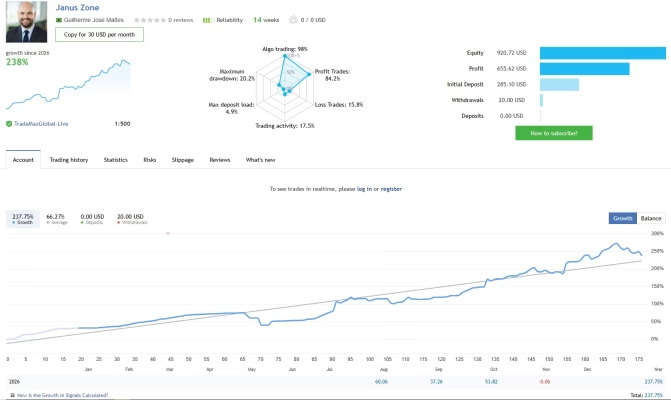
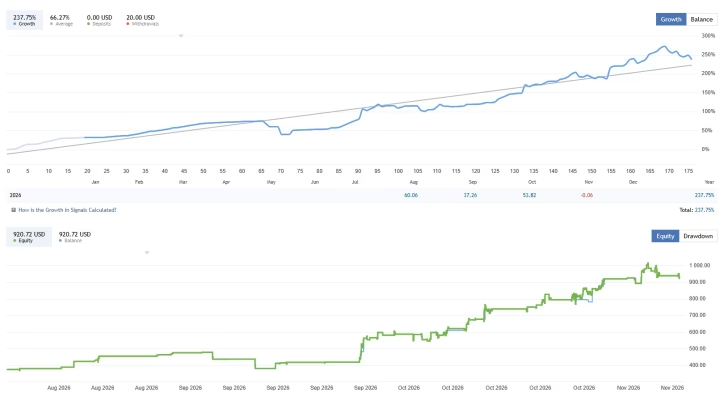
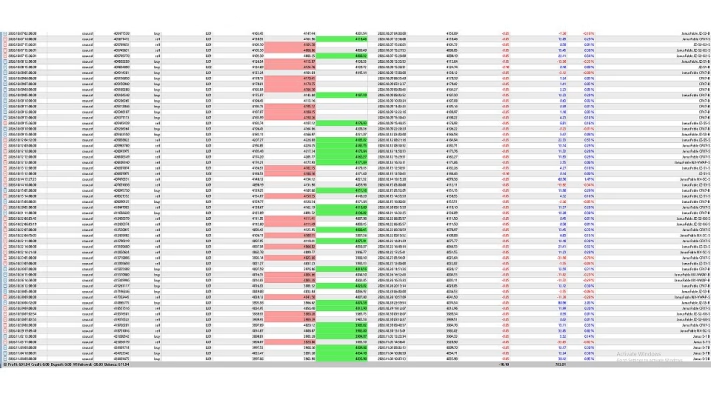
The product provider also presents two publicly accessible trading signal accounts for performance monitoring.
These signals allow traders to examine available trading statistics, account history, execution activity, and account development independently.
Remember that historical trading results are not guarantees of future performance. Always evaluate drawdown, trading frequency, broker conditions, and risk exposure before making a trading decision.
Janus Zone MT5 – Technical Specifications
| Feature | Details |
|---|---|
| Product Name | Janus Zone MT5 |
| Version | 2.20 |
| Platform | MetaTrader 5 |
| Product Type | Automated Expert Advisor |
| DLL | No DLL |
| Trading Instrument | XAUUSD / Gold |
| Recommended Timeframe | H1 |
| Trading Mode | Fully Automated |
| Trading Architecture | Multi-Engine System |
| Strategy Options | 10 Independent Switches |
| Entry Logic | Zone, Liquidity, Pullback, Reversion, Retest, Session-Based |
| Money Management | Automatic and Flexible |
| Position Sizing | Fixed Lot, Balance-Based, Percentage-Based, Drawdown-Based |
| Daily Protection | Profit Target and Loss Limit |
| P/L Monitoring | Closed and Floating P/L |
| Margin Verification | Integrated |
| Grid Trading | No |
| Martingale | No |
| Uncontrolled Averaging | No |
| Recommended Account | Raw Spread, ECN, or Zero |
| Recommended Chart Setup | One XAUUSD H1 Chart |
Recommended Trading Setup
Janus Zone MT5 is designed for a straightforward installation and trading process.
Recommended configuration:
- Trading Platform: MetaTrader 5.
- Trading Symbol: XAUUSD / Gold.
- Recommended Timeframe: H1.
- Chart Setup: One XAUUSD H1 chart.
- Trading Mode: Fully Automated.
- Recommended Account Type: Raw Spread, ECN, or Zero.
The EA is designed to operate from a single XAUUSD H1 chart, so there is no need to attach multiple instances to different symbols or timeframes.
For suitable execution conditions, consider a broker with competitive Gold spreads, reliable order execution, and sufficient liquidity.
Installation Guide
Follow these steps to get started:
- Download the Janus Zone MT5 product files.
- Open your MetaTrader 5 platform.
- Install the Expert Advisor in the appropriate Experts folder.
- Open an XAUUSD chart.
- Set the chart timeframe to H1.
- Attach Janus Zone MT5 to the chart.
- Configure your preferred risk and money management settings.
- Activate or deactivate individual strategies according to your preferences.
- Enable Algo Trading and monitor the EA.
For best results, test your selected configuration on a demo account before using real funds.
Why Choose Janus Zone MT5?
Janus Zone MT5 is designed for traders who prefer a structured, multi-strategy approach to automated Gold trading.
Its main advantages include:
- 10 Independent Strategy Switches: Customize the EA by enabling or disabling individual trading engines.
- Multi-Engine Architecture: Combines different trading approaches in one Expert Advisor.
- Intelligent Zone Analysis: Uses zone-based and liquidity-oriented trading logic.
- Flexible Money Management: Supports fixed lots, percentage-based risk, and drawdown-aware position sizing.
- Daily Account Protection: Includes configurable daily profit and loss thresholds.
- Floating P/L Monitoring: Considers both closed and floating trading results.
- Margin Verification: Checks available margin before submitting orders.
- No Grid or Martingale: Avoids aggressive recovery-based trading methods.
- No DLL Required: Uses the No DLL version for easier installation.
- Simple Configuration: Manage important settings directly from the EA interface.
Whether you are an experienced Gold trader or exploring automated trading systems, Janus Zone MT5 offers a flexible framework for evaluating different XAUUSD trading strategies.
Explore More Forex Trading Tools
Discover more trading software and resources from FXEAstore:
- Browse our collection of Forex Expert Advisors to find automated trading systems for MetaTrader.
- Explore our Forex Indicators for additional technical analysis tools.
- Visit our Forex Source Code category to discover available trading software source code.
Download and Customer Support
After completing your purchase, you can access your product files through the FXEAstore Download Center.
Stay informed about new Forex products, trading tools, and announcements through our FXEAstore Telegram Channel.
If you need assistance with your purchase or product access, contact our FXEAstore Support Team.
Important Risk Disclaimer
Trading Gold (XAUUSD), Forex, CFDs, and other leveraged financial instruments involves significant financial risk and may result in partial or complete loss of invested capital.
Although Janus Zone MT5 includes multiple trading strategies and account protection features, no automated trading system can guarantee profits or eliminate market risk.
Actual trading results may vary depending on market conditions, broker spreads, commissions, slippage, liquidity, leverage, execution speed, and account configuration.
Always backtest and test the EA on a demo account before deploying it on a live account. Use appropriate risk settings and never trade with money you cannot afford to lose.
Related products


Expert Advisor


Expert Advisor


Expert Advisor


Expert Advisor


Expert Advisor


Expert Advisor


Expert Advisor


Expert Advisor
IS New Project EA MT4 Unlimited with SetFiles (latest build)