

Pixel Haven 5 MT5 V1.53 Unlimited
$22
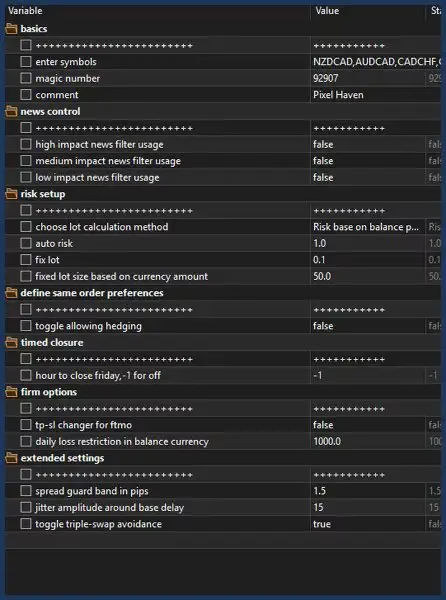
Pixel Haven 5 MT5 is an automated multi-currency Forex Expert Advisor for MetaTrader 5. Designed to operate from a single NZDCAD M30 chart, it monitors seven Forex pairs with automated risk-based lot sizing, flexible lot options, volume acceleration analysis, and configurable drawdown protection.

Description
Pixel Haven 5 MT5 – Automated Multi-Currency Forex Expert Advisor
Pixel Haven 5 MT5 – Simplified Multi-Currency Forex Automation
Pixel Haven 5 MT5 is a fully automated MetaTrader 5 Expert Advisor designed for traders who want to manage multiple Forex pairs from a single chart.
The system is built around a centralized one-chart setup. Instead of requiring traders to attach an EA to every individual currency pair, Pixel Haven 5 MT5 is designed to operate from one NZDCAD M30 chart while internally monitoring its assigned portfolio of seven Forex symbols.
The EA combines volume acceleration analysis, automated risk-based position sizing, flexible lot management, multi-symbol monitoring, and configurable drawdown protection into one systematic trading framework.
For traders looking for more automated trading systems, explore our complete Expert Advisor collection.
What Is Pixel Haven 5 MT5?
Pixel Haven 5 MT5 is an automated multi-currency trading system developed for the MetaTrader 5 platform.
Its main purpose is to simplify the management of several Forex markets by using one centralized chart. Once configured on the recommended NZDCAD M30 chart, the system can internally monitor and manage its assigned currency pairs according to its programmed trading rules.
The overall workflow can be summarized as:
Market Monitoring → Volume Activity Analysis → Trading Condition Evaluation → Risk Calculation → Trade Execution → Position Management → Drawdown Monitoring
This systematic structure is designed to reduce repetitive manual work and provide a more organized approach to automated Forex trading.
One Chart, Seven Forex Pairs
One of the most notable features of Pixel Haven 5 MT5 is its single-chart architecture.
The recommended setup requires the EA to be attached to:
- Symbol: NZDCAD
- Timeframe: M30
- Charts Required: One
From this single chart, the EA is designed to monitor the following seven currency pairs:
- NZDCAD
- GBPCAD
- CADCHF
- CADJPY
- EURCAD
- AUDCAD
- USDCAD
This multi-symbol structure provides broader market coverage while keeping the MT5 workspace simple.
However, several of these currency pairs contain CAD, which means they can sometimes show correlated movements. When multiple positions are active simultaneously, traders should therefore evaluate total portfolio exposure, not just the risk of individual trades.
Centralized Multi-Symbol Forex Trading
Managing seven Forex pairs manually can require significant chart monitoring and repeated adjustments.
Pixel Haven 5 MT5 is designed to simplify this process by bringing its supported markets into one automated framework.
One-Chart Trading Benefits
- One main chart required
- Seven Forex pairs monitored
- Centralized automated operation
- Less manual chart management
- Cleaner MT5 workspace
- Automated trading according to programmed rules
- Multi-symbol portfolio monitoring
This structure can be particularly useful for traders who prefer an organized MetaTrader environment while still wanting exposure to multiple currency markets.
Volume Acceleration & Market Activity Analysis
Pixel Haven 5 MT5 incorporates volume acceleration as part of its market-analysis methodology.
The system is designed to monitor changes in market activity and evaluate programmed volume-related conditions when searching for potential trading setups.
Its analytical process can include:
- Monitoring market activity
- Detecting significant changes in volume behavior
- Evaluating accelerated market conditions
- Identifying qualifying trading setups
- Executing trades according to programmed rules
Volume acceleration can provide additional information about market activity, but it cannot guarantee that a price movement will continue.
Markets can reverse unexpectedly, and increased activity may occur during both favorable and unfavorable trading conditions.
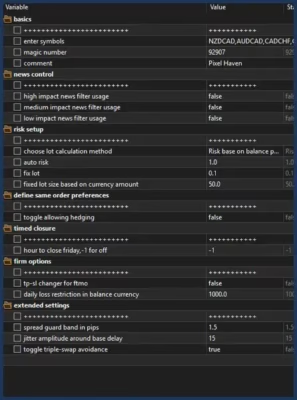
Automated Risk-Based Lot Calculation
Position sizing is an important component of any automated Forex strategy.
Pixel Haven 5 MT5 includes an automated lot-size calculation feature designed to determine trading volume according to relevant account and risk parameters.
The calculation can consider factors such as:
- Account balance
- Selected risk settings
- Stop Loss distance
- Active trading configuration
- Position-management conditions
This allows position sizing to be handled systematically rather than relying on one fixed lot size for every trade.
Automated position sizing can help create a more consistent approach to risk management, but actual exposure will also depend on leverage, margin, spreads, commissions, slippage, broker execution, and the number of simultaneous positions.
Flexible Lot Management
Different traders have different approaches to position sizing.
For this reason, Pixel Haven 5 MT5 provides multiple lot-management options.
Automatic Risk-Based Lot
The EA can calculate position size according to the selected risk-management parameters and account conditions.
Fixed Lot
Traders can choose a predefined lot size when they prefer a fixed-volume approach.
Manual Lot
Users can manually define their desired trading volume according to their account-management strategy.
This flexibility allows traders to choose the position-sizing method that best matches their risk preferences.
Keep in mind that larger lot sizes increase both potential gains and potential losses.
Configurable Drawdown Protection
Risk management is another important part of Pixel Haven 5 MT5.
The EA includes configurable drawdown protection designed to provide an additional layer of account control.
Users can define a drawdown threshold within the available system settings. When the selected threshold is reached, the EA can apply its programmed protective response.
The concept can be summarized as:
Normal Trading → Account Monitoring → Drawdown Threshold → Protective EA Response
This feature is intended to help traders establish a predefined account-level risk boundary.
However, drawdown protection does not guarantee that losses will stop at an exact level. Rapid price movements, gaps, slippage, multiple simultaneous trades, and live broker execution can cause actual drawdown to differ from the configured threshold.
Automated Multi-Currency Trade Management
Pixel Haven 5 MT5 is designed to automate several stages of the trading process.
After installation and configuration, the EA can monitor its assigned symbols, evaluate market activity, identify qualifying conditions, calculate position sizes, execute trades, and monitor drawdown according to its programmed logic.
Automated Workflow
1. Market Monitoring
The EA monitors the assigned seven Forex pairs.
2. Market Activity Analysis
It evaluates volume acceleration and other programmed market conditions.
3. Trading Setup Identification
When the required conditions are detected, the system evaluates potential trading opportunities.
4. Position Sizing
The EA can use automatic risk-based calculation or the user’s selected fixed/manual lot settings.
5. Trade Execution
Qualifying trades are executed according to the EA’s internal trading rules.
6. Risk Monitoring
The system monitors account conditions and can apply its configured drawdown protection.
This structured process is designed to reduce the amount of manual intervention required during normal operation.
Why Choose Pixel Haven 5 MT5?
Pixel Haven 5 MT5 is designed for traders who want a multi-currency Forex Expert Advisor without having to manage multiple EA charts manually.
Its combination of centralized operation, seven-pair monitoring, volume acceleration analysis, automated lot sizing, and drawdown protection creates a practical framework for systematic Forex automation.
Key Advantages
- MetaTrader 5 compatible
- Fully automated Forex trading
- Seven supported currency pairs
- One-chart operation
- NZDCAD M30 recommended setup
- Multi-symbol monitoring
- Volume acceleration analysis
- Automated risk-based lot calculation
- Fixed lot option
- Manual lot option
- Configurable drawdown protection
- Centralized trading framework
- Automated position management
- Cleaner MT5 workspace
Pixel Haven 5 MT5 Supported Currency Pairs
The EA is designed to monitor and manage the following seven Forex pairs:
| Currency Pair | Status |
|---|---|
| NZDCAD | Supported |
| GBPCAD | Supported |
| CADCHF | Supported |
| CADJPY | Supported |
| EURCAD | Supported |
| AUDCAD | Supported |
| USDCAD | Supported |
Because several of these instruments contain CAD, traders should consider potential currency correlation when evaluating total portfolio exposure.
Pixel Haven 5 MT5 Specifications
| Feature | Details |
|---|---|
| Product Name | Pixel Haven 5 MT5 |
| Platform | MetaTrader 5 |
| Trading Type | Automated Multi-Currency Forex |
| Recommended Chart | NZDCAD |
| Recommended Timeframe | M30 / 30 Minutes |
| Charts Required | 1 |
| Managed Symbols | 7 |
| Market Analysis | Volume Acceleration & Market Activity |
| Lot Management | Automatic, Fixed, or Manual |
| Risk Management | Configurable |
| Drawdown Protection | Included |
| Trading Mode | Fully Automated |
| Version | 1.53 |
| Build | 6140+ |
| DLL | Required |
Recommended Pixel Haven 5 MT5 Setup
For the intended configuration, the product page recommends the following setup:
- Platform: MetaTrader 5
- Chart Symbol: NZDCAD
- Timeframe: M30
- Number of Charts: 1
- Managed Currency Pairs: 7
- Lot Management: Automatic, Fixed, or Manual
- Risk Control: Configurable
- Drawdown Protection: Available through system settings
Before using the EA with significant capital, traders should test it under their own broker and account conditions.
Important factors to evaluate include:
- Currency-symbol availability
- Symbol specifications
- Spread
- Commission
- Slippage
- Execution speed
- Minimum lot size
- Maximum lot size
- Margin requirements
- Broker server stability
- Correlation between active positions
Broker conditions can significantly affect the live performance of an automated trading system.
Who Is Pixel Haven 5 MT5 For?
Pixel Haven 5 MT5 may be suitable for traders searching for:
- An automated MetaTrader 5 Expert Advisor
- A multi-currency Forex trading robot
- A seven-pair Forex EA
- A one-chart multi-symbol EA
- An NZDCAD M30 trading system
- Automated Forex risk management
- A drawdown-protection EA
- Automated lot-size calculation
- Flexible fixed-lot trading
- Manual lot control
- Volume-based market analysis
- A centralized MT5 trading solution
It may particularly appeal to traders who want to monitor multiple Forex markets without manually attaching and managing separate EA instances across numerous charts.
For more automated trading systems, visit our Expert Advisor collection.
Pixel Haven 5 MT5 for Systematic Forex Trading
Manual trading across multiple currency pairs can quickly become demanding.
Traders may need to monitor charts, identify market conditions, calculate position sizes, execute orders, and track overall account exposure.
Pixel Haven 5 MT5 is designed to automate many of these repetitive processes within one centralized framework.
Its operating model can be summarized as:
One Chart + Seven Currency Pairs + Automated Analysis + Smart Position Sizing + Drawdown Control
This approach can provide a cleaner and more systematic trading environment for MetaTrader 5 users.
How to Get Started with Pixel Haven 5 MT5
Getting started with Pixel Haven 5 MT5 is straightforward:
- Install MetaTrader 5.
- Install the Pixel Haven 5 MT5 Expert Advisor.
- Open an NZDCAD chart.
- Select the M30 timeframe.
- Attach the EA to the chart.
- Confirm that the required seven currency symbols are available with your broker.
- Select your preferred lot-management method.
- Configure appropriate risk and drawdown settings.
- Enable automated trading.
- Monitor account exposure and EA activity regularly.
Before moving to live trading, conduct adequate demo or forward testing with your intended broker.
For traders and developers interested in algorithmic trading software, explore our Source Code collection.
Get Pixel Haven 5 MT5 Today
If you are looking for an automated multi-currency Forex EA for MetaTrader 5, Pixel Haven 5 MT5 offers a centralized solution designed to monitor seven Forex pairs from a single NZDCAD M30 chart.
The system combines:
- Multi-symbol monitoring
- One-chart operation
- Volume acceleration analysis
- Automated risk-based lot sizing
- Fixed lot settings
- Manual lot settings
- Configurable drawdown protection
- Automated trade execution
- Centralized position management
This combination makes Pixel Haven 5 MT5 an interesting option for traders who prefer systematic, automated Forex trading with a simplified MT5 workspace.
After purchasing the product, you can access your files through Download Immediately After Payment.
For product assistance, contact our Support team. You can also follow our Channel for updates and announcements.
Explore More Trading Tools
Expand your MetaTrader trading toolkit with our other product categories:
- Expert Advisor – Automated trading systems for Forex and other markets.
- Indicator – Technical analysis tools for market research.
- Source Code – Trading source-code solutions for developers and advanced users.
These resources provide additional options for traders looking to build a more flexible algorithmic trading environment.
Important Risk Disclaimer
Trading Forex, CFDs, and other leveraged financial instruments involves substantial financial risk and may result in the loss of part or all of your trading capital.
Pixel Haven 5 MT5 does not guarantee profits, eliminate drawdowns, or remove market risk.
Multi-currency trading can create significant combined exposure, particularly because several of the supported pairs contain CAD. Correlated movements can cause multiple positions to experience losses at the same time.
Automated lot sizing and drawdown protection can help structure risk management, but they cannot guarantee that losses will remain within a specific level.
Actual results may vary because of:
- Market volatility
- Rapid price movements
- Spread expansion
- Slippage
- Liquidity conditions
- Broker execution
- Commission costs
- Leverage
- Margin requirements
- Position size
- Correlated currency exposure
- Account balance
- Technical interruptions
- Internet connectivity
- VPS or server issues
- EA configuration
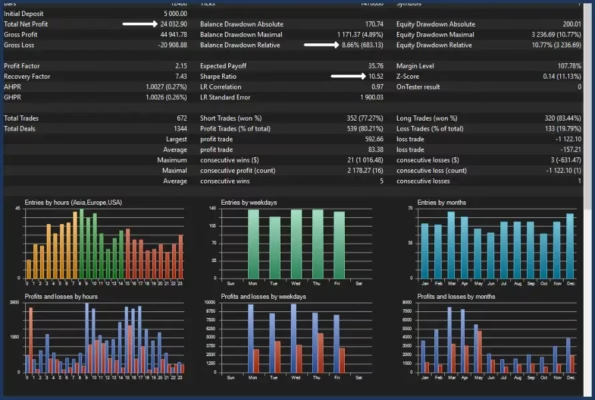
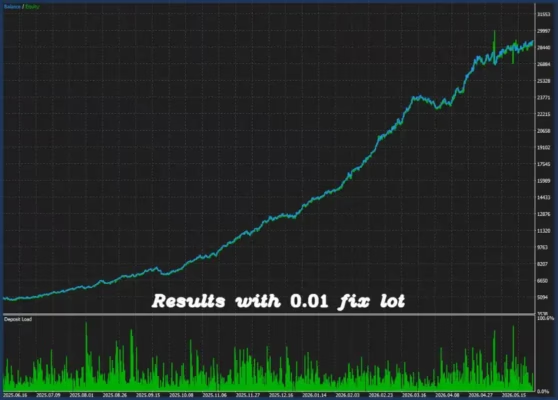
Past performance, historical data, backtests, simulations, screenshots, or statistical results do not guarantee future performance.
Users are responsible for testing the Expert Advisor, selecting suitable settings, monitoring account exposure, understanding leveraged trading risks, and making their own independent trading decisions.
Always test Pixel Haven 5 MT5 on a demo or appropriately sized account before committing significant real capital.

Related products


Expert Advisor


Expert Advisor


Expert Advisor


Expert Advisor


Expert Advisor


Expert Advisor


Expert Advisor


Expert Advisor