
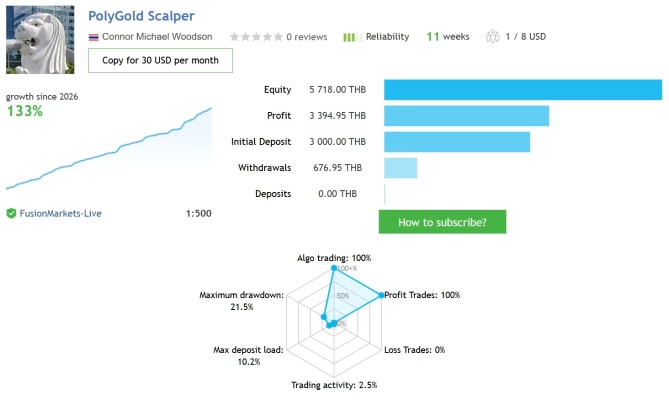
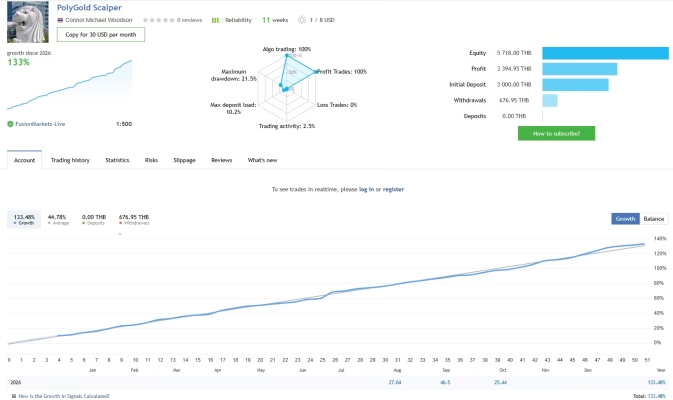
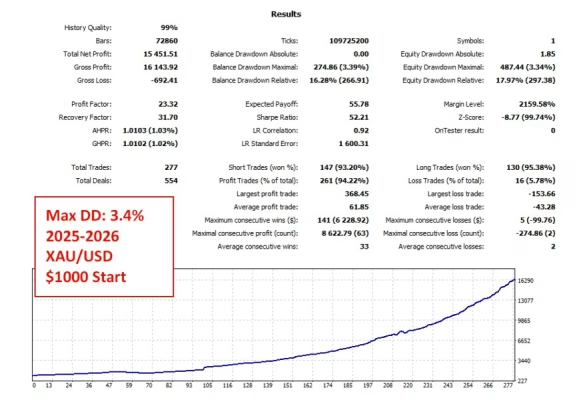

PolyGold Scalper MT5 Unlimited + SetFiles
$15
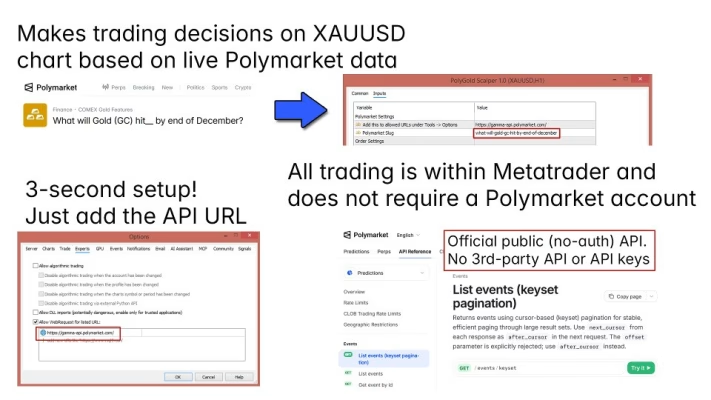
PolyGold Scalper MT5 is an automated gold trading Expert Advisor for MetaTrader 5 that combines XAUUSD price action with Polymarket prediction market sentiment. Designed for short-term scalping, it features single-position entries, a real-time sentiment dashboard, virtual stop-loss management, and volatility-based trailing stops. This EA does not use Grid or Martingale strategies and includes SetFiles for convenient setup.

Description
PolyGold Scalper MT5 – Smart Gold Scalping with Market Sentiment
PolyGold Scalper MT5 is an automated Expert Advisor developed for traders who want to explore a different approach to gold trading. Designed specifically for XAUUSD on MetaTrader 5, this trading robot combines gold price action with sentiment data from Polymarket prediction markets.
Instead of relying exclusively on conventional technical indicators, PolyGold Scalper MT5 incorporates market sentiment as an additional input when evaluating potential trading opportunities. The idea is to compare crowd expectations with the current behavior of gold prices and use that information as part of the EA’s trading logic.
The system is designed for short-term trading and manages individual positions rather than accumulating multiple orders through a grid. It also includes virtual stop-loss management, volatility-based trailing stops, and an on-chart sentiment dashboard.
With its no-DLL version and included SetFiles, PolyGold Scalper MT5 offers a convenient way to explore sentiment-based automated gold trading on MetaTrader 5.
If you are comparing automated trading solutions, explore our Expert Advisor collection for more trading tools.
Key Features of PolyGold Scalper MT5
PolyGold Scalper MT5 combines sentiment analysis, automated execution, and individual trade management in one MT5 Expert Advisor.
Key features include:
- Polymarket Sentiment Integration: Uses prediction market sentiment as an additional input for evaluating gold market conditions.
- Automated XAUUSD Scalping: Designed to identify potential short-term trading opportunities in gold.
- Single-Position Entries: Focuses on individual trade entries rather than grid-based position accumulation.
- No Grid or Martingale: Does not rely on grid trading or martingale position-sizing strategies.
- Virtual Stop Loss: Uses software-based trade-exit logic to help manage adverse price movements.
- Volatility-Based Trailing Stop: Adjusts trade management according to the EA’s volatility-based logic.
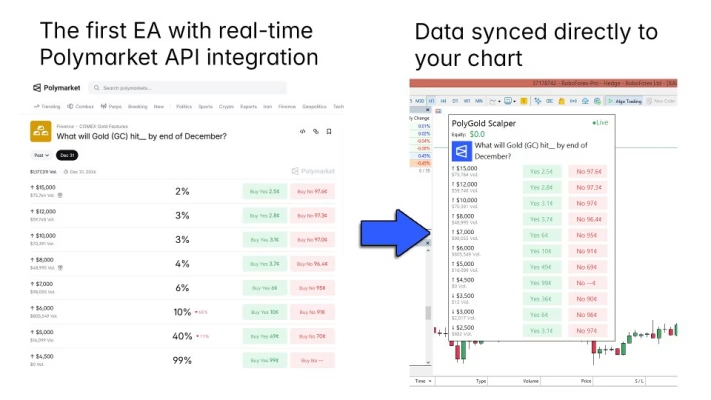
- On-Chart Sentiment Dashboard: Displays Polymarket data directly within the MetaTrader 5 chart.
- No-DLL Version: The product listing identifies a no-DLL version.
- SetFiles Included: Provides preset files to help simplify initial configuration.
- Straightforward Setup: Requires configuring the relevant WebRequest permission in MetaTrader 5 for the sentiment data feed.
These features describe the EA’s design and functionality. Actual trading performance depends on market conditions, broker execution, configuration, and the behavior of the sentiment data feed.
Polymarket Sentiment Analysis for Gold Trading
One of the defining characteristics of PolyGold Scalper MT5 is its integration of Polymarket sentiment data into an automated gold trading strategy.
Prediction markets reflect participants’ expectations about future outcomes. This information may provide a different perspective from traditional indicators that primarily analyze historical price movements.
PolyGold Scalper MT5 uses sentiment data as an additional input and compares it with the current behavior of XAUUSD. Depending on its trading logic, the EA evaluates the relationship between these inputs when identifying potential trading opportunities.
How Sentiment Can Complement Price Action
Gold prices can respond to economic releases, interest-rate expectations, geopolitical developments, and changes in overall market sentiment. Combining price behavior with another source of market information may help traders explore alternative ways to assess market conditions.
PolyGold Scalper MT5 is designed around this concept. Its sentiment dashboard allows users to monitor the incoming data directly from their MT5 chart without constantly switching between applications.
However, sentiment data should not be treated as a reliable forecast of future gold prices. A difference between crowd expectations and price action does not guarantee a reversal, and the market may continue moving against a trading position.
Automated XAUUSD Scalping on MetaTrader 5
PolyGold Scalper MT5 is designed specifically for gold scalping on the MetaTrader 5 platform.
Scalping strategies seek to identify and manage relatively short-term trading opportunities. Because gold can experience rapid price changes, an automated system must consider execution conditions, spreads, volatility, and trade-exit rules.
The EA applies its configured logic to identify potential entries and manage positions automatically. This reduces the need to manually execute every trading decision, although users remain responsible for monitoring their accounts and selecting appropriate risk settings.
Dedicated Gold Trading Focus
The EA focuses on XAUUSD rather than presenting itself as a general-purpose multi-instrument robot.
This focused approach may appeal to traders who specialize in gold and want to evaluate an automated system built around gold price behavior and prediction market sentiment.
H1 Timeframe
The product’s recommended setup specifies the H1 timeframe for XAUUSD. Users should follow the supplied product instructions and verify the correct configuration before running the EA.
The recommended timeframe is a starting point rather than a guarantee that the system will perform consistently in every market environment.
Single-Position Trading Without Grid or Martingale
PolyGold Scalper MT5 uses a single-position entry approach and does not rely on Grid or Martingale strategies.
Grid-based systems typically add positions at different price levels, while Martingale strategies increase position sizes to attempt to recover previous losses. These approaches can expose accounts to substantial drawdowns when market movements continue against open positions.
PolyGold Scalper MT5 instead focuses on individual trade entries and manages exits through its configured virtual stop-loss and trailing-stop logic.
Potential advantages of this design include:
- A more straightforward approach to position management.
- No grid-style accumulation of multiple entries.
- No martingale-based progressive position sizing.
- Greater clarity when reviewing individual trade decisions.
- A trading structure focused on entry conditions and exit management.
The absence of Grid and Martingale does not eliminate trading risk. A single position can still generate a significant loss, particularly when trading leveraged gold during volatile conditions.
Virtual Stop Loss and Volatility-Based Trailing Stop
Trade management is an important consideration for automated gold scalping. PolyGold Scalper MT5 uses a virtual stop-loss mechanism and a trailing stop based on daily volatility.
Virtual Stop-Loss Management
The EA uses software-based logic to determine when a trade should be exited under its configured conditions.
A virtual stop loss differs from a conventional broker-side Stop Loss order. Because the exit depends on the EA and trading terminal functioning correctly, it may not provide the same protection if the platform, connection, or automated trading process becomes unavailable.
Users should understand exactly how the virtual stop loss operates before using the EA with real funds. Consider whether additional broker-side protection is appropriate and compatible with the EA’s trading logic.
Volatility-Based Trailing Stop
The trailing-stop mechanism uses volatility-based logic to manage a position as market conditions change.
A volatility-aware approach can respond differently during relatively calm and more active market conditions. However, trailing stops cannot guarantee that a trade will close at a particular price, especially during rapid price movements, gaps, or periods of poor liquidity.
Why Trade Management Matters
Effective trade management involves more than choosing an entry signal. Traders should also consider position size, exit conditions, maximum acceptable loss, and the possibility of slippage.
PolyGold Scalper MT5 provides automated trade-management functions, but users must still evaluate whether the selected configuration is appropriate for their account and risk tolerance.
Real-Time Sentiment Dashboard Inside MT5
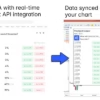
PolyGold Scalper MT5 includes an on-chart dashboard that displays data from its Polymarket sentiment feed.
The dashboard is designed to make the relevant sentiment information accessible within the MetaTrader 5 environment. Users can monitor the data without needing to keep a separate browser window open for routine observation.
This feature can be useful for traders who want to understand the information feeding into a sentiment-driven trading system.
The dashboard’s usefulness depends on the data feed being accessible and updating correctly. Users should verify that the sentiment display is functioning as expected before relying on the EA for live trading decisions.
No Polymarket Account or Personal API Key Required
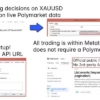
According to the product information, users do not need to create their own Polymarket account or provide a personal API key to use the EA’s sentiment integration.
However, the setup still requires the relevant API URL to be added to MetaTrader 5’s permitted WebRequest list. This allows the terminal to access the required external data feed.
The WebRequest permission must be configured correctly for the sentiment functionality to work. If the feed is unavailable or fails to update, the EA’s intended behavior may be affected.
Before live deployment, confirm that:
- The required WebRequest URL is permitted in MT5.
- The sentiment dashboard receives and displays data correctly.
- Automated trading is enabled as required.
- The EA is attached to the correct XAUUSD chart.
- All available settings are configured according to the supplied instructions.
No-DLL Version and SetFiles Included
PolyGold Scalper MT5 is listed as a no-DLL product and includes SetFiles.
No-DLL Version
The no-DLL version is designed to operate without relying on a separate DLL file. This can simplify file management and may be preferable for users who want to avoid enabling DLL imports in their trading terminal.
The sentiment data connection still requires the correct WebRequest permissions in MetaTrader 5.
SetFiles for Easier Configuration
SetFiles are preset configuration files that can help simplify the initial setup process. They allow users to load supplied parameter settings rather than manually entering every available value.
Before applying a preset to a live account, review the settings and confirm they are suitable for your broker, account balance, and trading conditions.
You can explore other automated trading tools in our Expert Advisor collection or browse our Indicator collection for additional technical analysis tools.
Recommended Trading Settings for PolyGold Scalper MT5
The following table summarizes the recommended setup stated in the product information.
| Parameter | Recommended Setup |
|---|---|
| Product Name | PolyGold Scalper MT5 |
| Trading Platform | MetaTrader 5 |
| Trading Instrument | XAUUSD (Gold) |
| Recommended Timeframe | H1 |
| Trading Style | Automated gold scalping |
| Sentiment Data | Polymarket |
| Entry Structure | Single-position entries |
| Trade Management | Virtual stop loss and volatility-based trailing stop |
| Account Types | Standard, ECN, Raw, or Cent, subject to broker compatibility |
| Suggested Starting Deposit | $200 USD, as stated by the product listing |
| Grid Strategy | Not used |
| Martingale Strategy | Not used |
| Product Package | No-DLL version and SetFiles |
The suggested $200 deposit is a product recommendation, not a guarantee that this balance is suitable for every broker or configuration. Gold trading involves leverage and can generate losses quickly. Choose position sizing based on your available capital, broker requirements, and risk tolerance.
How to Install PolyGold Scalper MT5
Follow these general steps to prepare the EA for use:
- Prepare MetaTrader 5. Install and log in to a compatible MT5 trading account.
- Download the product files. Obtain PolyGold Scalper MT5 and the included SetFiles after purchase.
- Install the EA. Copy the Expert Advisor file into the appropriate MetaTrader 5 Experts directory and refresh the platform or restart it if necessary.
- Open the XAUUSD chart. Use the recommended H1 timeframe as your starting point.
- Configure WebRequest permissions. Add the required sentiment API URL to the list of permitted WebRequest URLs in MT5.
- Load the appropriate SetFile. Apply the supplied preset if suitable, then review the parameters before enabling trading.
- Check the sentiment dashboard. Confirm that the data feed is updating correctly.
- Test on a demo account. Observe entry behavior, exits, dashboard updates, and the EA’s response under different market conditions.
- Monitor the system. Review open positions, account equity, and risk exposure regularly.
For purchased products, access your available files through the FxEAstore Downloads page.
If you need assistance, contact FxEAstore Support or follow the FxEAstore Telegram Channel.
Who Should Consider PolyGold Scalper MT5?
PolyGold Scalper MT5 may be suitable for traders who:
- Focus primarily on XAUUSD gold trading.
- Use MetaTrader 5 for automated trading.
- Want to explore sentiment-driven trading strategies.
- Prefer single-position entries rather than grid-based accumulation.
- Want to evaluate a system that does not use Martingale.
- Value an on-chart sentiment dashboard.
- Are comfortable configuring WebRequest permissions in MT5.
- Understand the importance of trade management and risk control.
The EA may be less suitable for traders who expect guaranteed returns, do not want to monitor their trading accounts, or are unfamiliar with the risks associated with leveraged gold trading.
Why Choose PolyGold Scalper MT5?
PolyGold Scalper MT5 offers a distinctive combination of features for traders interested in automated gold scalping.
Sentiment-Driven Trading: Incorporates Polymarket prediction market data as an additional input for evaluating gold market conditions.
Focused XAUUSD Strategy: Designed specifically for gold trading on MetaTrader 5.
Single-Position Approach: Avoids grid-based position accumulation and martingale-based lot increases.
Automated Trade Management: Includes virtual stop-loss and volatility-based trailing-stop functionality.
Convenient Monitoring: Displays sentiment data directly on the trading chart.
No-DLL Product Version: Provides a version designed to operate without a separate DLL file.
SetFiles Included: Helps simplify the initial configuration process.
Unlimited Version and Updates: The product listing identifies the package as an unlimited-use version and states that free updates are included.
These are product features, not assurances of trading performance. Actual outcomes depend on market behavior, execution conditions, configuration, and the quality and availability of the sentiment data feed.
Explore More Trading Tools at FxEAstore
If you are looking for more tools to support your trading workflow, explore our Expert Advisor collection for automated trading systems.
You can also browse our Indicator collection for technical analysis tools or visit the Source Code section if you are interested in trading software source code.
For product updates and assistance, visit the FxEAstore Telegram Channel or contact FxEAstore Support.
Get Started with PolyGold Scalper MT5
PolyGold Scalper MT5 combines automated XAUUSD scalping with Polymarket sentiment data, an on-chart dashboard, and volatility-based trade management. Its single-position approach and lack of Grid or Martingale strategies make it an option for traders who want to explore an alternative method of automated gold trading.
The included SetFiles and no-DLL version can simplify parts of the setup process, although users must still configure WebRequest permissions and verify that the sentiment feed is functioning correctly.
Before using the EA with real money, test it under demo conditions, understand its virtual stop-loss behavior, and select risk settings that fit your account.
Risk Disclaimer
Trading Forex, CFDs, gold, and other leveraged financial instruments involves substantial risk and may not be suitable for every investor. XAUUSD prices can move rapidly, and losses may exceed expectations, particularly during periods of high volatility or poor liquidity.
PolyGold Scalper MT5 does not guarantee profits or prevent losses. Polymarket sentiment is an additional source of information, not a reliable prediction of future gold prices. Virtual stop-loss functionality also depends on the EA and trading terminal operating correctly and may not provide the same protection as a broker-side Stop Loss order.
Past performance, backtests, simulations, and historical trading results do not guarantee future returns. Live results may differ because of spreads, commissions, slippage, execution speed, data-feed availability, and broker conditions.
Always test the EA on a demo account before live deployment. Understand its settings, monitor account exposure, and never trade with money you cannot afford to lose.
Related products


Expert Advisor


Expert Advisor


Expert Advisor


Expert Advisor


Expert Advisor


Expert Advisor


Expert Advisor


Expert Advisor