

SwingForge Gold MT5 V1.13 Unlimited + SetFiles
$15
SwingForge Gold MT5 is an automated MetaTrader 5 Expert Advisor designed for XAUUSD Gold trading. It uses multi-zone swing breakout analysis, pending breakout orders, Hard Stop Loss, break-even, trailing protection, fakeout filtering, equity guards, and an optional news filter.

Description
SwingForge Gold MT5 – Multi-Zone XAUUSD Breakout Expert Advisor
SwingForge Gold MT5 – Structured XAUUSD Breakout Trading
SwingForge Gold MT5 is an automated Gold trading Expert Advisor for MetaTrader 5, built around swing breakouts and structured risk management.
The EA analyzes Gold price structure across multiple independent trading zones and can place pending Buy Stop or Sell Stop orders when defined swing levels are broken.
Unlike Grid or Martingale recovery systems, SwingForge Gold MT5 is designed without continuously adding to losing positions. Each trade can be protected with a Hard Stop Loss, while additional management tools help control trades after entry.
For more automated Forex and Gold trading tools, explore our Expert Advisor collection.
8 Independent Trading Zones
One of the main features of SwingForge Gold MT5 is its eight independent trading zones.
The zones are:
- Crest
- Anvil
- Ridge
- Spark
- Forge
- Crown
- Flint
- Ember
Each zone uses its own swing-depth parameters, session schedule, and volatility offsets to identify potential breakout levels.
When a relevant swing high or swing low is broken, the EA can process a corresponding pending breakout order according to its programmed rules.
This multi-zone architecture allows the system to evaluate different areas of Gold market structure rather than relying on a single breakout level.
Automated XAUUSD Breakout Strategy
SwingForge Gold MT5 focuses on confirmed swing breakouts.
The basic process is:
- Analyze Gold market structure.
- Identify relevant swing highs and lows.
- Monitor the configured trading zones.
- Place pending breakout orders when conditions are met.
- Manage the resulting trade automatically.
- Apply predefined protection and exit rules.
This structure provides a systematic approach to automated Gold breakout trading.
Built Without Grid or Martingale
SwingForge Gold MT5 is designed without traditional Grid or Martingale recovery methods.
The EA does not continuously add positions simply because an existing trade is losing.
Instead, its trading structure focuses on breakout entries and defined risk-management mechanisms.
This can make the strategy structure easier to evaluate during backtesting because traders can separately examine entry conditions, stop-loss behavior, trailing management, and account-level protection.
Hard Stop Loss on Every Trade
Risk control is an important part of SwingForge Gold MT5.
Each trade can be protected with a Hard Stop Loss, providing a predefined level at which the position can be closed if the market moves against the trade.
Additional trade-management features include:
- Dynamic Break-Even
- Trailing Stop
- Fakeout Filter
- Maximum Daily Loss protection
- Maximum Drawdown protection
- Automatic trading shutdown when risk limits are reached
- Spread-aware trade management
- Minimum Trade Hold Duration
These tools are designed to help structure the EA’s risk-management process, but they cannot eliminate market risk.
Dynamic Break-Even & Trailing Protection
After a trade moves in the intended direction, SwingForge Gold MT5 can use dynamic break-even and trailing mechanisms to manage the position.
Break-Even
The break-even function can adjust trade protection according to the EA’s configured conditions.
Trailing Stop
The trailing mechanism can follow favorable price movement according to the selected settings.
These functions allow the EA to manage open positions automatically rather than relying entirely on manual intervention.
Fakeout Detection
Breakout trading can be affected by false breakouts, where price temporarily moves beyond a significant level before reversing.
SwingForge Gold MT5 includes a Fakeout Filter designed to help identify and manage such conditions according to its programmed logic.
The filter works alongside the breakout structure and other trade-management components.
Because false breakouts are an inherent feature of financial markets, the filter should be evaluated through historical testing and Demo testing rather than being treated as a guarantee against losing trades.
Maximum Daily Loss & Drawdown Protection
SwingForge Gold MT5 includes account-level protection mechanisms.
These include:
- Maximum Daily Loss protection
- Maximum Drawdown protection
- Automatic trading shutdown when configured risk limits are reached
These features are designed to prevent the EA from continuing to trade once predefined risk thresholds have been reached.
However, actual losses can still exceed expectations because of market gaps, slippage, spread changes, execution delays, or other market and broker conditions.
Optional News Filter
The EA includes a built-in News Filter that can pause trading and clear pending orders around high-impact USD economic events.
Four filter levels are available:
- Off
- Low
- Medium
- High
This gives traders flexibility in deciding how the EA should respond around major economic announcements.
The News Filter should be considered an additional trading-management feature rather than a guarantee of protection against news-related volatility.
Automatic XAUUSD Price Detection
SwingForge Gold MT5 can automatically detect whether a broker quotes Gold with 2 or 3 decimal places.
This helps the EA adapt to different XAUUSD pricing formats used by brokers.
Nevertheless, traders should always verify their broker’s XAUUSD contract specifications, including tick size, tick value, spread, minimum lot size, and margin requirements.
Three Risk Management Presets
SwingForge Gold MT5 provides three main configuration modes.
Low Risk
The Low Risk preset is designed around more conservative settings and controlled daily trading.
Balanced
The Balanced preset enables a more active configuration across different trading zones.
Custom
The Custom mode provides greater control over parameters such as:
- Lot size
- Risk percentage
- Stop Loss
- Trailing settings
- Trading-zone configuration
- Other trading parameters
This allows traders to adjust the EA according to their own account size and risk-management requirements.
Minimum Trade Hold Duration
The EA includes a Minimum Trade Hold Duration setting.
This feature can be useful for traders operating under certain prop-firm challenge rules where minimum trade duration may be relevant.
However, the trading zones themselves are not specifically optimized for every prop-firm program. Traders should always check the rules of their individual prop firm before using any automated trading system.
Live Trading Dashboard
SwingForge Gold MT5 includes an on-chart dashboard that provides an overview of the EA’s current activity.
The dashboard can display:
- Daily P&L
- Win rate
- Open trades
- Current spread
- Trading-zone status
This makes it easier to monitor the EA while it operates automatically on MetaTrader 5.
Recommended Setup for SwingForge Gold MT5
The product information provides the following recommended configuration:
| Specification | Recommendation |
|---|---|
| Platform | MetaTrader 5 |
| Symbol | XAUUSD / GOLD |
| Timeframe | H1 or Any |
| Minimum Balance | $100 with 0.01 lot |
| Recommended Balance | $500+ |
| Leverage | 1:30 to 1:500 |
| Account Type | ECN / Raw Spread / Hedging |
| VPS | Low-latency Windows VPS, ideally under 20ms |
| EA Type | No DLL |
| Version | 1.13 |
| SetFiles | Included |
The minimum and recommended balances are product-level guidelines, not guarantees that a particular account size will be appropriate for every trader.
Recommended XAUUSD Trading Environment
SwingForge Gold MT5 is designed specifically around XAUUSD / Gold.
The source recommends ECN, Raw Spread, or Hedging account environments and a low-latency Windows VPS.
The product has been optimized on Vantage and tested on StarTrader, Ultima Markets, and TMGM according to the supplied product information.
However, actual results can vary between brokers because of differences in:
- Spread
- Commission
- Slippage
- Execution speed
- Liquidity
- Leverage
- Contract specifications
- Trading conditions
Always test the EA with your own broker before using real funds.
Why Low-Latency VPS Matters
An automated breakout EA needs reliable communication between MetaTrader 5 and the broker’s trading server.
A low-latency Windows VPS can help reduce communication delays between the EA and broker infrastructure.
The product recommends a VPS with latency ideally below 20ms.
VPS latency does not eliminate slippage or guarantee better trading results, but a stable trading environment can help reduce technical interruptions.
SwingForge Gold MT5 Key Features
- Automated MetaTrader 5 Expert Advisor
- Designed specifically for XAUUSD Gold
- Multi-zone swing breakout strategy
- 8 independent trading zones
- Pending Buy Stop and Sell Stop orders
- Hard Stop Loss
- Dynamic Break-Even
- Trailing Stop
- Fakeout Filter
- Maximum Daily Loss protection
- Maximum Drawdown protection
- Automatic trading shutdown at risk limits
- Spread-aware trade management
- Minimum Trade Hold Duration
- Optional News Filter
- 4 news-filter levels
- Automatic 2/3 decimal Gold-price detection
- Low Risk preset
- Balanced preset
- Custom configuration
- Live on-chart dashboard
- No Grid strategy
- No Martingale recovery
- No DLL
- SetFiles included
- Version 1.13
SwingForge Gold MT5 Specifications
| Feature | Details |
|---|---|
| Product | SwingForge Gold MT5 |
| Platform | MetaTrader 5 |
| Trading Instrument | XAUUSD / Gold |
| Strategy | Swing Breakout |
| Trading Zones | 8 Independent Zones |
| Entry Type | Pending Breakout Orders |
| Timeframe | H1 or Any |
| Risk Presets | Low Risk, Balanced, Custom |
| Stop Loss | Hard Stop Loss |
| Trade Protection | Break-Even & Trailing Stop |
| Fakeout Protection | Included |
| Daily Loss Guard | Included |
| Drawdown Protection | Included |
| News Filter | Optional |
| DLL | Not Required |
| Version | 1.13 |
| SetFiles | Included |
How to Install SwingForge Gold MT5
Step 1 – Prepare MetaTrader 5
Install MetaTrader 5 and log in to your compatible trading account.
Step 2 – Open XAUUSD
Open your broker’s XAUUSD or GOLD chart.
Step 3 – Select the Timeframe
The product recommends H1 or allows use on other timeframes depending on configuration.
Step 4 – Install the EA
Install SwingForge Gold MT5 and attach it to the selected Gold chart.
Step 5 – Enable Algo Trading
Make sure Algo Trading is enabled in MetaTrader 5 and automated trading is allowed in the EA settings.
Step 6 – Select a Risk Preset
Choose Low Risk, Balanced, or Custom configuration.
Step 7 – Review Lot Size & Risk
Check your lot size, risk percentage, Stop Loss, trailing settings, and other parameters before activating automated trading.
Step 8 – Test Before Live Trading
Run a backtest and then forward-test the EA on a Demo Account under your own broker conditions.
Backtesting SwingForge Gold MT5
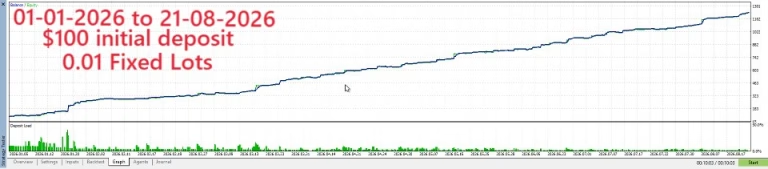
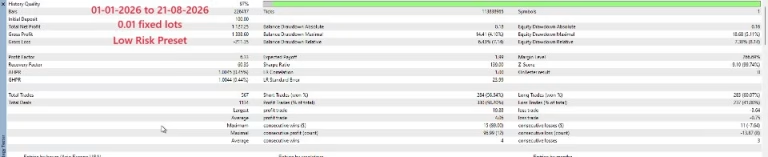
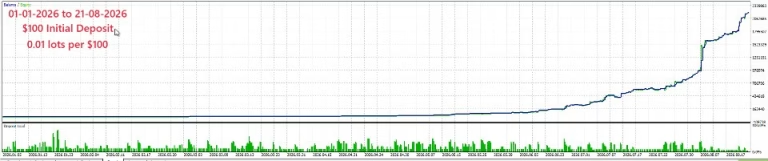
Backtesting can help traders understand how the EA behaves under different historical Gold-market conditions.
When testing SwingForge Gold MT5, consider evaluating:
- XAUUSD
- H1 and other intended timeframes
- Different market-volatility periods
- Spread conditions
- Slippage
- Commission
- Breakout frequency
- Fakeout behavior
- Maximum drawdown
- Daily loss limits
- Trading-zone activity
- News-filter behavior
Use realistic spread and trading-cost assumptions whenever possible.
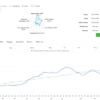
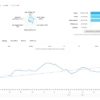
Historical results represent past or simulated conditions and should not be interpreted as a guarantee of future performance.
Demo Testing Before Live Deployment
Before using SwingForge Gold MT5 with real capital, Demo testing is recommended.
During forward testing, monitor:
- Entry frequency
- Breakout quality
- Fakeout filtering
- Stop Loss behavior
- Break-even activity
- Trailing Stop behavior
- Spread
- Slippage
- Daily P&L
- Drawdown
- Open positions
- Trading-zone activity
This helps traders understand how the EA behaves under their specific broker and account conditions.
Explore More Forex Trading Tools
If you are looking for other automated trading systems, visit our Expert Advisor collection.
For additional technical-analysis tools, explore our Indicator collection.
Traders and developers interested in editable Forex algorithms can also browse our Source Code collection.
Download SwingForge Gold MT5
After completing your purchase, access your digital product through Download immediately after payment.
For installation assistance or product questions, contact FxEAstore Support.
You can also follow the FxEAstore Telegram Channel for new product releases and updates.
Risk Management & Trading Disclaimer
Forex, Gold, CFDs, and other leveraged financial instruments involve substantial financial risk.
SwingForge Gold MT5 does not guarantee profits, consistent returns, low drawdown, or protection against losses.
Actual trading results can be affected by:
- XAUUSD volatility
- False breakouts
- Market gaps
- Spread
- Slippage
- Commission
- Liquidity
- Broker execution
- Leverage
- Account balance
- Position sizing
- VPS and network conditions
- Economic news
- Trading-session conditions
Risk-management features such as Hard Stop Loss, Daily Loss protection, and Drawdown protection can help structure trading risk but cannot eliminate market risk.
Always test the EA on a Demo Account or through the MT5 Strategy Tester before considering live deployment. Use appropriate position sizing and trade only with capital you can afford to lose.
Final Overview
SwingForge Gold MT5 is a multi-zone automated Expert Advisor for MetaTrader 5, designed specifically for XAUUSD Gold breakout trading.
Its eight independent trading zones, pending breakout orders, Hard Stop Loss, Fakeout Filter, break-even, trailing protection, equity guards, and optional News Filter provide a structured framework for automated Gold trading.
The EA is designed without Grid or Martingale recovery methods and includes Low Risk, Balanced, and Custom configuration options.
For a responsible evaluation, traders should backtest and Demo-test SwingForge Gold MT5 using their own broker conditions, paying particular attention to spread, execution, drawdown, risk settings, and XAUUSD volatility.

Related products

Expert Advisor


Expert Advisor


Expert Advisor


Expert Advisor


Expert Advisor


Expert Advisor


Expert Advisor