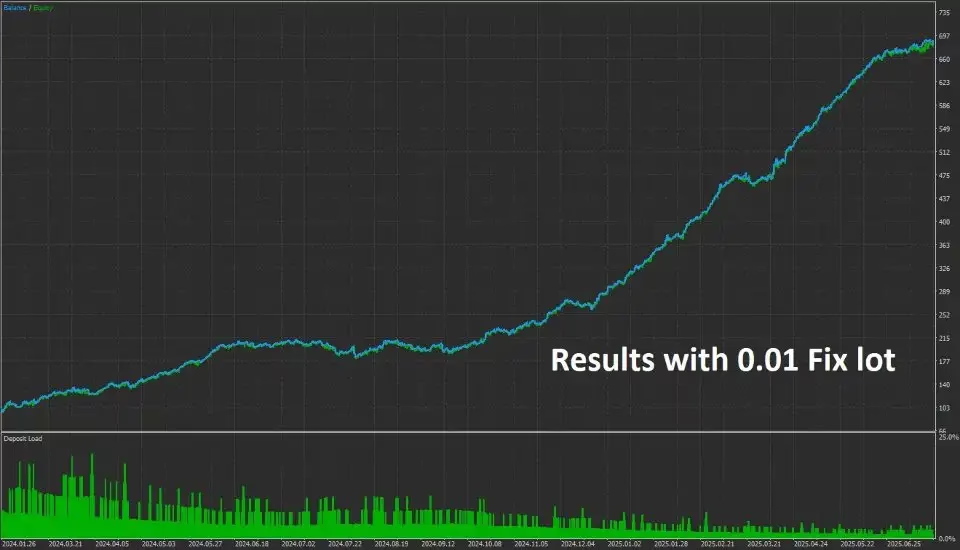
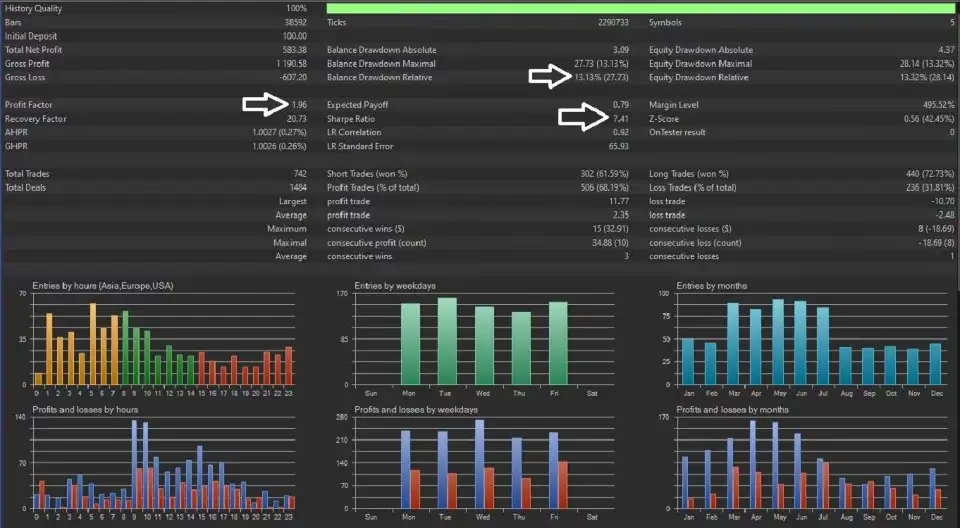

Urban Pulse MT5 V8.85 Unlimited
$22
Urban Pulse MT5 is a professional Forex Expert Advisor for MetaTrader 5, featuring multi-trend confirmation, automatic risk management, drawdown protection, and one-chart trading across five GBP pairs.

Description
Urban Pulse MT5 – Consistent Multi-Pair Forex Trading EA
Urban Pulse MT5 – Smart, Consistent & Risk-Controlled Forex Automation
Urban Pulse MT5 is a professional Forex Expert Advisor designed for traders who value consistency, disciplined execution, and controlled risk. Built specifically for MetaTrader 5, the EA combines automatic risk management, multi-trend confirmation, drawdown protection, and multi-pair trading in a convenient one-chart setup.
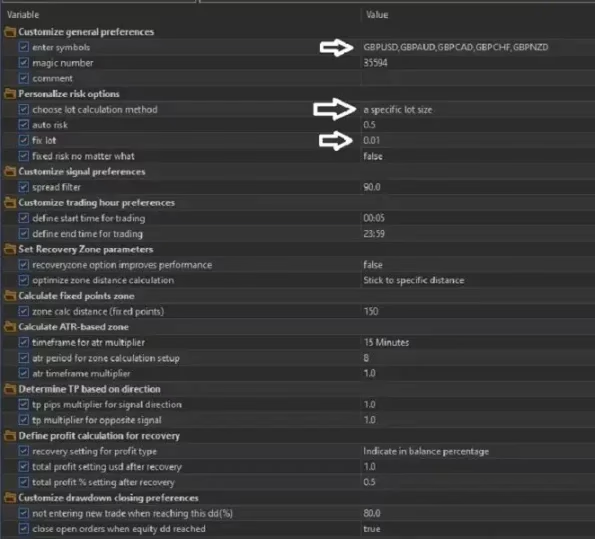
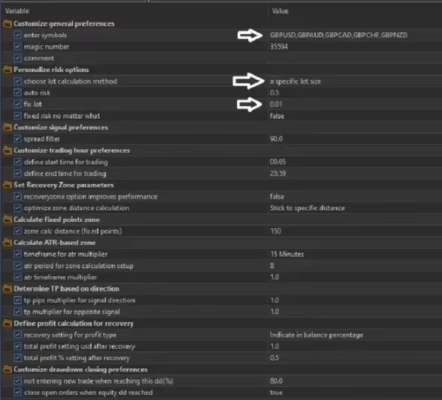
Instead of requiring traders to attach separate EAs to multiple charts, Urban Pulse MT5 can operate from a single GBPUSD H1 chart while internally managing five GBP-based currency pairs.
This streamlined approach makes the EA suitable for traders interested in systematic Forex automation, portfolio diversification, and prop-firm-oriented risk management.
Why Choose Urban Pulse MT5?
Urban Pulse MT5 focuses on structured trading rather than unnecessary complexity. Its algorithm evaluates trend direction across multiple timeframes before allowing a trade entry.
The system is designed to help filter out weaker market conditions and reduce exposure to choppy price movements.
Core Benefits
- Automated Forex trading on MetaTrader 5
- Multi-trend confirmation
- Automatic risk-based lot calculation
- Fixed-lot trading mode
- Built-in drawdown protection
- One-chart multi-pair execution
- Five GBP currency pairs managed internally
- H1 trading framework
- Prop-firm-friendly risk controls
- Simple setup and centralized management
You can explore more automated trading solutions in our Expert Advisor collection.
Advanced Multi-Trend Confirmation
One of the key features of Urban Pulse MT5 is its multi-trend confirmation model.
Before opening a position, the EA evaluates trend direction across several timeframes. This multi-timeframe approach is designed to identify stronger directional alignment rather than reacting to isolated price movements.
The strategy aims to:
- Confirm broader market direction
- Filter weaker trading signals
- Avoid some choppy market conditions
- Focus on aligned trend setups
- Improve the consistency of automated entries
By combining trend confirmation with strict risk controls, Urban Pulse MT5 provides a systematic framework for automated Forex execution.
Automated Risk Management
Effective position sizing is an important part of the Urban Pulse MT5 system.
The EA can automatically calculate the appropriate lot size based on factors such as:
- Account balance
- Stop-loss distance
- Configured risk parameters
This allows position size to adapt to account conditions instead of relying solely on a fixed lot size.
For traders who prefer direct control, Urban Pulse MT5 also provides fixed-lot mode. This gives users flexibility to choose a position-sizing method that fits their own trading plan.
Drawdown Guard Protection
Urban Pulse MT5 includes a built-in Drawdown Guard designed to help control account-level risk.
When floating losses reach the user’s predefined percentage limit, the EA can stop opening new trades. This provides an additional layer of protection for traders operating with strict risk limits.
Drawdown protection can be particularly useful for:
- Prop-firm trading
- Risk-controlled accounts
- Automated portfolios
- Traders focused on capital preservation
- Accounts with predefined loss limits
The feature does not eliminate market risk, but it provides a predefined framework for controlling further trading activity when drawdown becomes excessive.
One-Chart Multi-Pair Trading
A major advantage of Urban Pulse MT5 is its centralized multi-pair architecture.
Simply attach the EA to:
GBPUSD – H1
The EA can then internally manage five GBP-based currency pairs without requiring a separate chart for every instrument.
Supported Currency Pairs
Urban Pulse MT5 manages:
- GBPAUD
- GBPCHF
- GBPNZD
- GBPCAD
- GBPUSD
This one-chart approach helps reduce chart clutter and makes multi-pair automated trading easier to monitor.
Efficient Portfolio Diversification
Trading multiple currency pairs can provide broader market coverage than relying on a single instrument.
Urban Pulse MT5 uses its five-pair structure to monitor different GBP-related opportunities from one centralized EA instance.
However, traders should remember that currency pairs can have correlations. Several GBP pairs may respond to similar market events, meaning diversification does not necessarily remove overall market exposure.
For this reason, appropriate risk settings remain essential when running the EA across multiple pairs.
Flexible Lot Management
Urban Pulse MT5 provides flexibility in how positions are sized.
Automatic Risk Mode
The EA can calculate position size automatically according to account conditions and stop-loss distance.
Fixed-Lot Mode
Traders can select a fixed lot size when they prefer more predictable position sizing.
This flexibility makes Urban Pulse MT5 adaptable to different account-management approaches and trading preferences.
Recommended Setup
For the intended configuration, use the following setup:
| Setting | Recommended Configuration |
|---|---|
| Platform | MetaTrader 5 |
| Expert Advisor | Urban Pulse MT5 |
| Chart | GBPUSD |
| Timeframe | H1 |
| Managed Symbols | 5 GBP pairs |
| Trading Model | Multi-Trend Confirmation |
| Risk Management | Automatic / Fixed Lot |
| Protection | Drawdown Guard |
| Operation | One Chart |
| Version | 4.73 |
| Build | 5430+ |
| DLL | Required |
The one-chart configuration keeps the setup simple while allowing the EA to manage multiple instruments internally.
Who Is Urban Pulse MT5 For?
Forex Traders
Urban Pulse MT5 is suitable for traders who want to automate their Forex strategy on MetaTrader 5 without manually monitoring several currency pairs.
Prop-Firm Traders
Its automatic risk management and drawdown protection can be useful for traders who operate under predefined account-level risk rules.
However, no EA can guarantee that a prop-firm challenge will be passed, as trading conditions and firm rules can vary.
Portfolio Traders
The five-pair structure allows traders to gain exposure to multiple GBP-related markets from a centralized setup.
Beginners in Automated Trading
The one-chart architecture makes the technical setup relatively straightforward. Beginners should nevertheless understand basic concepts such as leverage, lot size, drawdown, and stop-loss management before using an automated trading system.
Key Features of Urban Pulse MT5
1. Multi-Trend Confirmation
The EA checks trend direction across multiple timeframes before considering trade entries.
2. Automatic Risk Logic
Position size can be calculated according to account balance, stop-loss distance, and selected risk parameters.
3. Fixed-Lot Mode
Users can switch to fixed-lot trading when they want greater control over position sizing.
4. Drawdown Guard
A predefined floating-loss threshold can stop further trading activity when the configured limit is reached.
5. Five-Pair Management
GBPAUD, GBPCHF, GBPNZD, GBPCAD, and GBPUSD can be managed from one EA instance.
6. One-Chart Operation
Attach the EA to GBPUSD H1 rather than manually installing it on every supported pair.
7. MetaTrader 5 Compatibility
Urban Pulse MT5 is developed specifically for the MT5 trading environment.
Simple Installation & Setup
Getting started with Urban Pulse MT5 is straightforward.
Step 1 – Prepare MetaTrader 5
Install and log in to your MetaTrader 5 trading account.
Step 2 – Install the EA
Add Urban Pulse MT5 to your MT5 Experts directory and restart the platform if necessary.
Step 3 – Open GBPUSD H1
Open a GBPUSD chart and select the H1 timeframe.
Step 4 – Attach Urban Pulse MT5
Attach the EA to the chart and enable automated trading.
Step 5 – Configure Risk
Choose automatic risk calculation or fixed-lot mode according to your trading plan.
Step 6 – Configure Drawdown Protection
Set an appropriate floating drawdown limit to control additional trading activity.
Step 7 – Test Before Live Trading
Run the EA on a demo account first. Monitor its behavior, execution, drawdown, spreads, and overall performance before considering live deployment.
Explore More Forex Trading Tools
If you are looking for additional automated trading solutions, visit our Expert Advisor category.
You can also discover complementary technical tools through our Indicator collection or explore our Source Code products if you are interested in MQL development and customizable trading systems.
Download Urban Pulse MT5
After completing your purchase, you can access your purchased product through your account download area:
Download immediately after payment
Make sure your MT5 platform is properly configured before installing and running the EA.
Urban Pulse MT5 Support
Need help with installation or configuration?
Contact our Support team on Telegram for product-related assistance.
You can also follow our Telegram Channel for product updates, announcements, and new Forex trading tools.
Final Thoughts on Urban Pulse MT5
Urban Pulse MT5 is a structured MetaTrader 5 Expert Advisor built around multi-trend confirmation, automated risk management, drawdown protection, and centralized multi-pair execution.
Its ability to manage five GBP currency pairs from a single GBPUSD H1 chart makes it a convenient solution for traders who want broader market coverage without maintaining multiple EA instances.
With automatic and fixed-lot options, a built-in Drawdown Guard, and multi-timeframe trend confirmation, Urban Pulse MT5 offers a disciplined framework for automated Forex trading.
As with all Expert Advisors, trading performance can vary according to market conditions, spreads, execution quality, leverage, broker conditions, and user configuration. Always test the EA thoroughly on a demo account and use responsible risk management before trading with real capital.
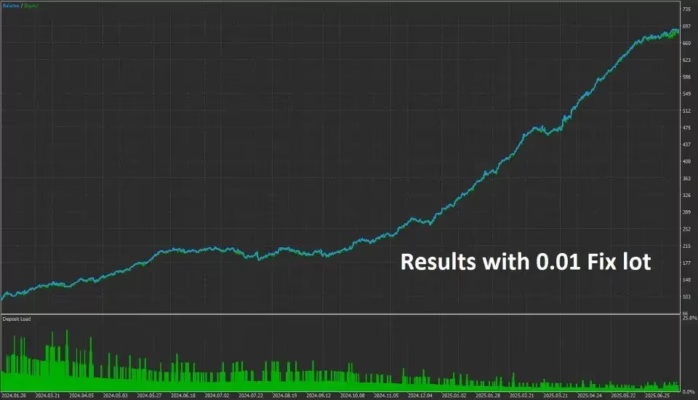
Trading involves significant risk. Past, backtested, or simulated performance does not guarantee future results.
Related products


Expert Advisor


Expert Advisor


Expert Advisor


Expert Advisor


Expert Advisor


Expert Advisor


Expert Advisor


Expert Advisor