


Hector EA MT5 V2.1 Unlimited + SetFiles
$15
Hector EA MT5 is an automated Gold trading Expert Advisor designed for MetaTrader 5. Featuring 74 independent grid strategies, mandatory Stop Loss protection, flexible position sizing, optional basket hedging, and broker-specific SET files, this EA offers a configurable approach to automated XAUUSD trading. The package includes version 2.1 without DLL requirements and preset configurations. Suitable for experienced traders who understand grid trading, drawdown, and margin risks.

Description
Hector EA MT5 – Automated Gold Trading with 74 Independent Strategies
Discover Hector EA MT5 for Automated Gold Trading
Hector EA MT5 is a multi-strategy trading robot developed specifically for XAUUSD (Gold) on the MetaTrader 5 platform. Instead of relying on a single trading setup, it combines 74 independent grid strategies, each with its own entry conditions and trading behavior.
The system is designed to identify trading opportunities across different market conditions while providing configurable position sizing and mandatory Stop Loss protection. Traders can customize their strategy portfolio by enabling or disabling individual strategies according to their trading preferences and risk tolerance.
Hector EA MT5 is intended for traders seeking automated Gold trading with configurable risk parameters. However, it is important to understand that grid-based systems can accumulate open positions and experience substantial floating losses during strong market movements.
Key Features of Hector EA MT5
1. 74 Independent Trading Strategies
Hector EA MT5 includes 74 independent strategies designed to operate under different market conditions.
Each strategy has its own entry logic, trading frequency, and potential grid depth. This allows the EA to distribute its trading activity across multiple setups rather than depend on a single strategy.
Key benefits include:
- Multiple trading approaches within one EA.
- Independent strategy configuration.
- The ability to enable or disable individual strategies.
- Different trading frequencies and grid characteristics.
- Greater flexibility when evaluating trading configurations.
Although using multiple strategies can diversify trading activity, it does not eliminate risk. Several strategies may experience losses simultaneously when market conditions become unfavorable.
2. Specialized XAUUSD Gold Trading
Hector EA MT5 is designed specifically for Gold trading rather than being a general-purpose robot for every Forex pair.
Gold can offer substantial price movement, but it can also experience rapid reversals, widening spreads, and significant volatility. The EA’s grid-based approach should therefore be evaluated carefully under the trading conditions provided by your broker.
For proper configuration, use the intended XAUUSD symbol and confirm that your broker’s contract specifications are compatible with the EA.
3. Grid-Based Trading Logic
The EA operates through a portfolio of independent grid strategies. Each strategy waits for its own entry conditions and manages its trading sequence according to its programmed logic.
Some strategies may generate relatively frequent trades, while others may operate less frequently and develop deeper grids.
This structure offers flexibility, but grid trading carries important risks. If Gold moves persistently against open positions, floating losses and margin usage can increase. Multiple active strategies can also create overlapping exposure.
Hector EA MT5 should not be considered a guaranteed recovery system or a low-risk investment.
4. Mandatory Stop Loss Protection
Risk management is an important component of Hector EA MT5. According to the product specifications, every strategy includes mandatory Stop Loss protection that cannot be disabled.
The EA supports percentage-based Stop Loss settings within a stated range of 3% to 30%.
Features include:
- Mandatory Stop Loss for each strategy.
- Configurable percentage-based protection.
- Separate protection levels for individual strategies.
- Flexible position sizing to suit different account sizes.
A Stop Loss helps define an exit condition, but it cannot guarantee the exact execution price during slippage, gaps, or extreme market conditions. Consecutive Stop Loss events are also possible.
5. Flexible Lot Sizing
Hector EA MT5 allows traders to adjust position sizes according to their account balance and preferred risk level.
Choosing an appropriate lot size is particularly important when multiple strategies can open positions at the same time. Larger lots can increase both potential gains and potential losses.
Traders should evaluate total exposure, margin requirements, and the possibility of simultaneous drawdowns rather than selecting lot sizes based on balance alone.
6. Optional Basket Hedging
The EA supports optional basket hedging for traders whose account configuration and trading approach are compatible with this feature.
Hedging may change the way exposure is managed, but it does not remove market risk. Additional positions can increase transaction costs, margin usage, and the complexity of managing a trading basket.
Before enabling hedging, confirm that your broker supports the required hedging account mode and understand how the selected configuration affects your overall exposure.
7. Broker-Specific SET Files Included
The product package includes SET files for configuring the EA.
These preset files are important because Hector EA MT5 requires a suitable configuration before trading. All 74 strategies are disabled by default, so the EA will not begin trading until an appropriate SET file has been loaded and the relevant settings have been configured.
A broker-specific configuration may be necessary because spreads, commissions, price feeds, contract specifications, and execution conditions vary.
Always verify that the SET file matches your broker and account type. Settings that perform differently on one broker may produce different results on another.
8. Historical Testing and Evaluation
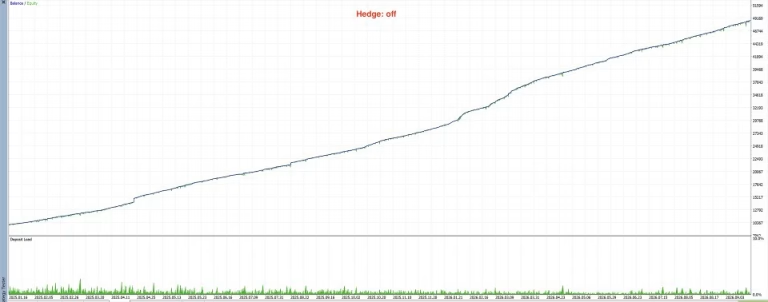
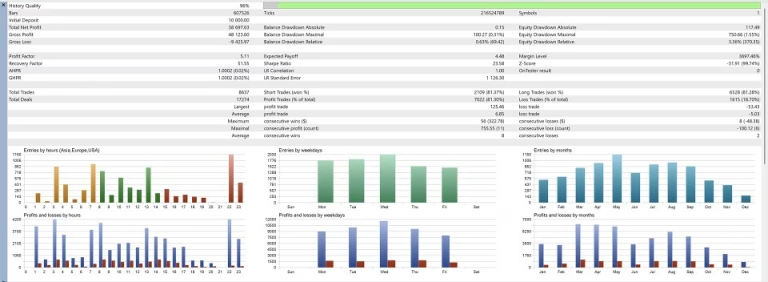
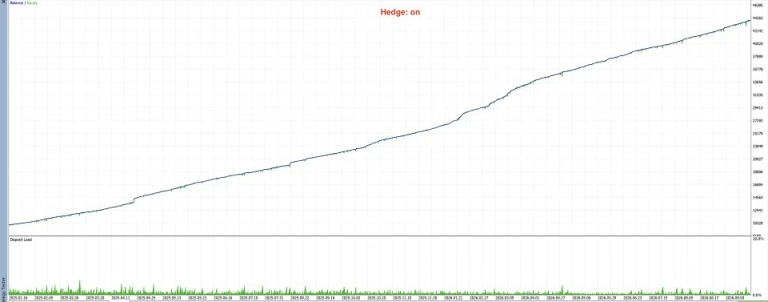
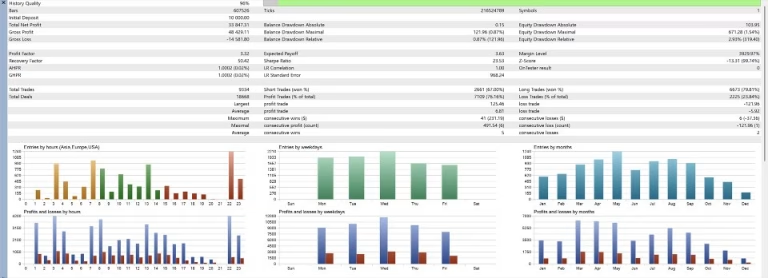
The developer describes a testing process using historical data from 2020 across multiple brokers, including out-of-sample evaluation.
The stated methodology includes separate yearly tests, standardized baseline parameters, and comparisons across different broker price feeds.
Historical testing can help traders understand how a strategy behaved under previous market conditions. However, backtests depend on data quality, assumptions, trading costs, and execution modeling. They cannot guarantee future profitability.
For a more meaningful evaluation, test the current version with the intended broker’s historical tick data and validate the results through forward testing.
Recommended Settings for Hector EA MT5
The product documentation provides the following suggested lot sizes as a starting reference:
| Account Balance | Suggested Lot Size |
|---|---|
| $1,000–$9,999 | 0.01 |
| $10,000–$19,999 | 0.02 |
| $20,000–$29,999 | 0.03 |
| $30,000–$39,999 | 0.04 |
| $40,000–$49,999 | 0.05 |
For each additional $10,000 in account balance, the suggested lot size increases by 0.01.
These figures are configuration guidelines, not guarantees of capital preservation. Actual risk depends on the number of active strategies, concurrent positions, grid depth, Stop Loss settings, leverage, and broker specifications.
The developer’s stated baseline testing configuration uses a $10,000 starting deposit, a fixed lot size of 0.02, and a 5% Stop Loss setting.
Before using these settings, evaluate whether the potential drawdown and margin requirements are acceptable for your account.
Technical Specifications
- Product Name: Hector EA MT5
- Platform: MetaTrader 5 (MT5)
- Product Type: Automated Expert Advisor
- Version: 2.1
- DLL Requirement: No DLL required
- Trading Instrument: XAUUSD (Gold)
- Trading Strategy: Multi-strategy Grid Trading
- Number of Strategies: 74 independent strategies
- Timeframe: Any supported timeframe, subject to the selected configuration
- Stop Loss: Mandatory, with a stated configurable range of 3%–30%
- Position Sizing: Adjustable lot sizes
- Basket Hedging: Optional
- Preset Files: SET files included
- Account Type: Hedging account required
- Recommended Trading Costs: Zero or low spreads preferred
- Recommended Leverage: 1:500 or higher, subject to broker availability
- Suggested Starting Deposit: $1,000
- VPS: Recommended for continuous operation
- Configuration: Suitable broker-specific SET file required
Check your broker’s minimum lot size, margin requirements, XAUUSD contract specifications, and account permissions before installation.
Broker Compatibility and Trading Conditions
Low-Spread Accounts
Hector EA MT5 is intended for use with competitive trading conditions. ECN or RAW-style accounts may be worth evaluating because spreads and commissions can significantly affect the performance of grid-based strategies.
Consider the following before selecting a broker:
- Average and maximum XAUUSD spreads.
- Commission per trade.
- Slippage during volatile market conditions.
- Swap charges and overnight holding costs.
- Margin requirements and stop-out levels.
- Compatibility with hedging and the EA’s SET files.
No account type guarantees profitable results. Test the actual conditions offered by your broker before deploying the EA with real funds.
Hedging Account Support
The EA’s stated requirements specify a hedging account. Confirm that your MetaTrader 5 account permits multiple positions on the same instrument and supports the intended order-management behavior.
Do not assume that a netting account will operate identically.
VPS Recommendation
A Virtual Private Server (VPS) can help keep MetaTrader 5 running when your personal computer is switched off or disconnected.
A stable trading environment may support more consistent EA operation, but a VPS cannot eliminate market risk, slippage, or losses.
How to Install Hector EA MT5
Follow these steps to prepare Hector EA MT5 for testing.
Step 1: Install MetaTrader 5
Install MT5 and connect it to a compatible broker account that supports hedging.
Step 2: Open the XAUUSD Chart
Select the Gold trading symbol provided by your broker. Confirm that its price precision and contract specifications are compatible with the EA.
Step 3: Install the EA File
Copy the EA file into the appropriate MetaTrader 5 Experts directory, then refresh the Navigator panel or restart the platform.
Step 4: Load the Appropriate SET File
Choose a preset suitable for your broker and account type. Since all strategies are disabled by default, loading a suitable configuration is essential before the EA can trade.
Step 5: Review Risk Parameters
Check the selected strategies, lot size, Stop Loss percentage, hedging options, and other available settings. Ensure the potential exposure is appropriate for your account.
Step 6: Enable Automated Trading
Attach Hector EA MT5 to the intended chart and enable AutoTrading after reviewing its configuration. The listed version does not require a DLL.
Step 7: Backtest and Forward-Test
Test the EA using relevant historical tick data. Then run it on a Demo account with your intended broker to evaluate execution, drawdown, margin usage, and trading costs.
Do not move directly to live trading based only on historical profitability.
Who Should Consider Hector EA MT5?
Hector EA MT5 may be worth evaluating for traders who:
- Want to automate Gold trading on MetaTrader 5.
- Understand multi-strategy grid systems.
- Have experience with position sizing and drawdown management.
- Can evaluate floating losses and margin usage.
- Use a compatible hedging account.
- Are willing to test and maintain broker-specific configurations.
- Understand that recovery periods and consecutive losses can occur.
It may be unsuitable for traders who require guaranteed returns, cannot tolerate significant drawdowns, or expect automated trading to eliminate the possibility of losing capital.
Why Choose Hector EA MT5?
Hector EA MT5 offers a configurable approach to automated Gold trading through a portfolio of 74 independent strategies.
Its main features include:
- A specialized XAUUSD trading system.
- 74 independently configurable grid strategies.
- Mandatory Stop Loss protection.
- Adjustable lot sizing.
- Optional basket hedging.
- Included SET files for configuration.
- A version that does not require DLLs.
- Historical testing and broker-specific evaluation options.
The key consideration is not simply the number of strategies, but whether the selected configuration can operate within your acceptable risk and margin limits.
Get More Trading Tools at FxEAstore.com
Explore additional tools to build your trading setup:
- Forex Expert Advisors: Browse automated trading software for different strategies and platforms.
- Forex Indicators: Explore technical analysis tools and trading indicators.
- Source Code: Discover source-code products for trading software.
- Download immediately after payment: Access your purchased digital products through your account.
- Official Telegram Channel: Follow product announcements and updates.
- Customer Support: Contact the support team if you need assistance.
Risk Disclaimer
Forex and Gold trading involve substantial financial risk. Grid-based Expert Advisors can accumulate multiple open positions, experience significant floating drawdowns, and face increasing margin requirements during sustained market movements.
Mandatory Stop Loss protection does not eliminate the possibility of losses, and optional hedging does not guarantee protection against adverse market conditions. Historical results and backtests do not guarantee future performance.
Always test Hector EA MT5 on a Demo account before live deployment. Verify your broker’s compatibility, use an appropriate position size, monitor total exposure, and never trade with money you cannot afford to lose.
Related products


Expert Advisor


Expert Advisor


Expert Advisor

Expert Advisor


Expert Advisor


Expert Advisor


Expert Advisor