


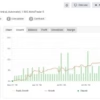
GoldCycle MT5 Unlimited
$15
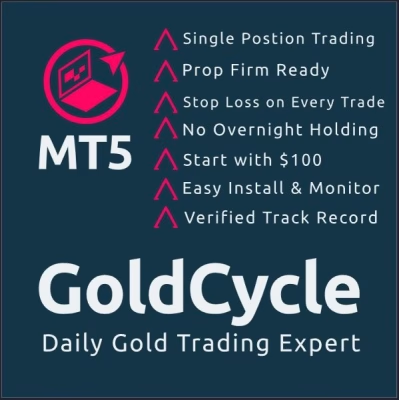
GoldCycle MT5 is an automated Expert Advisor designed for trading GOLD (XAUUSD) on MetaTrader 5. It uses daily high-low price levels, volatility-based Stop Loss and Take Profit, and percentage-based position sizing to execute a structured trading strategy. With a maximum of two trades per day, optional trailing stop and breakeven features, and configurable risk profiles, GoldCycle MT5 is designed for traders seeking systematic gold trading without grid or martingale position accumulation. Demo testing is recommended before live deployment.

Description
GoldCycle MT5 – Automated Gold Trading with Dynamic Risk Management
GoldCycle MT5 is an automated trading robot developed specifically for the gold market on MetaTrader 5. Its strategy combines daily price levels, volatility analysis, pending orders, and configurable risk management to identify and manage potential trading opportunities.
The EA calculates trading levels around the daily high and low, then places pending orders according to its programmed rules during the early European session. It adjusts Stop Loss and Take Profit distances based on market volatility and calculates position sizes using the selected risk settings.
GoldCycle MT5 is designed to limit trading activity to a maximum of two trades per day and close positions according to its configured session schedule. It also avoids conventional grid and martingale position accumulation, although an optional recovery function can increase risk following a losing trade.
These features may appeal to traders looking for a structured approach to automated XAUUSD trading. However, no automated system can eliminate market risk or guarantee profitable results.
Key Features of GoldCycle MT5
1. Automated XAUUSD Trading
GoldCycle MT5 is designed specifically for GOLD (XAUUSD), allowing users to automate trading decisions on MetaTrader 5.
The EA follows predefined trading rules to identify price levels, place pending orders, and manage trades. This can reduce repetitive manual work while maintaining a consistent trading process.
2. Daily High-Low Trading Strategy
The system uses daily high-low price levels as part of its entry strategy. During the configured early European session, it calculates relevant levels and places pending orders according to its trading rules.
This approach provides a structured framework for identifying potential opportunities from daily price movements without requiring traders to monitor charts continuously.
3. Volatility-Based Stop Loss and Take Profit
GoldCycle MT5 adjusts its Stop Loss (SL) and Take Profit (TP) distances according to market volatility.
- Stop Loss: Defines the intended protective exit level for a trade.
- Take Profit: Establishes the configured profit-taking target.
- Volatility Adjustment: Changes the relevant trading distances according to the strategy’s volatility calculations.
Although adaptive levels can help the EA respond to changing market conditions, they do not prevent slippage, gaps, or losses greater than expected under unfavorable execution conditions.
4. Percentage-Based Risk Management
The EA calculates position size based on the selected risk percentage and Stop Loss distance.
Its configurable risk parameters include:
- Start Risk: Sets the initial risk configuration.
- Recovery Factor: Controls the configured risk increase after a loss when recovery is enabled.
- Max Risk: Defines the configured maximum risk level.
- Stop Loss: Specifies protective trade-exit settings.
- Trailing Stop: Enables trailing-stop management when selected.
- Breakeven: Enables the configured breakeven function when selected.
Position sizing requires careful review. A narrower Stop Loss may produce a larger calculated lot size, and actual monetary losses can differ from planned risk due to slippage and other execution factors.
5. Maximum Two Trades per Day
GoldCycle MT5 is designed to open no more than two trades per day. This trading-frequency limit supports a structured approach rather than unrestricted trading throughout the session.
A lower trade count does not automatically mean lower risk. The size, direction, and outcome of each position remain important.
6. No Grid or Martingale Position Accumulation
According to the product specifications, GoldCycle MT5 does not use a conventional grid or martingale strategy to accumulate additional positions or average down losing trades.
However, the EA includes an optional recovery function that can increase configured risk after a loss. Traders should understand this distinction and carefully review the recovery settings before enabling the feature.
7. Optional Trailing Stop and Breakeven
The EA provides optional trade-management functions:
- Trailing Stop: Adjusts the protective stop according to the configured rules as a trade develops.
- Breakeven: Allows the EA to move a stop toward the entry price under its programmed conditions.
These tools may help manage open trades, but they cannot guarantee that a trade will close at breakeven or secure a profit in every market situation.
8. Scheduled Position Closure
GoldCycle MT5 is designed to close open positions and cancel pending orders at its configured session-end time. This approach aims to avoid overnight and weekend exposure when the EA operates as intended.
Correct broker server-time settings are essential. Traders should verify session times and daylight-saving adjustments before using the EA on a live account.
9. Configurable Risk Profiles for Personal and Prop Firm Accounts
The product information includes different risk configurations for standard accounts and prop firm evaluations.
The supplied profiles are intended to help users adapt risk settings to different account requirements. Nevertheless, no configuration guarantees compliance with every prop firm’s rules or guarantees a successful evaluation.
Before using the EA with a prop firm, verify its restrictions on daily drawdown, overall drawdown, trading hours, news trading, and position holding.
GoldCycle MT5 Technical Specifications
- Product Name: GoldCycle MT5
- Product Type: Automated Expert Advisor
- Trading Platform: MetaTrader 5 (MT5)
- Trading Instrument: GOLD (XAUUSD)
- Recommended Timeframe: H1
- Trading Style: Automated daily trading
- Entry Method: Pending orders around daily high-low levels
- Maximum Trades per Day: Up to 2
- Money Management: Percentage-based risk
- Stop Loss and Take Profit: Automated, volatility-based
- Trailing Stop: Optional
- Breakeven: Optional
- Recovery Function: Optional
- Grid Strategy: Not used according to the product description
- Martingale Strategy: Not used according to the product description
- Overnight and Weekend Exposure: Designed to close positions and cancel pending orders at the configured session end
- Minimum Lot Size: 0.01 lots, subject to broker conditions
- Stated Minimum Deposit: 100 units of account currency, subject to broker requirements
- DLL Requirement: No-DLL version
- Account Compatibility: Depends on broker and account configuration
The product information identifies version 1.0 and recommends the GOLD H1 chart. Confirm the version supplied with your purchase, the correct broker configuration, and the EA’s input parameters before installation.
Recommended Risk Settings
The product listing provides the following example configurations:
| Account Profile | Starting Risk | Starting Risk with Trailing Stop | Recovery Factor | Max Risk |
|---|---|---|---|---|
| Standard account | 2.5% | 5% | 2 | 10 |
| Prop firm account | 0.5% | 1% | 2 | 2 |
These are the configurations reported in the product information, not universal recommendations or guaranteed maximum drawdown limits. Confirm how the supplied EA interprets each input and whether the figures represent percentages or other internal risk units.
For evaluation accounts, conservative settings are generally preferable. Test the EA against the specific firm’s drawdown rules before deploying it.
How GoldCycle MT5 Works
GoldCycle MT5 follows a systematic daily trading process.
Step 1: Collect Daily Market Data
The EA collects the required daily trading information at its configured start time to identify relevant price levels.
Step 2: Calculate Daily High-Low Levels
The system uses daily price data to determine levels for its pending-order strategy.
Step 3: Place Pending Orders
During the configured early European session, the EA places pending orders according to its trading rules.
Step 4: Manage Risk and Trade Exits
The EA calculates position size from the selected risk settings and determines Stop Loss and Take Profit distances using its volatility-based logic. Optional trailing-stop and breakeven functions can also be enabled.
Step 5: Close Positions at Session End
At the configured session-end time, the system is designed to close open trades and cancel pending orders, helping avoid overnight and weekend exposure.
Broker server time, daylight-saving changes, execution quality, and the selected settings can all affect how this process operates in practice.
How to Install and Test GoldCycle MT5
Follow these steps before using the EA with real funds:
- Prepare MetaTrader 5: Install the platform and connect it to a compatible trading account.
- Install the Expert Advisor: Place the supplied EA file in the appropriate MT5 Experts directory and refresh or restart the platform as needed.
- Attach the EA to the Chart: Use the recommended GOLD H1 chart and confirm that the broker’s symbol name matches the EA’s requirements.
- Check Server Time: Verify your broker’s GMT offset, daylight-saving behavior, and the configured trading session.
- Configure Risk Settings: Review Start Risk, Recovery Factor, Max Risk, Stop Loss, and optional trade-management features.
- Backtest the Strategy: Use suitable historical data with realistic spreads, commissions, and execution assumptions.
- Forward-Test on Demo: Confirm that order placement, position sizing, trade exits, and session-end closures work as intended.
- Monitor Performance: Review equity, drawdown, trade frequency, and execution quality before considering live deployment.
The original product information indicates that an installation manual may need to be requested separately. Follow the instructions supplied with your purchased files.
Is GoldCycle MT5 Suitable for Prop Firm Trading?
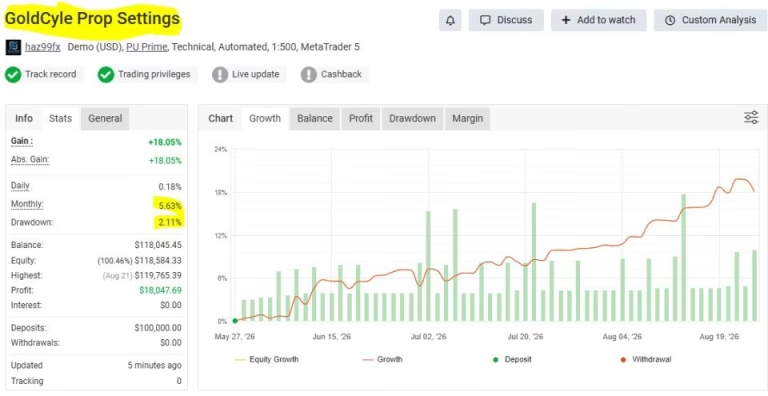
GoldCycle MT5 includes risk profiles intended for traders evaluating or managing prop firm accounts. Its limited trading frequency, automated protective orders, and scheduled position closure may be relevant to certain account rules.
However, compatibility depends on the specific firm’s requirements. Before use, check:
- Maximum daily and overall drawdown.
- Whether overnight and weekend holding is restricted.
- News-trading policies.
- Trading-hour requirements.
- Rules governing automated trading and Expert Advisors.
- How the firm calculates equity-based and trailing drawdown.
No Expert Advisor can guarantee a prop firm pass or ensure that every rule is satisfied. Test the intended configuration and monitor compliance carefully.
Who Should Consider GoldCycle MT5?
GoldCycle MT5 may suit traders who:
- Use MetaTrader 5.
- Focus on automated XAUUSD trading.
- Prefer a daily high-low trading framework.
- Want volatility-based Stop Loss and Take Profit settings.
- Need configurable percentage-based risk management.
- Want to explore structured trading with a limited number of daily trades.
- Understand automated trading risks and are prepared to backtest and forward-test an EA.
It may not be suitable for traders who expect guaranteed returns, cannot tolerate drawdown, or do not understand how position sizing and recovery settings affect account exposure.
Frequently Asked Questions About GoldCycle MT5
What Market Does GoldCycle MT5 Trade?
GoldCycle MT5 is designed specifically for GOLD (XAUUSD), the gold-versus-US-dollar instrument.
Which Timeframe Is Recommended?
The product specifications recommend the H1, or one-hour, chart.
Does GoldCycle MT5 Use Grid or Martingale Trading?
The product description states that the EA avoids conventional grid and martingale position accumulation. However, it includes an optional recovery function that can increase configured risk following a loss. Review this setting carefully before use.
How Many Trades Can GoldCycle MT5 Open Per Day?
The stated maximum is two trades per day.
Can GoldCycle MT5 Be Used with Prop Firms?
The EA provides risk profiles intended for prop firm trading, but compatibility with a particular firm’s rules is not guaranteed. Verify the firm’s requirements and test the configuration before use.
Does GoldCycle MT5 Hold Positions Overnight?
The EA is designed to close open positions and cancel pending orders at its configured session-end time. Confirm the schedule and broker server-time settings to ensure the intended behavior.
Can GoldCycle MT5 Guarantee Profits?
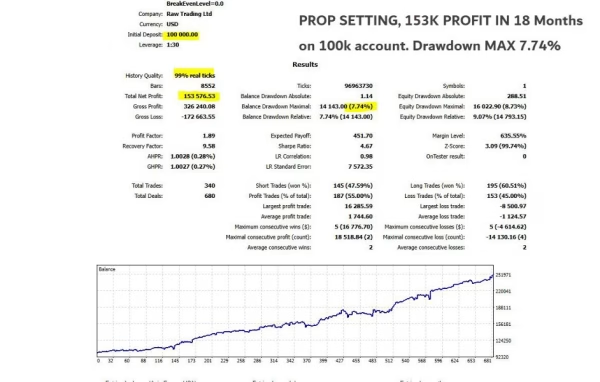
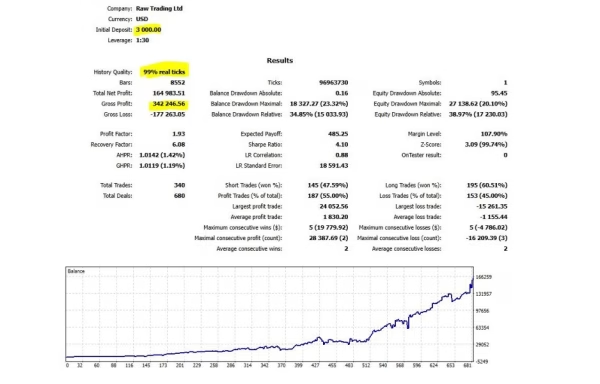
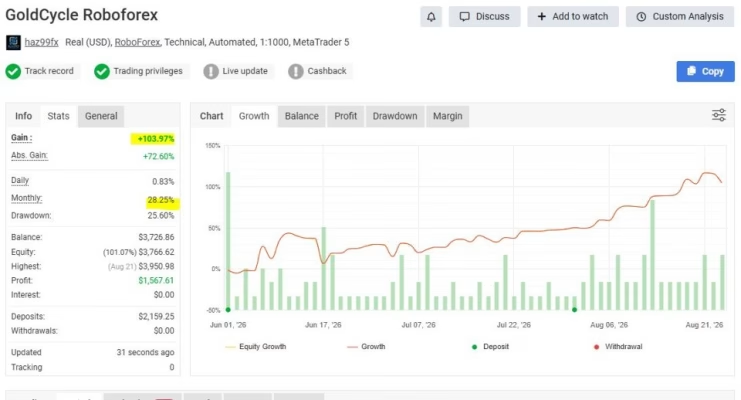
No. All trading involves risk, and historical testing does not guarantee future performance. Market volatility, execution conditions, spreads, and slippage can affect results.
Get GoldCycle MT5 from FxEAstore.com
GoldCycle MT5 offers an automated approach to XAUUSD trading using daily high-low levels, volatility-based trade management, and configurable risk settings. If you are considering this Expert Advisor, verify its compatibility with your broker and thoroughly test the supplied version before using real funds.
Explore more automated systems in our Expert Advisors collection, discover technical tools in our Indicators collection, or browse our Source Code collection.
After completing your purchase, access eligible product files through Download immediately after payment. For product announcements and updates, visit our official channel. If you need assistance, contact FxEAstore Support.
Risk Disclaimer: Forex and gold trading involve substantial financial risk. Stop Loss orders may experience slippage, and actual losses can exceed planned risk during volatile market conditions. Percentage-based position sizing and optional recovery settings do not guarantee a specific outcome or limit total account drawdown. Past performance and backtest results do not guarantee future results. Always test thoroughly, use appropriate risk controls, and trade only with funds you can afford to lose.
Related products


Expert Advisor


Expert Advisor


Expert Advisor


Expert Advisor


Expert Advisor


Expert Advisor


Expert Advisor


Expert Advisor