

BUAS EA MT4 V7.2 Unlimited + SetFiles
$15
BUAS EA MT4 is an automated trading robot for MetaTrader 4, designed for Gold (XAUUSD) and Bitcoin (BTCUSD). Version 7.2 combines breakout entries, Adaptive Asymmetric Grid (AAG) logic, equity-based trailing, and ATR-based stop management. The package includes SetFiles and a No-DLL version, along with an interactive on-chart trading console. This unlimited version includes free updates. Because it uses a grid-based strategy, careful configuration and thorough testing are essential before live trading.

Description
BUAS EA MT4 – Adaptive Grid Breakout Trading for Gold and Bitcoin
Trading Gold and Bitcoin requires a clear strategy and careful attention to volatility, market momentum, and margin usage. These instruments can move rapidly, creating opportunities while also exposing traders to substantial losses.
BUAS EA MT4 is an automated Expert Advisor for MetaTrader 4 that combines breakout trading with an Adaptive Asymmetric Grid (AAG) system. It is designed for XAUUSD (Gold) and BTCUSD (Bitcoin), with the H4 timeframe listed as the recommended starting point.
Unlike a purely passive trading robot, BUAS EA MT4 also includes an interactive on-chart control panel. This allows users to monitor account information and access supported manual trading and position-management functions directly from the chart.
The product package includes SetFiles and a No-DLL version. It is offered as an unlimited version with free updates, making it an option for experienced traders who want to explore configurable automated trading with additional control over order management.
Key Features of BUAS EA MT4
1. Adaptive Grid Breakout Strategy
BUAS EA MT4 combines breakout mechanics with adaptive grid logic. Its stated approach uses pending Buy Stop and Sell Stop orders around the market price, allowing the system to respond when price moves beyond the configured entry levels.
According to the product specifications, the first triggered side activates the grid cycle.
Key characteristics include:
- Breakout-based order placement
- Automated pending-order execution
- Adaptive grid management
- A focus on price movement rather than relying solely on indicator-based entry signals
A breakout does not guarantee a sustained move in the same direction. False breakouts and reversals can result in losses, particularly when a grid cycle remains exposed to a strong market move.
2. Adaptive Asymmetric Grid (AAG) System
One of the main features of BUAS EA MT4 is its Adaptive Asymmetric Grid system.
Instead of maintaining identical grid spacing on both sides in every situation, the EA is described as adjusting grid behavior according to a directional bias score. The product information identifies several technical inputs used in this process:
- EMA Fast and Slow: Used to assess trend direction.
- ADX: Used to evaluate trend strength.
- RSI: Used to assess momentum.
- ATR: Used to scale grid distances according to volatility.
The stated logic adjusts Buy Stop and Sell Stop spacing according to the calculated bias. This aims to make grid placement responsive to market conditions rather than completely static.
Adaptive grid logic does not eliminate the risk of accumulating exposure. Traders should evaluate the number of open orders, lot progression, margin requirements, and potential drawdown under different market scenarios.
3. Supports XAUUSD and BTCUSD
BUAS EA MT4 is designed for two volatile markets:
- XAUUSD: Gold against the US dollar.
- BTCUSD: Bitcoin against the US dollar.
The H4 timeframe is listed as the recommended starting point, while BTCUSD may require adjusted parameters.
Broker specifications differ significantly for Gold and cryptocurrency instruments. Contract size, spreads, trading hours, leverage, and margin requirements should be checked before using the EA on either market.
Explore more automated trading tools in our Expert Advisor collection.
4. Dual Adaptive Trailing Protection
BUAS EA MT4 includes two separate trailing mechanisms intended to help manage open trades and account-level performance.
Equity-Based Trailing
This feature tracks account equity in monetary terms. According to the product information, it can trail equity upward after a defined gain has been reached.
Its purpose is to help manage account-level profit protection according to the configured rules. It does not guarantee that profits will be retained during fast market movements or adverse execution conditions.
ATR-Based Trailing Stop
The second mechanism uses the Average True Range (ATR) to adapt stop-loss distance to market volatility.
A volatility-based distance can respond differently in quieter and more active conditions. However, the effectiveness of trailing stops depends on the settings, market behavior, and execution quality.
The product information states that the two trailing systems can be paused or resumed independently through the on-chart panel.
5. Flexible Position and Risk Controls
BUAS EA MT4 provides several configuration options for managing position sizes and account exposure.
Listed controls include:
- Fixed-lot mode
- Progressive lot sequence
- Lot multipliers with a maximum lot limit
- Margin-level safeguards
- Equity-based profit targets
- Monetary Stop Loss settings
These options give users control over important aspects of the trading setup. However, progressive position sizing and grid-based exposure can increase margin usage and losses during unfavorable market conditions.
Set conservative limits, understand how the lot sequence behaves, and test the system’s maximum exposure before using it on a live account.
6. Interactive On-Chart Trading Console
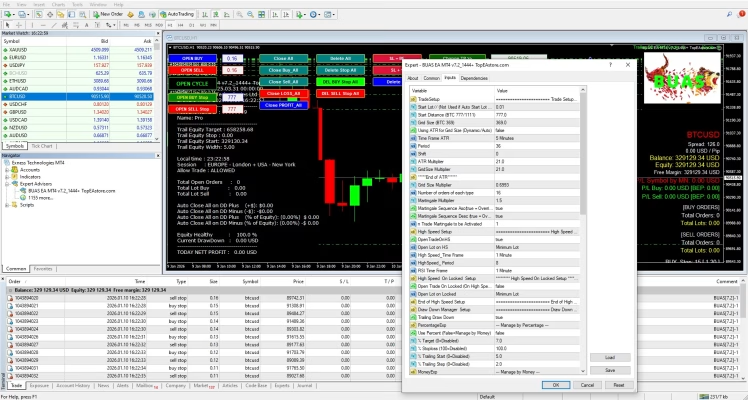
BUAS EA MT4 includes an on-chart console that provides access to a range of trading and management functions.
The listed controls include:
- Open Buy and Open Sell
- Open Cycle
- Place Buy Stop and Sell Stop orders
- Close All and Delete All
- Close Loss and Close Profit
- Adjust Stop Loss and Take Profit
- Move Stop Loss to breakeven or a configured positive level
- Manage trailing functions
- Rest & Realize, described as a partial-profit and cycle-restart function
The dashboard also displays account information such as balance, equity, free margin, drawdown, profit and loss by Magic Number, trailing status, and cycle state.
These tools can help experienced users monitor and manage trading activity from the chart. Manual controls should be used carefully because changes to open positions and pending orders may affect overall risk.
7. No-DLL Version with SetFiles
The package is listed as a No-DLL version and includes SetFiles.
This can simplify installation compared with EAs that require external DLL files. SetFiles provide predefined parameters as a starting point, but they should not be assumed to be optimal for every broker or account.
Review the included files and instructions, verify compatibility with your MetaTrader 4 installation, and test the selected settings before enabling live trading.
8. Unlimited Version and Free Updates
BUAS EA MT4 is offered as an unlimited-use version with free updates when new versions become available through the seller.
The package is intended to provide access to the EA and its supplied presets without a standard time-limited license. Review the purchase terms to understand the exact scope of updates and product access.
How Does BUAS EA MT4 Work?
BUAS EA MT4 combines breakout order placement, adaptive grid spacing, and multiple trade-management mechanisms.
At a high level, its stated workflow is:
- Evaluate market conditions: The EA uses its programmed logic and technical inputs to calculate directional bias and assess volatility.
- Place pending orders: Buy Stop and Sell Stop orders are positioned according to the configured breakout rules.
- Activate a cycle: When one side is triggered, the EA activates the corresponding grid cycle.
- Adjust grid behavior: The AAG logic adjusts grid spacing according to the calculated bias and volatility-related settings.
- Manage exposure: Position sizing, lot limits, margin safeguards, and equity-related controls are used according to their configuration.
- Apply trailing mechanisms: Equity-based and ATR-based trailing functions help manage account-level and trade-level protection.
The actual outcome depends on the EA settings, broker execution, market behavior, and available margin. Grid-based systems can remain exposed during sustained one-directional moves, so understanding the cycle logic is essential.
BUAS EA MT4 – Technical Specifications
| Specification | Details |
|---|---|
| Product Name | BUAS EA MT4 |
| Version Listed | v7.2 |
| Trading Platform | MetaTrader 4 (MT4) |
| Main Instruments | XAUUSD and BTCUSD |
| Recommended Timeframe | H4 |
| Trading Approach | Breakout with Adaptive Asymmetric Grid |
| Grid Logic | Adaptive asymmetric grid |
| Technical Inputs Listed | EMA, ADX, RSI, ATR |
| Trailing Systems | Equity-based and ATR-based |
| Position Controls | Fixed lot or progressive sequence |
| Risk Controls | Maximum lot limit, margin safeguards, equity-based targets and monetary Stop Loss |
| File Type | No DLL |
| SetFiles | Included |
| License | Unlimited version |
| Updates | Free updates |
Recommended Settings and Trading Environment
The product information lists the following starting points for evaluation:
- Recommended balance: $10,000
- Testing balance mentioned: $1,000
- Account type: ECN or Raw Spread
- Leverage: 1:200 or higher
- Execution environment: Stable broker with low latency
- Recommended timeframe: H4
These are vendor-listed recommendations, not guarantees that a particular balance or leverage level will be safe or sufficient. The testing balance mentioned should not be interpreted as a safe minimum for live trading.
Grid strategies can require substantial free margin as positions accumulate. A smaller balance, high lot multiplier, or prolonged adverse trend may cause large drawdowns or a margin call.
Before using BUAS EA MT4 with real funds:
- Backtest across multiple years where suitable historical data is available.
- Forward-test on a demo account using realistic spreads and commissions.
- Check how the EA handles sustained trends, reversals, and high-volatility periods.
- Review the maximum lot limit and progressive lot sequence.
- Understand the equity-based profit target and Stop Loss behavior.
- Test XAUUSD and BTCUSD separately with appropriate parameters.
- Confirm that the broker’s symbol specifications match the selected settings.
For additional trading resources, explore our Indicator collection and Source Code products.
How to Install BUAS EA MT4
Follow these general steps to install the Expert Advisor. If the package contains specific installation instructions, use those instructions as the primary reference.
- Download the package: After purchasing the EA, access the supplied files through your account.
- Extract the files: Unzip the package and locate the EA file and SetFiles.
- Open MetaTrader 4: Launch MT4 on your computer.
- Open the data folder: Select File → Open Data Folder.
- Locate the Experts folder: Open
MQL4 → Experts. - Copy the EA file: Place the supplied BUAS EA MT4 file in the appropriate directory.
- Refresh the Navigator panel: Restart MT4 or refresh the Expert Advisors list.
- Attach the EA to a chart: Select the intended XAUUSD or BTCUSD symbol and the recommended H4 timeframe, subject to the supplied instructions.
- Load a SetFile: Choose the relevant preset and carefully review its parameters.
- Test before live use: Confirm order execution, grid behavior, and risk controls on a demo account.
After payment, access your available files through the FxEAstore Downloads page. For installation or configuration help, contact FxEAstore Support on Telegram.
Who Should Consider BUAS EA MT4?
BUAS EA MT4 may be worth evaluating for:
- Experienced MT4 users interested in automated Gold or Bitcoin trading.
- Traders who understand breakout and grid-based strategies.
- Users who want configurable grid spacing and position-size controls.
- Traders interested in equity-based and ATR-based trailing mechanisms.
- Users who can actively monitor exposure, margin usage, and drawdown.
It may not be appropriate for beginners who do not understand grid risk, progressive lot sizing, or margin requirements. It is also unsuitable for anyone expecting guaranteed returns or a completely hands-off system that requires no monitoring.
Why Choose BUAS EA MT4?
BUAS EA MT4 brings several trading and management features together in one MetaTrader 4 Expert Advisor:
- Automated breakout order placement
- Adaptive Asymmetric Grid logic
- XAUUSD and BTCUSD support
- Equity-based and ATR-based trailing systems
- Configurable position sizing and exposure controls
- Interactive on-chart trading console
- No-DLL package with SetFiles
- Unlimited version with free updates
These features provide flexibility for traders who want to study and configure an automated grid breakout system. They do not guarantee profitability or eliminate the risks associated with leverage, volatile markets, and accumulating positions.
Get BUAS EA MT4 Today
If you are looking for an MT4 Expert Advisor that combines breakout trading, adaptive grid logic, and multiple trade-management controls, BUAS EA MT4 is worth evaluating as part of your automated trading setup.
Review the included SetFiles, understand the grid and position-sizing rules, and test the EA under realistic conditions before committing real capital.
After purchase, visit the FxEAstore Downloads page to access your available files. You can also follow our Telegram channel for updates or contact customer support if you need assistance.
Risk Disclaimer: Trading Gold, Bitcoin, Forex, and CFDs involves substantial financial risk. Grid strategies and progressive lot sizing can increase exposure and drawdown during adverse market conditions. No Expert Advisor can guarantee profits or prevent losses. Always test on a demo account, use conservative risk settings, and trade only with money you can afford to lose.
Related products


Expert Advisor


Expert Advisor


Expert Advisor


Expert Advisor


Expert Advisor


Expert Advisor


Expert Advisor


Expert Advisor