

Lycan MT5 V2.5 Unlimited
$28
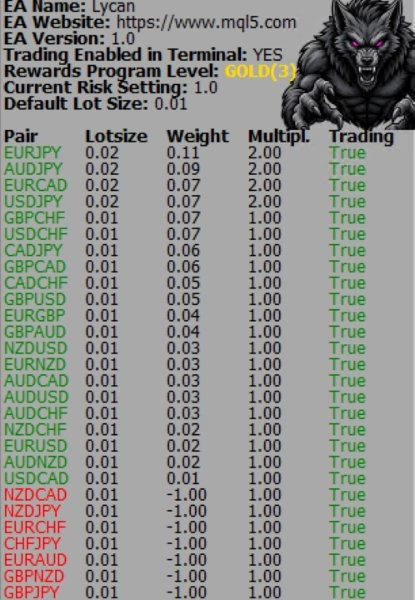
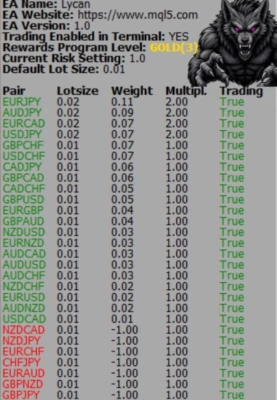
Lycan MT5 is an automated Forex Expert Advisor developed for MetaTrader 5. Designed to operate around the clock on the H1 timeframe, it supports all 28 major and minor currency pairs. The EA follows a single-trade approach, with clearly defined Stop Loss and Take Profit levels for each position. It also features an internal learning mechanism that automatically updates optimal lot sizes while running on a live account, helping adapt position sizing over time.

Description
Lycan MT5 – Adaptive Automated Forex Trading Expert Advisor
Discover Lycan MT5 – Automated Trading Across 28 Currency Pairs
Lycan MT5 is a professional automated Forex trading system designed for traders who want to manage multiple currency pairs through one MetaTrader 5 Expert Advisor.
Developed as the larger counterpart to Chiroptera, Lycan follows a different operating schedule and timeframe. While Chiroptera is designed for night-time trading on M5, Lycan operates throughout the day on H1.
The system supports all 28 major and minor currency pairs and uses individual trades with clearly defined Stop Loss and Take Profit levels.
Another notable feature is its internal learning mechanism, which automatically updates optimal position sizes while the EA operates on a live trading account. This means users do not need to manually prepare learning files.
If you are looking for more automated trading solutions, explore our Expert Advisor collection.
Key Features of Lycan MT5
1. Supports 28 Major and Minor Currency Pairs
Lycan MT5 is designed to trade across 28 major and minor Forex pairs, offering broader currency-market coverage through a single Expert Advisor.
Instead of focusing on only one instrument, traders can attach Lycan to their preferred supported currency pairs.
2. H1 Timeframe Trading
Lycan operates on the H1 timeframe, providing a higher-timeframe trading approach compared with short-term systems that focus on M1 or M5 charts.
This design makes it suitable for traders who prefer hourly market analysis rather than very short-term trading activity.
3. Around-the-Clock Operation
Unlike its sibling Chiroptera, which operates only at night, Lycan is designed to trade at all times.
This allows the EA to participate in trading opportunities across different Forex market sessions, subject to its trading conditions and broker environment.
4. Single-Trade Execution
Lycan follows a single-trade approach rather than opening multiple simultaneous positions as part of a grid or basket strategy.
Each trade is managed individually, helping maintain a clearly defined structure for order execution and position management.
5. Clearly Defined Stop Loss and Take Profit
Every trade opened by Lycan has predefined Stop Loss and Take Profit levels.
These levels establish the intended exit boundaries for individual positions and provide a structured approach to trade management.
However, Stop Loss execution may be affected by market gaps, slippage, and broker execution conditions.
6. Internal Learning for Automatic Lot Sizing
One of the distinctive features of Lycan MT5 is its internal learning mechanism.
According to the product information, optimal lot sizes are automatically embedded and continue to be updated through internal learning while the EA runs on a live account.
Users do not need to manually train the system using separate learning files during normal live operation.
7. Default Settings for Different Brokers
The developer recommends using the default settings for all brokers.
This is intended to simplify the initial setup process. Nevertheless, traders should always check symbol specifications, broker suffixes, spreads, and execution conditions before running the EA.
8. Flexible Backtesting Method
Lycan supports a simplified backtesting method using the 1-minute OHLC modeling option.
According to the developer, this is sufficient for backtesting and can reduce testing time compared with using Every Tick Based on Real Ticks.
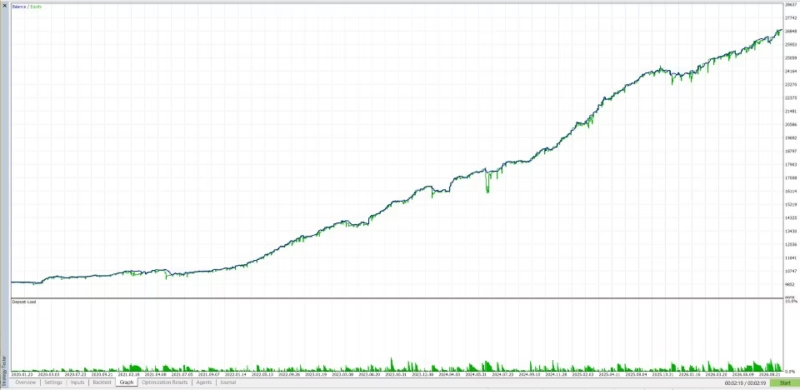
An important consideration is that the EA uses minimum lot sizes during backtesting until its learning process has converged. The developer states that this process may take approximately two to three years.
How Does Lycan MT5 Work?
Lycan combines automated Forex execution with internal position-size learning.
Its general operating process can be understood in the following stages:
Step 1 – Select a Currency Pair
Choose one of the supported major or minor Forex pairs, taking care to use the correct broker symbol and any applicable suffix.
Step 2 – Apply the H1 Trading Setup
Lycan is designed around the H1 timeframe. Attach the EA to the appropriate currency-pair chart and configure the trading environment.
Step 3 – Identify Trading Opportunities
The EA applies its programmed trading logic to identify opportunities according to its internal conditions.
Step 4 – Execute and Manage Individual Trades
When its trading conditions are satisfied, Lycan opens an individual position with defined Stop Loss and Take Profit levels.
Step 5 – Update Optimal Position Sizes
While running on a live account, the EA uses its internal learning mechanism to update optimal lot sizes automatically.
This process is designed to operate without requiring users to manage separate learning files.
Lycan MT5 – Technical Specifications
| Specification | Details |
|---|---|
| Product Name | Lycan MT5 |
| Current Listed Version | 2.5 |
| Trading Platform | MetaTrader 5 |
| Trading Category | Expert Advisor |
| Supported Instruments | 28 Major and Minor Forex Pairs |
| Designed Timeframe | H1 |
| Operating Schedule | Around the Clock |
| Trading Approach | Single-Trade Execution |
| Stop Loss | Defined for Each Trade |
| Take Profit | Defined for Each Trade |
| Position Sizing | Automatic Lot-Size Learning |
| Broker Settings | Default Settings Recommended |
| Backtesting Method | 1-Minute OHLC |
| Internal Learning | Automatically Updated on Live Accounts |
Recommended Setup for Lycan MT5
For a straightforward setup, follow the developer’s general recommendations:
- Platform: MetaTrader 5
- Trading Instruments: Supported major and minor Forex pairs
- Timeframe: H1
- Initial Configuration: Default settings recommended
- Symbol Naming: Check broker suffixes where applicable
- Trading Environment: A stable MT5 connection
The developer also specifies that the product’s designated web address must be added to the terminal’s list of allowed URLs for live-account operation.
Make sure this requirement is configured correctly before expecting the internal learning and lot-size updates to work.
Important Backtesting Considerations
Lycan has a specific learning behavior during historical testing.
The developer advises using 1-minute OHLC instead of Every Tick Based on Real Ticks for faster backtesting.
However, the EA may trade minimum lot sizes until its internal learning process converges. The stated learning period can range from two to three years.
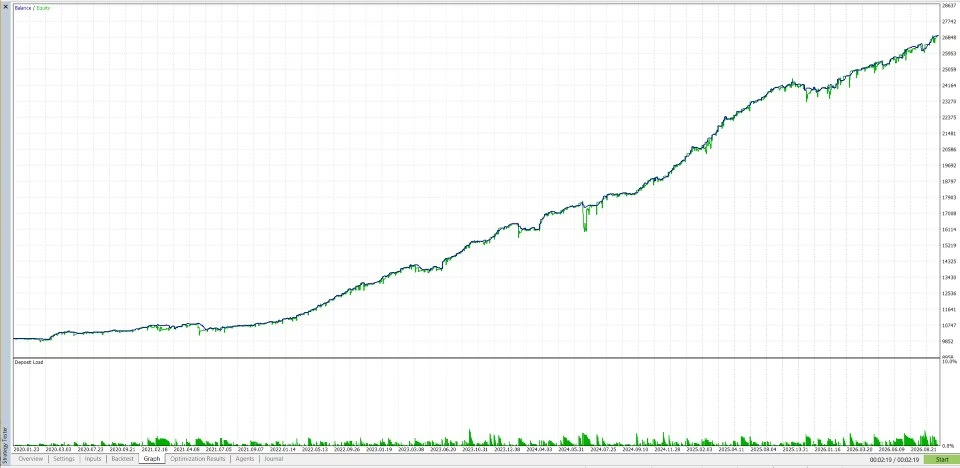
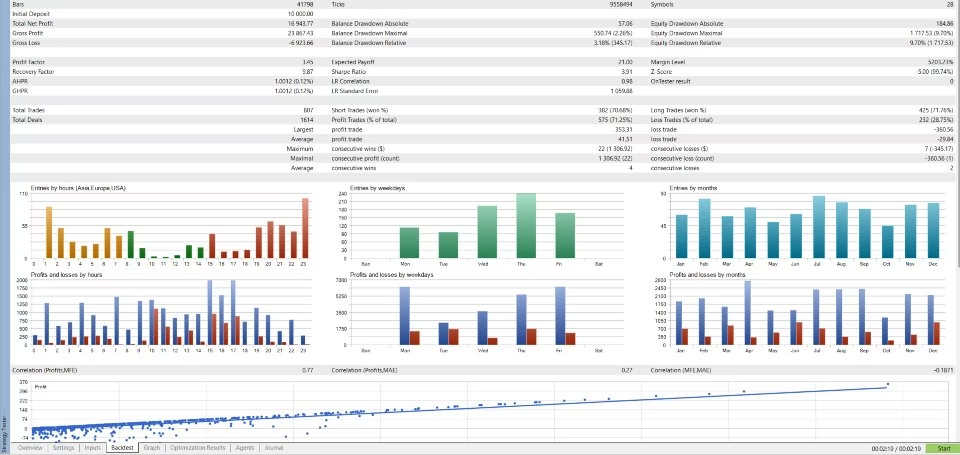
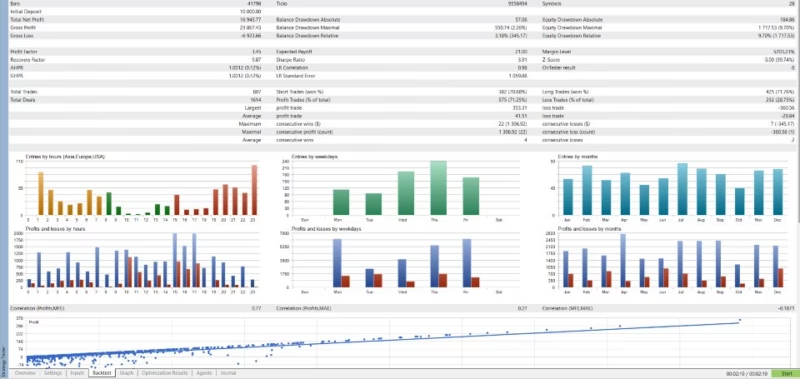
Therefore, short historical tests may not represent the EA’s fully learned live-account behavior. Consider this limitation when interpreting backtest results.
Why Choose Lycan MT5?
Lycan MT5 combines multi-currency support, H1 trading, individual trade management, and automatic lot-size learning in one automated Forex system.
Its main advantages include:
- 28 Currency Pairs: Supports a broad selection of major and minor Forex instruments.
- H1 Trading: Designed for hourly timeframe operation.
- Around-the-Clock Trading: Operates throughout the day.
- Single-Trade Approach: Manages individual positions with defined exit levels.
- Stop Loss and Take Profit: Each trade has clearly defined protective and target levels.
- Internal Learning: Automatically updates optimal lot sizes on live accounts.
- Simplified Setup: Default settings are recommended by the developer.
- Faster Backtesting: Supports 1-minute OHLC modeling.
If you want to explore other trading tools to complement your trading setup, visit our Indicator collection.
Who Should Consider Lycan MT5?
Lycan MT5 may be worth considering for:
- Forex traders who use MetaTrader 5.
- Traders interested in automated trading across multiple currency pairs.
- Users who prefer H1 trading rather than short-term scalping.
- Traders looking for individual trade management with defined SL and TP.
- Users interested in automatic lot-size learning.
- Traders who want an EA designed to operate throughout the day.
It is important to understand the product’s internal learning and backtesting behavior before deploying it on a live account.
How to Install Lycan MT5
Follow these general steps to install an Expert Advisor on MetaTrader 5:
- Download the Lycan MT5 product package after purchase.
- Open MetaTrader 5 on your computer.
- Select File → Open Data Folder.
- Navigate to the MQL5 → Experts directory.
- Copy the EA file into the Experts folder.
- Restart MetaTrader 5 or refresh the Expert Advisors section in the Navigator.
- Open your preferred supported currency-pair chart.
- Select the H1 timeframe.
- Attach Lycan MT5 to the chart.
- Configure the required URL permission in the terminal settings as specified by the developer.
- Enable algorithmic trading and monitor the EA.
For traders interested in software development resources and customizable trading tools, explore our Source Code collection.
Get Lycan MT5 from FXEAstore
Explore automated Forex trading across 28 major and minor currency pairs with Lycan MT5.
After completing your payment, you can access your purchased product through the FXEAstore Download Area.
Follow the FXEAstore Telegram Channel for product announcements, updates, and new trading tools.
For purchase assistance or installation support, contact the FXEAstore Support Team.
Final Thoughts
Lycan MT5 is an automated multi-currency Expert Advisor designed for traders who prefer H1 trading and individual position management.
Its support for 28 major and minor currency pairs, around-the-clock operation, defined Stop Loss and Take Profit levels, and internal learning-based lot sizing make it a distinctive option in the MetaTrader 5 EA category.
The special backtesting learning behavior is important to understand before evaluating historical results. Traders should test the EA carefully and allow sufficient time to assess its operation under their broker’s conditions.
Risk Disclaimer: Forex trading involves substantial financial risk. Automated trading systems cannot guarantee profits or eliminate losses. Stop Loss orders may experience slippage during volatile market conditions, and actual results can differ from backtests. Always test the EA on a demo account, use appropriate position sizing, and trade only with capital you can afford to lose.
Related products


Expert Advisor


Expert Advisor


Expert Advisor


Expert Advisor


Expert Advisor


Expert Advisor


Expert Advisor


Expert Advisor