
Tradivo Profit Shield EA MT5 V1.7 Unlimited + SetFiles
$15
Tradivo Profit Shield EA MT5 is an automated Expert Advisor designed for MetaTrader 5, focusing on Gold (XAUUSD) trading on the M1 timeframe. Version 1.7 includes SetFiles and is presented as a no-grid, no-martingale trading solution. The unlimited version includes free updates, offering traders a convenient way to explore systematic gold trading. Demo testing and careful risk management are recommended before live use.
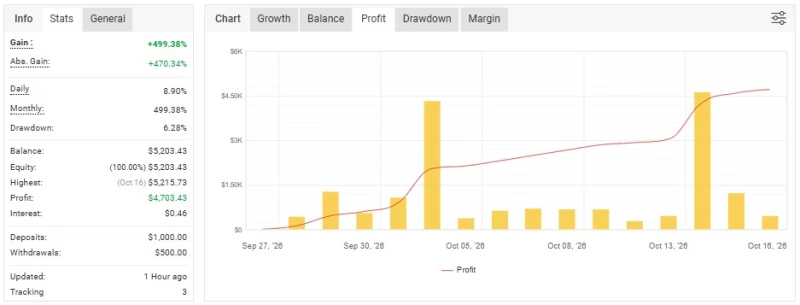
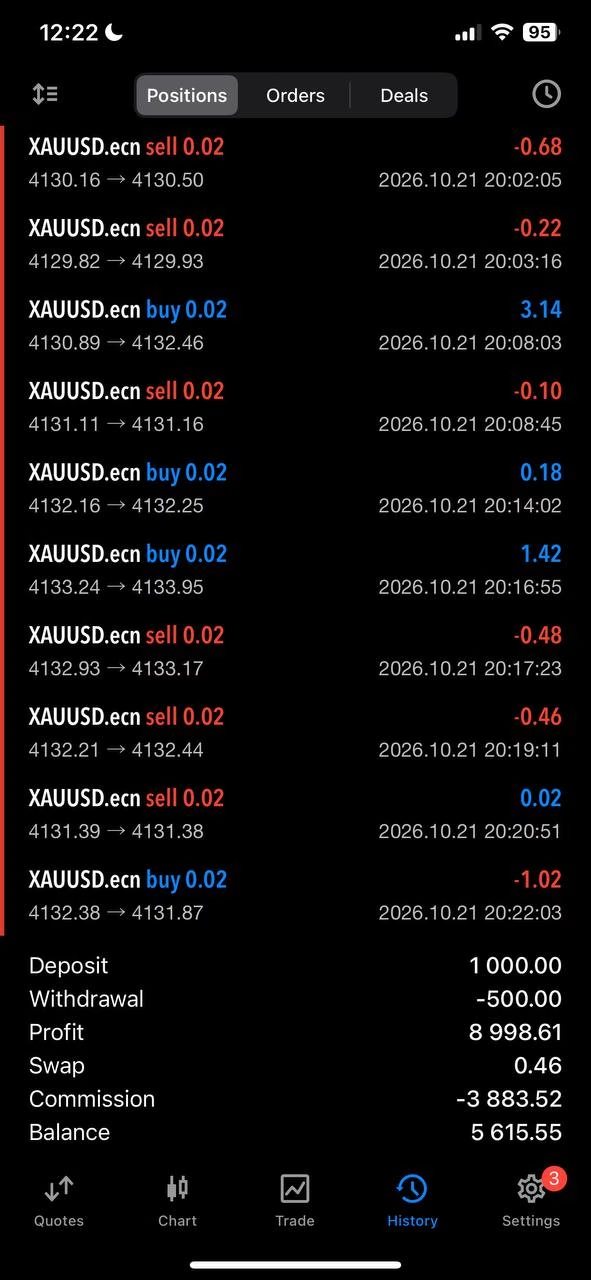
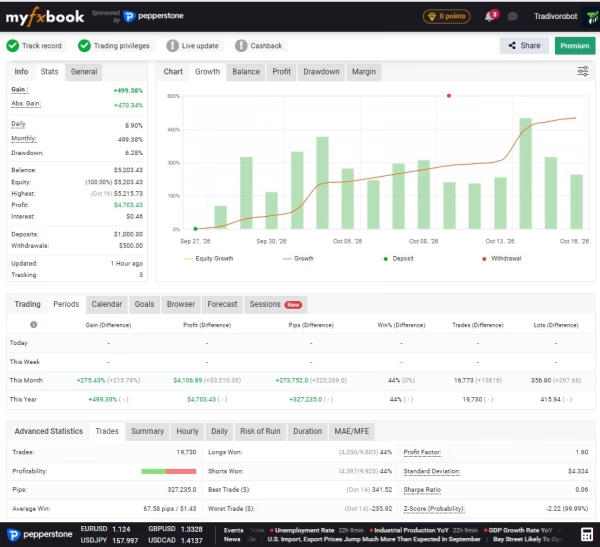
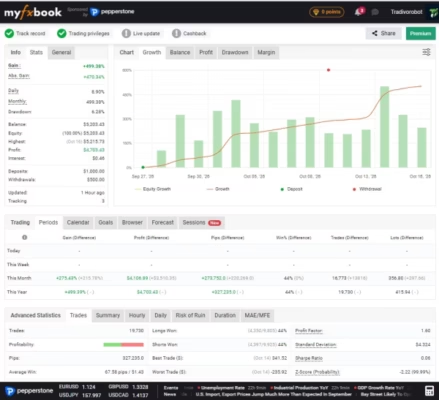
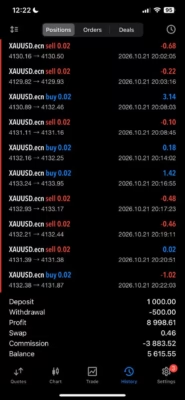
LirunexLimited-Live-MT5469211751BuyOnly1:Tradivofx.com
Description
Tradivo Profit Shield EA MT5 – Automated Gold Trading on MetaTrader 5
Gold trading offers opportunities in both rising and falling markets, but short-term price movements can also create significant risks. Monitoring every market change manually requires time, discipline, and a consistent trading plan.
Tradivo Profit Shield EA MT5 is an automated trading Expert Advisor developed for the MetaTrader 5 platform. Its stated focus is XAUUSD (Gold) on the M1, or one-minute, timeframe. The EA is designed to automate trading operations according to its programmed rules, helping users explore a more systematic approach to short-term gold trading.
Version 1.7 comes with SetFiles, giving traders configuration files to use when setting up and evaluating the EA. The product is also presented as a no-grid, no-martingale system for traders who prefer to avoid these specific trading approaches.
Whether you are expanding your automated trading portfolio or exploring a dedicated gold trading tool, Tradivo Profit Shield EA MT5 is an option to evaluate through careful testing and appropriate risk management.
Key Features of Tradivo Profit Shield EA MT5
1. Automated Trading with MetaTrader 5
Tradivo Profit Shield EA MT5 is designed to automate trading operations through MetaTrader 5. Instead of manually placing every order, users can evaluate the EA’s programmed execution process and configured parameters.
Automated execution can reduce repetitive manual tasks, but it does not remove the need to monitor performance, review settings, or manage financial risk.
2. Designed for Gold (XAUUSD)
The product specifications identify XAUUSD, representing Gold against the US dollar, as the target trading instrument.
Gold can experience rapid price changes during different market sessions and economic events. Traders should evaluate how the EA behaves during trending conditions, sideways markets, and periods of increased volatility before using it with real funds.
For users exploring more automated trading solutions, visit our Expert Advisor collection.
3. M1 Timeframe for Short-Term Trading
Tradivo Profit Shield EA MT5 is specified for the M1 timeframe, where each candle represents one minute of market activity.
Short-term trading makes execution conditions particularly important. Spreads, commissions, slippage, latency, and broker-specific contract specifications can all influence the results of an automated strategy.
Before live deployment, test the EA using the same broker and account conditions you intend to use for actual trading.
4. No-Grid, No-Martingale Approach
The product is presented as a trading system that does not use grid or martingale strategies.
This may appeal to traders who prefer to avoid adding layers of positions through a grid system or increasing position sizes according to a martingale progression.
However, the absence of grid and martingale methods does not automatically mean that a strategy has low risk. Traders should verify the EA’s actual position-sizing behavior, maximum exposure, entry rules, and exit management before committing capital.
5. SetFiles Included
Tradivo Profit Shield EA MT5 version 1.7 includes SetFiles to assist with configuration.
These files can provide predefined parameter settings for evaluation. Users should still review the available settings and confirm that they suit their broker, account type, and personal risk tolerance.
A preset is not a guarantee of profitability, and settings that perform well under one set of market conditions may produce different results under another.
6. Unlimited Version with Free Updates
This product is offered as an unlimited version with free updates. Available updates can be accessed through your account when newer versions are provided.
This makes it easier to keep track of the product files associated with your purchase without repeatedly purchasing the same version.
How Does Tradivo Profit Shield EA MT5 Work?
Tradivo Profit Shield EA MT5 is intended to execute trading operations automatically through MetaTrader 5 based on its programmed trading logic.
Its published product information identifies XAUUSD and the M1 timeframe as the intended configuration. However, the detailed entry signals, exit conditions, and specific Stop Loss mechanisms should be verified before live trading.
A practical evaluation process includes:
- Market selection: Confirm that the EA is attached to the correct Gold trading symbol offered by your broker.
- Configuration: Review the supplied SetFiles and available input parameters.
- Trade execution: Observe how the EA places and manages orders during different market conditions.
- Risk review: Check position sizing, Stop Loss behavior, maximum exposure, and potential drawdown.
- Performance monitoring: Compare backtest results with forward testing on a demo account.
Understanding these elements will help you assess whether the EA’s behavior matches your trading objectives.
Tradivo Profit Shield EA MT5 – Technical Specifications
| Specification | Details |
|---|---|
| Product Name | Tradivo Profit Shield EA MT5 |
| Product Version | 1.7 |
| Product Type | Expert Advisor (EA) |
| Trading Platform | MetaTrader 5 |
| Target Trading Pair | XAUUSD (Gold) |
| Stated Timeframe | M1 (1 minute) |
| File Type | No DLL version |
| SetFiles | Included |
| Trading Method | Automated trading |
| Grid Strategy | Stated as not used |
| Martingale Strategy | Stated as not used |
| Stated Minimum Deposit | $500 |
| License | Unlimited version |
| Updates | Free updates |
Important: The stated $500 minimum deposit is a product specification, not a guarantee that this amount will be sufficient for every broker, account type, position size, or risk setting. Verify all trading requirements before using the EA.
Benefits of Using Tradivo Profit Shield EA MT5
A More Systematic Trading Workflow
Automating trading operations can help reduce repetitive manual actions and support a consistent process based on predefined rules.
A Dedicated Gold Trading Focus
The published specifications identify XAUUSD as the target instrument, making the EA relevant to traders who focus on the gold market.
Preset Configuration Files
Included SetFiles provide a starting point for configuration and testing, although the settings should be reviewed before use.
Avoids Grid and Martingale Methods
The stated strategy approach may suit traders who prefer not to use these specific position-management techniques. Actual order behavior should be verified independently.
Convenient Product Access
The unlimited version includes free updates, and purchased files can be accessed through your account.
You can also explore other trading resources in our Indicator collection or browse available Source Code products.
Recommended Setup and Risk Management
Before running Tradivo Profit Shield EA MT5 on a live account, establish a testing process that reflects your actual trading environment.
Recommended preparation checklist:
- Use MetaTrader 5 and confirm the correct XAUUSD symbol.
- Review the installation instructions and available SetFiles.
- Confirm compatibility with your broker and account type.
- Run a historical backtest using realistic spreads, commissions, and slippage assumptions.
- Forward-test the EA on a demo account under live market conditions.
- Check position sizing, Stop Loss behavior, and maximum potential exposure.
- Monitor the EA during both normal and highly volatile market conditions.
- Consider using a VPS if continuous platform operation is required.
The M1 timeframe can be sensitive to execution costs, so results from one broker may not be replicated on another. Avoid increasing position sizes based solely on a short period of favorable performance.
How to Install Tradivo Profit Shield EA MT5
Follow these general steps to install an Expert Advisor on MetaTrader 5. Refer to the supplied product instructions for any version-specific requirements.
- Download the product files. After completing your purchase, access the files through your account.
- Open MetaTrader 5. Launch the trading platform on your computer.
- Open the data folder. Select File → Open Data Folder.
- Locate the Experts directory. Open
MQL5 → Experts. - Copy the EA file. Place the supplied EA file in the appropriate folder.
- Refresh the Navigator panel. Restart MetaTrader 5 or refresh the Expert Advisors list.
- Attach the EA to a chart. Select the correct XAUUSD symbol and M1 timeframe, subject to the product’s installation requirements.
- Load and review the SetFiles. Confirm that the settings match your intended testing environment.
- Test before live trading. Observe the EA on a demo account and verify its execution and risk-management behavior.
After payment, access your files through the Download Immediately After Payment page. If you encounter installation or configuration issues, contact FxEAstore Support on Telegram.
Who Should Consider Tradivo Profit Shield EA MT5?
Tradivo Profit Shield EA MT5 may be worth evaluating for:
- MetaTrader 5 users interested in automated trading.
- Traders who focus on XAUUSD (Gold).
- Users exploring short-term strategies on the M1 timeframe.
- Traders who prefer to avoid grid and martingale methods.
- Users who want to evaluate an EA with included SetFiles.
- Traders who are comfortable testing, monitoring, and managing the risks of automated systems.
It may not be suitable for users who expect guaranteed profits, fixed returns, or an automated system that requires no supervision. Traders who need independently verified performance records or fully documented strategy rules should obtain and review that information before purchasing.
Why Choose Tradivo Profit Shield EA MT5?
Tradivo Profit Shield EA MT5 offers several features for traders exploring automated gold trading:
- MetaTrader 5 compatibility
- XAUUSD trading focus
- M1 timeframe specification
- No-grid, no-martingale positioning as stated in the product information
- Version 1.7 with SetFiles included
- Unlimited version with free updates
These features provide a starting point for evaluating the product. They do not establish a particular level of profitability, drawdown, or future trading performance.
A disciplined approach to testing and risk management remains essential, regardless of the EA selected.
Get Tradivo Profit Shield EA MT5 Today
If you are looking for an automated trading tool for XAUUSD on MetaTrader 5, Tradivo Profit Shield EA MT5 is worth investigating as part of your trading toolkit.
Review its specifications, test the included SetFiles, and assess its behavior under realistic market conditions before using real funds.
Once your purchase is complete, visit the FxEAstore Downloads page to access your available files. You can also follow our Telegram channel for product updates or contact customer support if you need assistance.
Risk Disclaimer: Trading Forex and gold involves substantial financial risk. Automated trading systems can incur losses, and no Expert Advisor can guarantee profits or eliminate drawdown. Historical testing does not guarantee future results. Always test the EA on a demo account, use appropriate risk settings, and trade only with money you can afford to lose.
Related products


Expert Advisor


Expert Advisor


Expert Advisor


Expert Advisor


Expert Advisor


Expert Advisor
IS New Project EA MT4 Unlimited with SetFiles (latest build)


Expert Advisor


Expert Advisor