



Cosmos Orion MT5 V2.1 Unlimited + SetFiles
$15
Cosmos Orion MT5 is an automated Gold trading Expert Advisor for MetaTrader 5, designed for XAUUSD using a confirmed three-pivot breakout strategy on the H2 timeframe. It combines pending-order execution, hard Stop Loss and Take Profit, break-even protection, trailing stops, partial profit-taking, and flexible position sizing. The package includes SetFiles to help simplify configuration, while built-in spread, volatility, margin, weekend, and macro-event filters support more structured trade management.

Description
Cosmos Orion MT5 – Automated Gold Breakout Expert Advisor + SetFiles
Cosmos Orion MT5 – Trade Gold Breakouts with a Structured Strategy
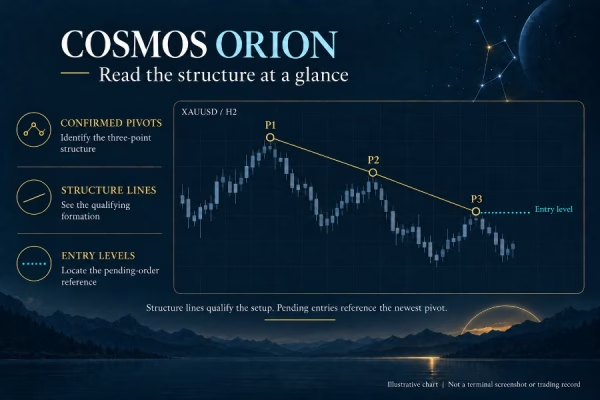
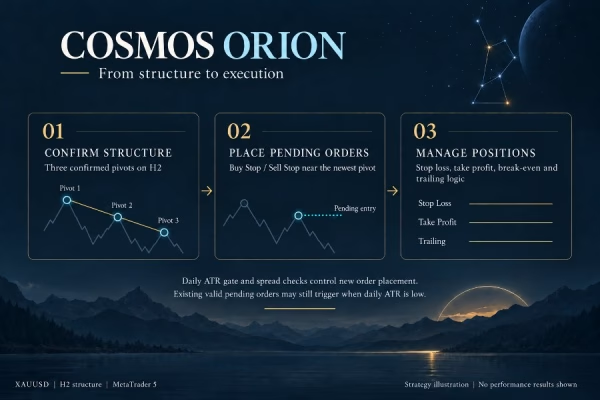
Cosmos Orion MT5 is a rule-based Gold Breakout Expert Advisor designed to automate XAUUSD trading on MetaTrader 5. Instead of entering trades based only on a prediction of market direction, it waits for a qualifying three-pivot price structure to form on the H2 timeframe before preparing a potential breakout trade.
Once a valid structure is confirmed, the EA can place a Buy Stop or Sell Stop order according to the setup direction. If the setup expires or becomes invalid, the associated pending order is automatically removed.
The system combines structured entries with predefined trade exits, configurable risk settings, and multiple market-condition filters. It is designed for traders who prefer a disciplined breakout approach rather than strategies that continually increase exposure through grid trading or martingale techniques.
The product package includes SetFiles, helping users configure the EA according to the available presets and their trading requirements. Settings should still be reviewed and tested before live deployment.
Key Features of Cosmos Orion MT5
1. H2 Three-Pivot Structure Detection
Cosmos Orion MT5 identifies qualifying three-pivot price structures using closed candles on the H2 timeframe.
This approach helps the EA wait for a confirmed structure before considering an entry, rather than reacting to every short-term price fluctuation.
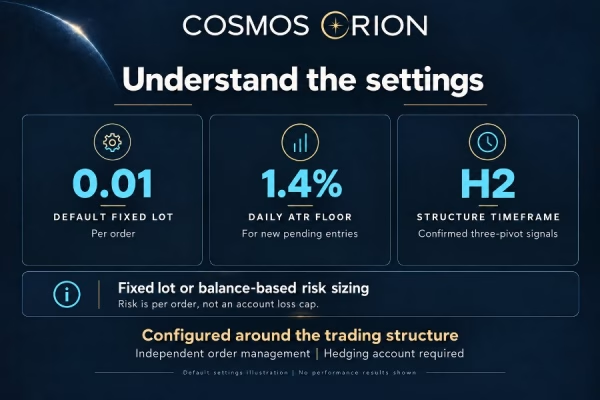
The signal logic is calculated on H2 regardless of the chart timeframe to which the EA is attached. This keeps the strategy’s analysis timeframe consistent.
2. Automated Breakout Entries
After confirming a valid setup, the EA can place Buy Stop or Sell Stop pending orders near the relevant pivot level according to its entry rules.
The order is triggered only when the market reaches the specified entry level. If the setup becomes invalid or expires, the EA removes the associated pending order.
This rule-based process is designed to keep entries aligned with confirmed price structures. However, breakouts can fail, and no entry method can guarantee profitable trades.
3. Hard Stop Loss and Take Profit
Cosmos Orion MT5 attaches predefined Stop Loss and Take Profit levels to pending orders.
Defining exit levels before a trade is triggered can help establish a structured approach to trade management. Actual execution prices may differ from requested levels during gaps, slippage, or extreme volatility.
4. Break-Even Protection
The EA includes a break-even function that can move the Stop Loss beyond the entry price after a trade reaches the required progress level.
This feature is intended to help protect accumulated gains or reduce the risk on an open position. It cannot guarantee a risk-free exit because market prices may move rapidly and execution can involve slippage.
5. Trailing Stops and Partial Take Profit
Cosmos Orion MT5 offers additional tools for managing open trades:
- Trailing Stop: Adjusts the Stop Loss as price moves favorably.
- Partial Take Profit: Closes part of a position to realize a portion of the gain while leaving the remaining volume open.
- Percentage-Based Exit Distances: Calculates trade-management distances as percentages of the current Gold price.
These functions help traders configure how positions are managed after entry. The appropriate settings depend on market volatility, account size, and trading objectives.
6. Flexible Position Sizing
The EA supports several position-sizing modes, allowing users to tailor exposure to their account and risk preferences.
Available options include:
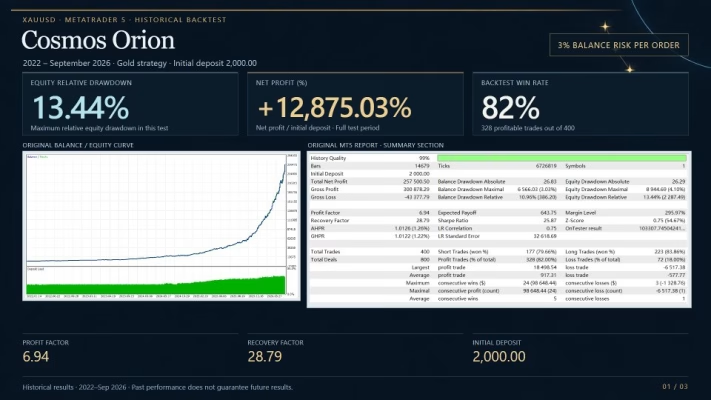
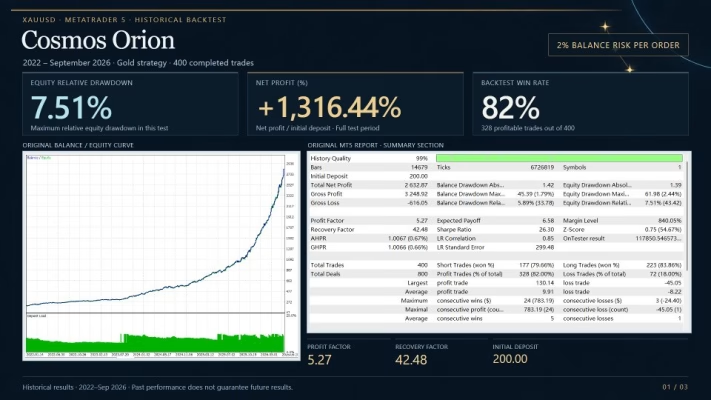
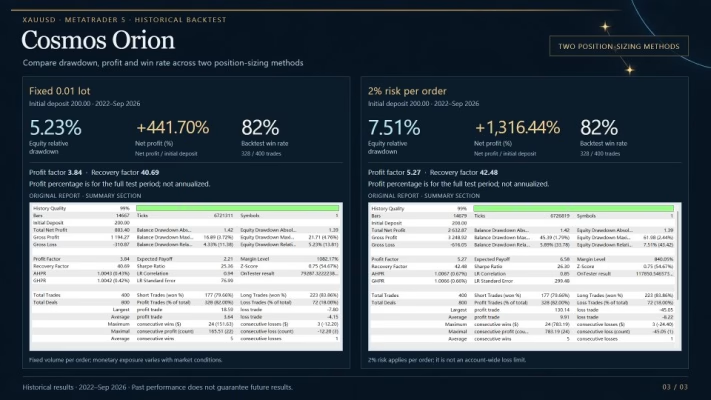
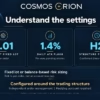
- L1–L5 Risk Levels: Configurable risk settings ranging from 1% to 5% per order.
- Balance-Based Risk: Calculates position size using the current account balance.
- Initial-Balance Risk: Uses the initial account balance as the sizing reference.
- Custom Risk Percentage: Allows users to define their preferred risk percentage.
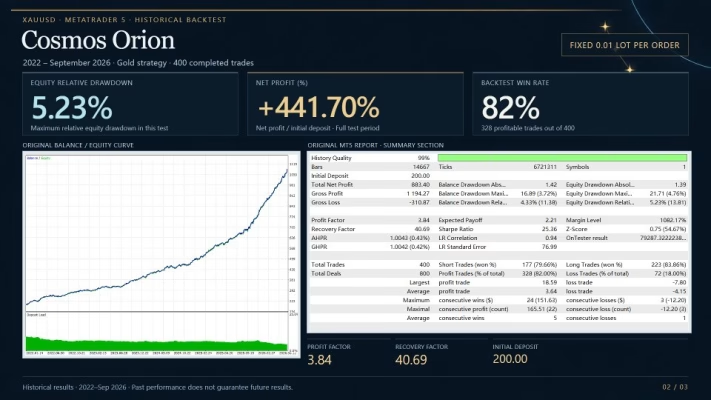
- Fixed Lot Mode: Lets users specify a trading volume manually.
Cosmos Orion MT5 also performs a margin pre-check before submitting orders, with a safety reserve intended to help reduce insufficient-margin situations.
Important: The minimum lot permitted by a broker may expose a small account to more risk than the selected percentage. Actual risk can also vary due to slippage, gaps, execution conditions, and trading costs.
7. Built-In Market Protection Filters
Gold can experience sudden volatility, widening spreads, and rapid price movements around major economic announcements. Cosmos Orion MT5 includes several filters designed to restrict new entries under selected conditions.
Maximum Spread Filter: Helps prevent new orders when the spread exceeds the configured threshold.
Volatility Filter: Blocks new entries when measured volatility falls outside the selected range.
Margin Pre-Check: Reviews available margin before order placement.
Macro Window Guard: Pauses new entries around configured windows for major US economic data releases.
Weekend Guard: Removes pending orders before the Friday market close according to the configured timing. Open positions continue to be managed.
Profit Lock: After two consecutive winning trades, new entries are paused until the next broker server day.
These protections are intended to support more disciplined execution. They cannot eliminate market risk or guarantee favorable fills.
8. No Grid, Martingale, or Averaging Down
Cosmos Orion MT5 uses a confirmed-structure breakout approach rather than relying on grid trading, martingale, or averaging down.
It does not progressively increase exposure through those recovery methods when the market moves against a position. Instead, it combines predefined trade risk with Stop Loss and Take Profit levels.
This design may appeal to traders who prefer defined entry and exit rules. Nevertheless, a non-grid strategy can still experience losses and drawdowns.
9. Automatic Broker Time Detection
The EA attempts to detect the broker’s GMT offset and daylight saving time using the daily Gold trading break.
If automatic detection is unsuccessful, it can fall back to manual time settings. The listed defaults are GMT+2 and US daylight saving time.
Correct time alignment is important for weekend restrictions and scheduled macro-event filters. Verify the detected time and configured event windows against your broker’s actual server schedule before trading live.
10. On-Chart Status Panel and Structure Visualization
Cosmos Orion MT5 includes chart-based monitoring tools designed to make its activity easier to review.
These features include:
- EA operating status.
- Broker time detection results.
- Active protection filters.
- Visualized three-pivot price structures.
- Potential Buy and Sell entry levels.
- Optional animations that can be disabled to reduce unnecessary visual processing.
The status panel provides useful information about the EA’s current state, while the structure drawings help users review the setups being evaluated.
11. Included SetFiles for Easier Configuration
This product package includes SetFiles, which can help simplify the process of configuring the EA.
Preset files are starting points rather than guaranteed optimal settings. Review the parameters in each file, confirm compatibility with your broker’s symbol specifications, and test the configuration on a demo account before using it with real funds.
Cosmos Orion MT5 Specifications
- Product Name: Cosmos Orion MT5 Unlimited + SetFiles
- Trading Platform: MetaTrader 5 (MT5)
- Primary Instrument: XAUUSD / Gold
- Strategy: Three-pivot structure breakout
- Signal Timeframe: H2
- Entry Method: Automated Buy Stop and Sell Stop pending orders
- Trade Management: Stop Loss, Take Profit, break-even, trailing stop, and partial take profit
- Risk Settings: L1–L5, custom risk percentage, balance-based risk, initial-balance risk, and fixed lots
- Market Filters: Spread, volatility, margin, weekend, and macro-event filters
- Additional Protection: Profit Lock and automatic pending-order removal for invalid or expired setups
- Grid/Martingale: Not used by the strategy
- Account Type: Hedging account required
- VPS: Recommended for continuous operation
- Recommended Minimum Deposit: $200, subject to broker conditions and minimum-lot risk
- Version: 2.1
- DLL Requirement: No-DLL version
- SetFiles: Included
Always confirm the version and files supplied with your order. The recommended deposit is not a guarantee of suitability; actual capital requirements depend on leverage, contract specifications, margin, and the broker’s minimum lot size.
Recommended Trading Conditions
For a more suitable setup, consider the following requirements:
- Platform: MetaTrader 5.
- Trading Symbol: XAUUSD or GOLD, including compatible broker-specific suffixes.
- Account Type: Hedging account; netting accounts are not supported.
- Broker Environment: Low-spread ECN or Raw account recommended.
- VPS: A reliable VPS is recommended for continuous operation.
- Chart Setup: Attach the EA to one chart only; its signal logic is calculated on H2.
- Risk Configuration: Start with the lowest risk setting and verify actual lot sizes before live trading.
Check your broker’s contract size, minimum lot, stop-distance restrictions, trading hours, spread, and margin requirements before installation.
How to Install and Configure Cosmos Orion MT5
Follow these general steps to prepare your trading setup:
- Install MetaTrader 5 and connect it to a compatible hedging account.
- Confirm your broker’s Gold symbol, such as XAUUSD or GOLD, including any suffix.
- Install the EA according to the supplied instructions.
- Attach the EA to one chart only.
- Review the included SetFiles and select a suitable starting configuration.
- Verify broker time detection, macro-event windows, and weekend settings.
- Configure risk levels, Stop Loss, Take Profit, and other trade-management parameters.
- Test the setup on a demo account and monitor execution, drawdown, and margin usage before considering live trading.
Do not assume that a preset is appropriate for every broker or account. Different spreads, contract sizes, and minimum lot restrictions can change the actual risk.
Who Should Consider Cosmos Orion MT5?
Cosmos Orion MT5 may be suitable for traders who:
- Want to automate Gold trading on MetaTrader 5.
- Prefer a structure-confirmation and breakout strategy on H2.
- Want predefined Stop Loss and Take Profit levels.
- Need flexible position sizing and trade-management options.
- Prefer a system without grid or martingale trading.
- Value built-in spread, volatility, margin, and macro-event filters.
- Want SetFiles to help with initial configuration.
- Are prepared to test and monitor an automated trading strategy.
This EA is not a guaranteed-income product. Its suitability depends on the user’s trading objectives, account conditions, and tolerance for risk.
Explore More Trading Tools at FxEAstore.com
Discover more automated trading solutions in our Expert Advisors collection, or browse our Indicators for technical analysis and market research.
If you are interested in developing or customizing trading systems, explore our Source Code section.
After completing your purchase, visit your Download Account to download your product immediately after payment, subject to order processing and product delivery.
Follow our Official Telegram Channel for product announcements and updates. For order or installation assistance, contact FxEAstore Support.
Why Choose Cosmos Orion MT5?
Cosmos Orion MT5 combines confirmed H2 three-pivot structures with automated breakout entries, predefined exits, flexible position sizing, and market-condition filters. Its no-grid, no-martingale approach may appeal to traders who prefer a structured trading system with defined entry and risk-management rules.
With SetFiles included, users have a starting point for configuration while retaining control over their risk settings. Careful testing and ongoing monitoring remain essential, particularly when trading Gold with leverage.
Risk Disclaimer: Trading Gold and other leveraged financial instruments involves significant risk and may result in the loss of some or all of your capital. Stop Loss orders do not guarantee execution at the requested price during gaps, slippage, or extreme volatility. Automated trading and protection filters cannot eliminate market risk. Past performance does not guarantee future results. Test the EA on a demo account first, verify the risk of the selected lot size, and never trade with money you cannot afford to lose.
Related products


Expert Advisor


Expert Advisor


Expert Advisor


Expert Advisor


Expert Advisor


Expert Advisor


Expert Advisor


Expert Advisor