

The Forex Exchanger MT5 V1.44 Unlimited
$15
The Forex Exchanger MT5 is a customizable automated trading Expert Advisor for MetaTrader 5. Supporting up to 28 forex pairs by default, it combines multi-timeframe entry filters, configurable grid trading, dynamic basket take-profit management, flexible position sizing, and currency exposure limits. With adjustable trading rules and drawdown controls, this EA offers a flexible framework for traders who want to automate multi-pair forex strategies.

Description
The Forex Exchanger MT5 – Advanced Automated Forex Trading Robot
The Forex Exchanger MT5 – Flexible Automation for Multi-Pair Forex Trading
The Forex Exchanger MT5 is an automated Forex Expert Advisor designed to execute trades according to configurable strategy rules on MetaTrader 5. It brings together multi-timeframe filters, grid-based trade management, dynamic take-profit settings, and customizable risk controls in one system.
The EA supports up to 28 currency pairs by default, while allowing users to select specific symbols according to their trading preferences. This flexibility makes it possible to configure the EA for a broader currency portfolio or a more focused group of pairs.
Its grid and basket management functions are designed to manage multiple positions within a trading sequence. Traders can adjust entry sensitivity, position sizing, currency exposure limits, and basket targets to suit their preferred setup.
The Forex Exchanger MT5 is intended for users who understand automated trading and the additional risks associated with grid strategies. Careful configuration, realistic testing, and ongoing monitoring are essential before using it on a live account.
Key Features of The Forex Exchanger MT5
1. Automated Forex Trading
The Forex Exchanger MT5 executes trading operations according to its configured entry rules and trade-management settings. Automation can reduce the need for manual order placement, while helping maintain consistency with the selected parameters.
However, automated execution does not guarantee profitable trades. Market volatility, liquidity, spreads, and broker execution can all affect results.
2. Multi-Pair Trading Across Up to 28 Forex Pairs
The EA supports up to 28 forex pairs by default, giving traders flexibility when selecting their trading portfolio.
Users can configure specific symbols instead of trading every available pair. This can help limit market coverage and concentrate the EA on selected instruments.
When using multiple pairs, traders should consider correlated currency exposure. Several positions across different symbols can still carry similar underlying risks when they involve the same currency.
3. Multi-Timeframe Entry Filters
The Forex Exchanger MT5 provides low- and high-timeframe sensitivity settings to refine its entry logic.
These filters allow traders to configure how the EA evaluates short-term signals alongside broader market conditions. The available sensitivity options can incorporate higher-timeframe context, including weekly and monthly perspectives.
The Start Threshold parameter provides an additional entry control. According to the product specifications, higher values can cause the EA to monitor potential entries and wait for more favorable prices before executing trades.
The effectiveness of these settings depends on market conditions and configuration.
4. Configurable Grid Trading
Grid trading is a core component of The Forex Exchanger MT5. The EA includes Grid Entry and Grid Sensibility settings that determine how additional positions are considered within an existing trade basket.
These controls give traders flexibility in configuring position additions and managing ongoing trade sequences.
Grid strategies can accumulate substantial exposure when the market moves against existing positions. Before enabling grid trading, carefully evaluate margin usage, maximum position count, and potential drawdown.
5. Dynamic Basket Take-Profit Management
The EA provides configurable take-profit management for groups of related positions, often referred to as trade baskets.
Its Target Factor influences how basket targets and take-profit levels are calculated according to the strategy settings. Users can also configure custom take-profit behavior for individual currency pairs.
These options allow traders to tailor exit management to different symbols. They should be tested carefully because changing basket targets can also affect exposure duration and the overall risk profile.
6. Flexible Position Sizing
The Forex Exchanger MT5 supports automatic lot-size calculations based on account balance or equity, depending on the selected settings.
Users can configure the Money to Consider and Risk Factor parameters to influence position sizing.
Before live trading, verify the EA’s calculated lot sizes and understand how the selected settings affect exposure. Position sizing should account for the combined risk of all open trades, especially when grid positions and multiple currency pairs are enabled.
7. Currency Exposure Limits
The EA includes currency-based trading restrictions designed to help control the accumulation of related positions across multiple pairs.
Available settings include:
- Max Trades per Currency – Main: Limits new main entries when configured currency and direction exposure reaches the selected threshold.
- Max Trades per Currency – All: Applies a similar restriction while also considering additional positions for existing trade baskets.
These settings can help manage overlapping exposure. They do not eliminate correlation risk or guarantee that losses remain within a specific limit.
8. Drawdown Control and Hard Stop Loss
The Forex Exchanger MT5 includes a configurable Hard Stop Loss Percentage setting. It is designed to close trades when the EA’s defined global loss condition reaches the configured threshold.
The Stop Threshold setting can also be used to prevent an additional grid position from opening when a specified trade-count condition is reached, triggering the closure of the existing trades on that symbol instead.
These controls provide additional ways to manage trade sequences and losses. They should not be treated as guaranteed maximum-loss limits because slippage, market gaps, liquidity conditions, and execution delays can cause actual losses to exceed the intended threshold.
9. Custom Symbol and Broker Compatibility Settings
The EA provides symbol-management options to help adapt its configuration to different broker environments.
These include:
- Custom currency-pair selection.
- Broker-specific symbol prefixes and suffixes.
- Symbol exclusion rules.
- Controls for restricting new main entries.
- Controls for preventing additional grid positions.
- Symbol-specific take-profit update settings.
- Magic Number configuration to identify the EA’s trades.
These options help users configure the system for their selected trading instruments and account setup.
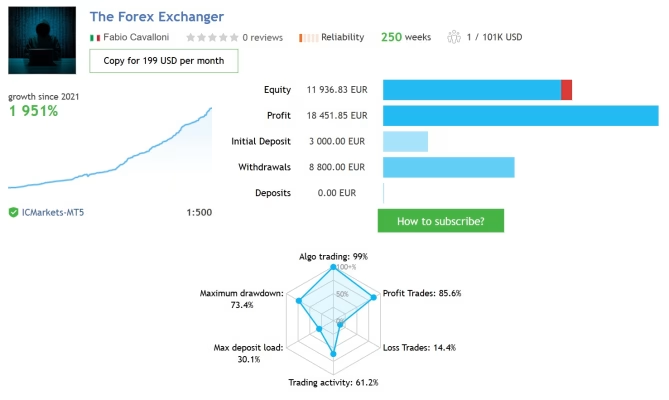
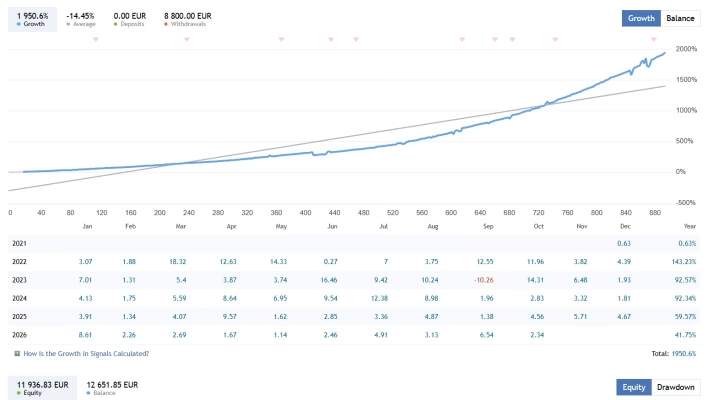
10. Published Trading Signals for Evaluation
The product information lists two published trading signals that traders can review when assessing the EA’s historical activity.
When evaluating any signal or backtest, consider its trading history, equity curve, drawdown, position sizing, leverage, and broker conditions. Results from another account may differ significantly from your own trading experience.
Historical performance should be treated as information for evaluation, not as a promise of future returns.
The Forex Exchanger MT5 Specifications
- Product Name: The Forex Exchanger MT5
- Trading Platform: MetaTrader 5 (MT5)
- Product Type: Automated Forex Expert Advisor
- Trading Instruments: Forex currency pairs
- Default Market Coverage: Up to 28 currency pairs
- Entry Logic: Configurable entry rules and multi-timeframe sensitivity filters
- Trading Method: Grid-based trade and basket management
- Take-Profit Management: Dynamic basket targets and symbol-specific settings
- Position Sizing: Configurable calculations based on balance or equity
- Risk Controls: Currency exposure limits, Stop Threshold, and Hard Stop Loss Percentage
- Symbol Management: Custom symbols, prefixes, suffixes, and exclusion rules
- Version Listed: 1.44
- DLL Requirement: No-DLL version listed
Always confirm the version supplied with your purchase and review its included documentation before installation.
Who Should Consider The Forex Exchanger MT5?
The Forex Exchanger MT5 may be suitable for traders who:
- Want to automate forex trading on MetaTrader 5.
- Prefer a configurable multi-currency-pair trading system.
- Need multi-timeframe entry filters.
- Want adjustable grid and basket management.
- Require customizable position sizing and currency exposure controls.
- Understand the risks associated with grid trading and accumulating positions.
- Are prepared to backtest, forward-test, and monitor an automated strategy.
This EA may not be appropriate for traders who need a simple, low-maintenance system or who are uncomfortable with the potentially large drawdowns associated with grid trading.
How to Set Up The Forex Exchanger MT5
Follow these general steps before deploying the EA:
- Install and connect MetaTrader 5 to a compatible trading account.
- Confirm the currency pairs supported by your broker.
- Configure the EA’s Magic Number and symbol settings.
- Review the entry filters and multi-timeframe sensitivity parameters.
- Configure grid behavior, basket take-profit settings, and position sizing.
- Set appropriate currency exposure limits and loss-control parameters.
- Test the EA with historical data and a demo account using realistic trading costs.
- Monitor drawdown, margin usage, open positions, and basket behavior before considering live deployment.
Start with conservative settings and avoid increasing position sizes simply because an initial test appears profitable.
Explore More Trading Tools at FxEAstore.com
Explore our collection of Expert Advisors to discover more automated trading systems. You can also browse our Indicators for technical analysis tools and market research.
If you are interested in customizing trading systems or studying their implementation, visit our Source Code section.
After completing your purchase, visit your Download Account to download your product immediately after payment, subject to order processing and product delivery.
For product announcements and updates, follow our Official Telegram Channel. If you need help with your order or installation, contact FxEAstore Support.
Why Choose The Forex Exchanger MT5?
The Forex Exchanger MT5 combines multi-pair automation, multi-timeframe entry filters, configurable grid trading, basket take-profit management, and currency exposure controls in one MetaTrader 5 Expert Advisor.
Its customizable settings allow traders to tailor market coverage and trade management to their own requirements. However, grid trading and exposure across multiple currency pairs can increase risk substantially, particularly when markets trend strongly or several correlated positions move against the account.
Thorough testing, conservative position sizing, and continuous risk monitoring are essential when evaluating this EA.
Risk Disclaimer: Forex trading involves significant financial risk and may result in the loss of some or all of your capital. Grid trading can accumulate positions and increase drawdown during adverse market conditions. Hard stop settings cannot guarantee a maximum loss. Past performance and backtesting results do not guarantee future results. Always test the EA on a demo account first and trade only with funds you can afford to lose.
Related products


Expert Advisor


Expert Advisor


Expert Advisor


Expert Advisor


Expert Advisor


Expert Advisor


Expert Advisor


Expert Advisor